Suzanne
Blender is a powerful open-source 3D creation suite, but beginners often lose momentum on small execution details such as selecting the correct mode, finding the right operator, or following steps in the proper order. This thesis presents Suzanne, a Blender add-on that embeds an instructional assistant directly in the 3D Viewport’s N-panel so that users can receive help without leaving their creative workspace. Suzanne was designed as a mixed-initiative learning tool rather than an automation-first copilot: it emphasizes short procedural guidance, clear status feedback, local conversation history, optional voice input, and optional use of recent Blender Info-history context. The system architecture includes Blender-native panel integration, operator-based request handling, local state management, and explicit error handling for setup, network, and response failures. To evaluate the project, this thesis uses two complementary forms of evidence. First, a completed software-verification pass tested prompt validation, request handling, failure recovery, panel rendering, preference safety, and state lifecycle behavior; all 65 automated checks passed. Second, three task-based Blender experiments examined simple question answering, longer procedural support for a fire simulation workflow, and context-aware reconstruction of recent user actions. Across these experiments, Suzanne produced clear, actionable, and workflow-relevant guidance inside Blender. These results suggest that an in-viewport assistant can reduce micro-execution friction for students and early-career artists while preserving user control, visibility, and responsible boundaries around AI-assisted creative work.
Introduction
Project overview
Blender is a free, open-source 3D creation suite used for modeling, animation, effects, simulation, and rendering [6, 27]. It powers professional production pipelines and is increasingly used beyond entertainment in research, engineering, and higher education. For example, Blender has been used in engineering research to generate synthetic digital image correlation images for computational experiments [25], in introductory engineering courses for simulation-based design activities involving satellite-motion analysis [29], and in higher-education chemistry instruction to help undergraduate and graduate students create visual scientific content [23]. Because Blender is both powerful and freely available, it lowers financial barriers for students, independent artists, and early-career creators building portfolios on limited budgets.
However, Blender’s strength comes with a cost: a steep learning curve. Prior analyses of Blender’s interface highlight how beginners struggle with its dense layout, multi-editor environment, and mode-dependent tool system [27]. New users must manage concepts such as object versus mesh data, operator conventions, modifier order, shading settings, and Python-driven tools long before they can produce high-quality work. This can slow progress, reduce confidence, and limit the number of completed portfolio pieces.
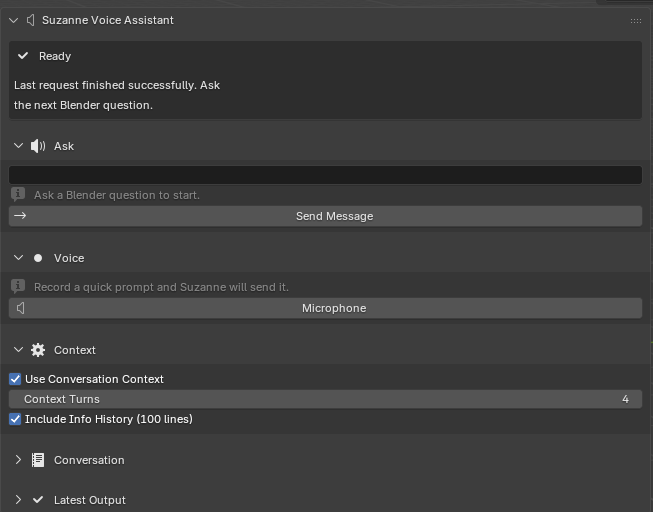
This project introduces Suzanne, a Blender add-on that lives in the right-hand N-panel and provides short, numbered, in-viewport steps for common tasks. Instead of searching externally for guidance while working, users receive instructions directly beside the 3D Viewport. The goal is to reduce context switching, help users execute reliably, and increase the number of polished artifacts that students and independent artists can publish.
Key terms and concepts
N-panel. A vertical sidebar toggled with N in the 3D Viewport hosting add-ons and tools. Suzanne is located here to keep guidance directly inside the creative workspace [6].
Mode. Blender tools are mode-specific (e.g., Object Mode vs. Edit Mode). Many operators behave differently or are unavailable depending on the mode, making explicit mode requirements essential in step-by-step guidance [6, 27].
Operator. Any action invoked by menus, buttons, shortcuts, or the F3 search. Naming operators (e.g., Mesh > Normals > Recalculate Outside) is key for reproducibility and structured documentation [6].
Modifier stack. A series of non-destructive operations whose order changes results. For example, applying Bevel before Subdivision Surface produces a different silhouette and shading than the reverse [6].
Grounding. Retrieval-Augmented Generation (RAG) combines large language models with authoritative sources. Integrating RAG ensures instructional steps match Blender’s official terminology and correct behavior [12].
Motivation
My motivation for this project is deeply personal. Over roughly six years of learning Blender, I repeatedly ran into the same problem: I often understood the goal of the task, but not the exact steps needed to carry it out. The hardest part was frequently not creativity, but information seeking. I had to stop working, search across videos, forum posts, Discord threads, and documentation, and then decide which explanation was correct for the version of Blender I was using. Research has shown that Blender’s growing scope and tool density can overwhelm newcomers and slow their learning process [27]. My own experience closely matches that pattern of “micro-execution” friction: figuring out which operator to call, what mode to be in, and what order to perform actions.
This project is also motivated by gratitude toward the Blender community. As an open-source ecosystem, Blender has given me access to free tools, tutorials, documentation, and community support that shaped me not only as a 3D learner, but also as a person. Building Suzanne is therefore a way of giving something back. If the add-on can reduce the confusion that I experienced as a beginner, then it contributes to the same community that helped me grow. In that sense, Suzanne is both a technical system and a community-oriented teaching tool aimed at helping newer users feel less isolated when they get stuck.
Meanwhile, early-career 3D creators—students, hobbyists, and emerging artists—grow primarily through their portfolios. Recruiters and instructors evaluate:
- Clean topology visible in wireframe or clay renders
- High-quality lighting and presentation
- Turntables and breakdowns
- UV layouts and readable materials
- Clear process documentation
Students typically post these artifacts to ArtStation, Behance, GitHub Pages, or social media. However, producing consistent, high-quality work requires fluid execution, and execution is often slowed by searching for instructions outside the application.
Suzanne aims to address this gap: deliver high-clarity, minimal-step instructions inside Blender, grounded on authoritative documentation and consistent terminology.
This approach is supported by educational research showing that AI-based learning tools improve cognitive outcomes when instructional content is concise, context-specific, and directly actionable [21]. Suzanne follows these principles by placing guidance beside the active viewport and presenting it as small, verifiable steps that can be performed immediately.
Educational research offers a stronger rationale for this design than convenience alone. Worked-example studies argue that novice learners often benefit when instruction presents integrated, stepwise solutions instead of leaving them to infer hidden transitions between sparse hints [3]. Effective worked examples segment the task, keep relevant information close together, and reduce unnecessary search so learners can devote more attention to understanding the procedure itself [3]. In a Blender context, this matters because beginners are frequently not blocked by high-level artistic intention, but by small operational gaps: they know they need a modifier, a light, or a simulation domain, yet do not know the exact sequence of actions required to produce it.
Research on tutoring systems points in the same direction. VanLehn’s review of human tutoring and intelligent tutoring systems suggests that step-based tutoring can approach the effectiveness of human tutoring more closely than answer-only instructional systems because it responds at the granularity where novices actually make mistakes [28]. Suzanne adopts this principle by treating procedural micro-steps as its primary output. Rather than merely stating what the final scene should look like, the assistant is designed to specify the relevant mode, identify the correct operator or panel path, and enumerate the ordered actions needed to move from the current task state toward the desired result.
There is also a workflow argument for embedding this help inside Blender instead of leaving it in a browser tab. Studies of knowledge work show that people frequently shift between tasks and “working spheres,” often every few minutes, and that interruptions may preserve speed only by increasing stress, frustration, and time pressure [14, 22]. Blender learning is not identical to office work, but it shares the same reorientation burden: pause the artistic task, search for guidance elsewhere, translate the explanation back into the current interface state, and then recover momentum. Suzanne is therefore motivated not just by the desire to answer questions, but by the desire to reduce the interruption tax attached to routine learning.
Problem statement
Blender learners lose time, motivation, and project momentum because most guidance lives outside the application, spread across long YouTube videos, scattered forum posts, or generic documentation. These sources are rarely tailored to the user’s current mode, object selection, or workflow context. As a result, beginners struggle with:
- Mode confusion
- Misordered modifiers
- Shading artifacts
- Inconsistent steps from mixed-version tutorials
- Difficulty reproducing actions from memory
The core gap is micro-execution: mode, operator, panel path, and modifier order.
This project addresses that gap by building an in-viewport assistant that:
- Returns verifiable steps inside the N-panel
- Grounds instructions on the official Blender Manual
- Uses retrieval techniques aligned with RAG best practices to maintain correctness [12]
- Supports small troubleshooting branches to handle common issues
Because Blender is increasingly used in research and engineering [25], reliable execution and clear documentation also support academic reproducibility.
Project goals and implemented features
Because Suzanne is now implemented as a working Blender add-on, this thesis delivers both a design argument and a concrete feature set. The finished system is intended to:
Provide in-viewport step-based teaching. Return concise, numbered instructions directly in Blender’s N-panel using Blender’s operator names, panel paths, and explicit prerequisites such as mode, selection, and object type.
Support flexible user input. Let users ask for help through typed prompts or voice input so that guidance can fit different working styles and reduce the need to leave the viewport [6].
Preserve learning continuity. Support follow-up interactions through local conversation history, allowing users to ask for the next step, request clarification, or continue a task without restarting the explanation from scratch.
Offer context-aware assistance. Allow recent conversation turns and optional Blender Info history to be attached so Suzanne can respond to what the user has just been doing rather than only answering decontextualized questions.
Deliver reliable, beginner-readable feedback. Surface clear status messages, validation errors, and recoverable failure states so the tool itself does not add more confusion to an already difficult learning environment.
Focus on portfolio-relevant workflows and evaluate the result. Prioritize guidance for modeling, lighting, rendering, and troubleshooting tasks that matter to student portfolios, and assess the finished prototype through software verification and task-based Blender experiments focused on reliability, instructional clarity, and workflow support.
Public-facing dissemination
By spring 2026, Suzanne existed not only as a thesis artifact, but also as a publicly packaged prototype. I published the source code in a public GitHub repository [10], released a demonstration video, ChatGPT Inside Blender? Meet Suzanne AI - Free Blender Addon, on YouTube [9], and deployed a beta distribution page, Suzanne AI Voice Assistant for Blender, on Gumroad [11]. These dissemination artifacts required the project to be explained in user-facing terms rather than only in research language: what the add-on does, which workflows it supports, what Blender version it targets, which dependencies it requires, and what limitations remain in the current beta release.
The GitHub repository is especially relevant because it exposes the implemented artifact itself: source files, automated tests, version tags, and user-facing documentation [10]. The Gumroad deployment complements that repository by framing Suzanne as something a real Blender learner could install and try rather than merely a conceptual design or a local classroom prototype [11]. The product page documents typed prompts, voice input, conversation memory, Blender-focused guidance, and platform-specific requirements such as Blender version support and ffmpeg availability on Linux [11]. Likewise, the YouTube video functions as a public demonstration of the add-on’s intended workflow and communicates Suzanne’s identity as a teaching-oriented assistant rather than an automation-first copilot [9]. These public artifacts do not replace controlled evaluation, but they do show that the project advanced to a stage of packaging, explanation, and distribution consistent with real-world use.
Assumptions, limitations, and delimitations
Assumptions
This project rests on several practical assumptions about the environment in which Suzanne is used and the people who choose to install it:
Installed Blender and access to the N-panel.
It is assumed that users already have a working installation of Blender and understand how to access the right-hand N-panel in the 3D Viewport [6]. Suzanne is implemented as an N-panel add-on rather than a standalone application, so users must be able to enable add-ons, save .blend files, and navigate basic interface regions. The project does not attempt to teach operating-system installation, GPU drivers, or basic Blender navigation from scratch.Informed consent for API usage.
When users submit text or audio to Suzanne’s AI features, those requests are processed through a third-party API. The system assumes that users are aware of this and consent to it at the point of configuration—specifically, when they paste an API key into the add-on preferences and enable AI-driven features. The design presumes that users (or instructors, in a classroom setting) have reviewed relevant institutional or personal policies regarding the use of external AI services.English-language interface as the baseline.
The initial release assumes that Blender’s UI is set to English and that users can work with English operator names, menu labels, and instructions. Suzanne’s retrieval pipeline targets the English Blender Manual [6], and the language model is prompted to mirror that vocabulary. Multilingual support and localization are identified as important directions for future work but are not treated as requirements for the first version.Intermediate technical comfort.
Although Suzanne targets novices in terms of Blender skill, it assumes a basic level of technical comfort: users can install add-ons, manage API keys, and understand the idea of “saving before running code.” The system does not, for example, guide users through package manager installation, shell configuration, or advanced debugging.
Limitations
Despite careful design choices, Suzanne has several important limitations that shape how its results should be interpreted:
Residual inaccuracy in LLM-generated steps.
Grounding on the Blender Manual and using retrieval-augmented generation improves factuality and terminology alignment, but it does not eliminate mistakes [12]. The model may still suggest slightly outdated menu paths, omit necessary steps, or assume a different initial selection than the user has. Users are therefore advised to treat Suzanne’s instructions as high-quality suggestions, not guaranteed truths, and to cross-check against the Manual or their own experience when something appears wrong.Restricted code execution scope.
For safety reasons, code execution is intentionally limited to a safe subset of Blender’s Python API, focusing on object creation, transforms, lights, cameras, and shader nodes. While this reduces the risk of destructive or security-sensitive operations, it also means that Suzanne cannot assist with every possible automation scenario. Advanced scripting tasks—such as complex rigging tools, file I/O, or integration with external render farms—are explicitly out of scope for the current version.Version- and hardware-dependent behavior.
Blender evolves rapidly, and operator locations, defaults, or UI layouts can change between releases [6]. Suzanne targets a specific range of Blender versions during development; outside that range, some instructions may no longer match the interface exactly. Similarly, behavior can vary by platform (Windows, macOS, Linux) and hardware configuration (GPU vs CPU, different input devices). The project cannot guarantee identical behavior across all environments, and some user-reported issues may stem from these external differences.Limited awareness of scene context.
Suzanne has only partial visibility into the user’s scene state. While future versions might integrate deeper inspection tools, the current implementation often infers context from user prompts and a small set of requested scene details. This can lead to misalignment when the scene contains unusual setups (e.g., non-standard hierarchies, heavily customized keymaps, or add-on-specific data structures).Evaluation scope.
The evaluation described later in this thesis is constrained to a limited number of tasks, users, and time. Results about time-on-task, perceived usefulness, or error reduction should be interpreted as initial evidence, not definitive proof of general effectiveness across all Blender workflows or learner populations.
Delimitations
In addition to inherent limitations, the project also includes deliberate design choices that narrow its scope. These delimitations are not weaknesses, but boundaries set so the work remains feasible and coherent:
Focus on learnability, modeling, shading, and presentation.
Suzanne is explicitly aimed at core workflows that support beginner and intermediate portfolio pieces: modeling (especially hard-surface and simple organic forms), shading, lighting, and basic presentation (turntables, still renders). Advanced areas such as character rigging, complex simulation (fluids, cloth, smoke), geometry nodes systems, and compositing are intentionally left out of the initial feature set. This allows the project to concentrate on the “bread-and-butter” tasks that most early-career artists must master to build a credible portfolio.No live microphone-based transcription in v0.x.
Although speech-to-text could further reduce friction for some users, the current version does not implement live microphone capture or continuous audio transcription. All prompts are entered as text, and any audio-based features are limited to explicitly uploaded or recorded snippets. This avoids additional privacy and consent complexity and keeps the interaction model simpler for evaluation.No end-user analytics or behavioral tracking.
Suzanne does not collect telemetry or analytics about how users interact with the add-on. There are no built-in dashboards tracking which prompts are most common, which steps cause difficulty, or how often scripts are executed. While such data could be valuable for iterative design and research, it would also introduce significant privacy and governance concerns. Instead, this thesis relies on local software verification and authored task demonstrations rather than behavioral tracking or human-subject data collection.No human-subject dataset in this thesis. The thesis does not report survey responses, timing logs, or other human-subject study data. Claims are therefore limited to implemented system behavior, automated reliability checks, and the documented task-based experiments presented later. Formal user studies remain future work.
Single primary documentation source.
For grounding, Suzanne relies primarily on the Blender Manual and does not, in this version, integrate other textual sources such as third-party books, course notes, or forum archives [6]. This delimitation keeps the retrieval pipeline manageable and the terminology consistent, but it also means that insights from community best practices (for example, from popular tutorial series or studio pipelines) are only reflected indirectly through prompt design, not through direct retrieval.
By making these assumptions, limitations, and delimitations explicit, the thesis clarifies the conditions under which Suzanne is expected to work well and the boundaries beyond which its claims should be treated cautiously. Later chapters return to these points when interpreting evaluation results and outlining directions for future work.
Ethical considerations
Privacy and consent
Submitted prompts and audio files are processed through a third-party API. Research shows that large language models (LLMs) face serious risks related to privacy, data leakage, and unintended memorization of sensitive content, even when providers claim to filter or anonymize data [8]. In the context of student work and personal projects, leaked prompts could reveal identifying details, coursework, or unpublished research, including descriptions of in-progress thesis ideas, screenshots of original models, or references to real people. Since Blender is often used to create highly personal or autobiographical work, these risks are not abstract; a prompt describing a “self-portrait scene in my dorm room at Allegheny” can easily become identifying if mishandled.
To reduce these risks, Suzanne adopts a local-first design wherever possible. API keys are stored only on the user’s machine, inside Blender’s add-on preferences, and are never transmitted to any external server controlled by the add-on developer. Suzanne does not implement its own logging of prompts or responses; once a session ends, there is no add-on-level history of user queries. The only data sent to the third-party provider is the text and/or audio that the user explicitly submits as part of a request. The interface includes clear warnings about avoiding sensitive material (e.g., real names, proprietary data, or confidential assets), and the documentation encourages users to consult institutional policies on AI tool usage before integrating Suzanne into graded coursework or research workflows.
In any future formal study of Suzanne, volunteers should be informed about what data leaves their machine, which provider processes it, and how long it may be retained according to that provider’s terms [8]. They should also be able to disable API-based features entirely and still use the add-on as a structured reminder of manual workflows grounded in the Blender Manual [6]. In classroom settings, instructors are encouraged to provide alternative, non-AI pathways to complete assignments so that students who are uncomfortable with third-party processing are not penalized.
Reliability and user control
While grounding on the Blender Manual and retrieval-augmented generation reduces some errors, LLMs remain fallible and can still propose incorrect or incomplete sequences of steps [8, 12]. For example, a generated workflow might reference an operator that moved in a newer Blender version, assume the wrong selection mode, or omit a crucial modifier step. Survey research on AI systems emphasizes that tools used in high-stakes or educational contexts must be designed around human oversight, transparency, and reversible actions to maintain user trust [8]. An assistant that silently edits the scene or hides its reasoning would be misaligned with these principles.
Suzanne therefore treats the model as an advisor, not an authority. It always displays instructional steps before any changes are applied and explicitly labels them as suggestions that should be verified by the user. When code snippets are generated, they appear in a dedicated panel where users can inspect the Python before deciding whether to run it. Code execution is strictly opt-in: Suzanne never executes code automatically in response to a prompt. Users must press a separate confirmation button, reinforcing the mental separation between “seeing advice” and “changing the scene.”
Blender’s own undo stack is highlighted as the primary recovery mechanism if something behaves unexpectedly. The add-on’s documentation recommends that users save incremental versions of their .blend file (for example, scene_v03.blend, scene_v04.blend) before experimenting with code-driven changes. The interface also encourages users to cross-check instructions against the Blender Manual when results look suspicious or differ from expectations [6]. In effect, the design continually nudges users to maintain interpretive control: Suzanne can suggest the next move, but the user decides whether it is appropriate for their current scene and learning goals.
Bias and inclusivity
Educational research on AI-based learning tools highlights the importance of clear, accessible feedback that supports diverse learners, rather than favoring only those with high prior knowledge or specific linguistic backgrounds [21]. Blender itself already presents a high barrier to entry: the interface is dense, the terminology is specialized, and much community documentation assumes familiarity with English technical jargon and gaming culture. Without care, an AI assistant could easily amplify these barriers—by using slang, skipping explicit prerequisites, or tailoring examples to a narrow subset of users.
Suzanne’s instruction style is therefore intentionally plain and procedural. Each step names the relevant mode, operator, and UI path instead of assuming tacit knowledge or relying on vague phrases like “clean up the mesh.” For instance, instead of saying “fix the shading,” Suzanne might say “Switch to Object Mode, select the object, then choose Object > Shade Smooth and enable Auto Smooth in the Object Data Properties > Normals panel.” This benefits students, self-taught artists, and non-native English speakers who may be less familiar with community slang or informal tutorial styles. It also supports learners who prefer to map instructions carefully to the interface rather than following along with a video at the instructor’s pace.
At the same time, the project acknowledges that underlying language models can encode societal biases in examples, metaphors, or suggested asset names [8]. To mitigate this, Suzanne intentionally scopes its responses toward technical actions (operators, modes, and parameters) and away from content that labels or describes people. The documentation discourages prompts that rely on demographic stereotypes (e.g., asking for “typical” appearances of certain groups) or that seek value judgments about whose work “looks better.” When portfolio examples are mentioned, they are framed in terms of topology cleanliness, lighting clarity, and presentation conventions, not in terms of personal attributes. The long-term goal is to support skill-building and confidence, particularly for learners who may not see themselves represented in mainstream 3D education spaces.
Cost transparency and outages
LLM providers can change pricing, rate limits, and model availability with little notice. This volatility is especially relevant for students and independent artists working with limited budgets, who may not be able to absorb unexpected charges or interruptions. A tool that quietly consumes API credits in the background or fails without explanation would undermine both trust and accessibility.
Suzanne addresses this by making API usage explicit and interruptible. The add-on requires users to paste their own API key rather than bundling any shared or hidden key, which makes the cost relationship clear: any charges are between the user and the provider. When an API request fails—because of quota exhaustion, authentication errors, or network issues—Suzanne surfaces explicit error messages rather than silently falling back to an empty response. Users are pointed toward their provider dashboard to check usage and are encouraged to set their own spending limits.
Whenever API-based features are unavailable, Suzanne falls back on workflows grounded in Blender’s official practices—for instance, pointing users directly to relevant sections of the Blender Manual or suggesting manual operator paths [6]. In classroom scenarios, instructors can choose to disable the API-dependent features entirely and still use the add-on as a structured, manual recipe panel. This ensures that the tool remains a useful learning aid even when AI services are unavailable or unaffordable, and it reinforces that the core knowledge lives in Blender’s open documentation rather than in any single commercial model.
Security and scope
Because unrestricted Python execution in Blender can cause serious harm—from deleting or corrupting scenes to interacting with the file system or network—Suzanne deliberately limits what kind of code it can propose. Security surveys of LLMs warn that generated code can be manipulated or misused to escalate privileges, exfiltrate data, or perform other unintended actions, especially when execution is automated or opaque [8]. Blender add-ons that expose “run arbitrary code” endpoints without constraints effectively grant the model the same power as an expert user with full access to the scene and environment.
In response, Suzanne restricts script generation to a narrow slice of Blender’s API: object creation, transforms, lights, cameras, and shader nodes. Operations such as deleting objects, applying all modifiers, or resetting entire scenes are either excluded or heavily discouraged. The add-on explicitly avoids file operations (opening, saving, or deleting files), external network calls, or direct system-level access, thereby reducing the potential attack surface. Any script that appears in the UI is kept short enough for a motivated user to skim, and it is formatted clearly so that parameter values and operator names are visible.
Suzanne also leverages Blender’s existing safety mechanisms. Scripts run within Blender’s Python environment, which already exposes undo and redo for most scene operations. Users are encouraged to save .blend files frequently and to experiment on copies rather than production scenes. The documentation includes a “safety checklist” that recommends: (1) saving before executing any script, (2) inspecting code for obviously destructive calls, and (3) using undo immediately if an unexpected change occurs. These guardrails do not eliminate all risk, but they align Suzanne with best-practice recommendations for LLM-driven code execution: minimize permissions, maximize visibility, and keep humans firmly in control [8]. In combination with the privacy and consent measures above, this scoped design aims to make Suzanne a responsible, student-friendly integration of AI into Blender rather than a source of hidden technical or ethical debt.
Chapter roadmap
The remainder of this thesis proceeds as follows:
- Related Work reviews Blender learning challenges, prior add-ons, AI tutoring systems, RAG-based grounding, and safe model usage.
- Methods details the N-panel UI, retrieval pipeline, grounding strategy, and safe code execution model.
- Evaluation presents the study design, tasks, metrics, and analysis.
- Discussion interprets results and limitations.
- Future Work explores multilingual support, richer scene graph awareness, and expanded tool-calling capabilities.
Related Work
Overview and Scope
This chapter reviews prior work in six areas that together frame Suzanne’s design and research questions: (i) how people currently learn Blender through manuals, books, and community pedagogy; (ii) in-app guidance and “copilot”-style assistance in creative and coding tools; (iii) AI teaching assistants and step-oriented learning tools; (iv) retrieval-augmented generation (RAG) grounded in trusted documentation; (v) code generation and safety in end-user environments; and (vi) portfolio-based assessment and learning outcomes.
Across these strands, a common pattern appears: powerful tools—whether 3D suites, IDEs, or AI models—offer enormous expressive range but place a high burden on micro-execution: knowing which operation to call, in which context, and in what order. Existing resources for Blender tend to live outside the viewport (books, PDFs, long videos, forum threads) or, in the case of recent AI assistants, focus on generating code rather than teaching reproducible steps. Suzanne positions itself at the intersection of these literatures as an in-viewport, step-by-step tutor that (a) grounds its responses in the official Blender Manual [6], (b) returns numbered, operator-named steps inside the N-panel, and (c) optionally surfaces small Python snippets behind explicit guardrails.
Learning Blender: Manuals, Tutorials, and Community Help
Blender’s official Manual is the primary authoritative source for terminology, operator behavior, and UI labels [6]. It defines core concepts such as modes, the modifier stack, and data-block organization, and it documents the precise menu paths and shortcuts associated with each operator. Because of its breadth and authoritative status, this work treats the Manual as the ground truth for operator names, panel labels, and expected behavior: Suzanne’s retrieval pipeline targets these pages, and its UI mirrors the Manual’s language where possible.
Research on Blender’s interface and evolution reinforces how challenging the software can be for new users. Soni et al. review multiple versions of Blender and highlight the complexity added by its multi-editor layout, dense menus, and mode-dependent tools [27]. They note that changes across versions can also create friction when users follow older tutorials, contributing to confusion about where options are located or why certain operators behave differently. These findings align with anecdotal reports from the Blender community that beginners frequently struggle with mode switching, modifier order, and shading artifacts.
Beyond official documentation, Blender learners rely heavily on project-based resources such as Arijan Belec’s Blender 3D Incredible Models, which walks readers through hard-surface modeling, procedural texturing, and rendering workflows [5]. Books like this provide rich, end-to-end examples but still require learners to juggle a separate text or PDF alongside the 3D viewport, translating prose descriptions and screenshots into local actions.
Video tutorials represent another major learning ecosystem. The Blender Guru “donut” series, for instance, is a well-known example of a beginner-oriented tutorial sequence for modeling, shading, and rendering [24]. Long-form videos offer detailed demonstrations and a sense of progression, but they also introduce substantial context-switching costs: learners pause, rewind, or scrub to find the relevant moment; they struggle to map instructions onto different Blender versions; and they often have to adapt the tutorial to their own scene.
Taken together, prior work and practitioner resources show that Blender learners have access to deep, high-quality material, but it is fragmented across manuals, books, and videos. Very little of this guidance appears as short, verifiable steps inside the viewport itself, which is the gap Suzanne aims to explore.
Interruptions, Context Switching, and Procedural Friction
Research on interruptions and task switching helps explain why external help can remain costly even when the information it contains is correct. González and Mark describe how knowledge workers continuously move among larger “working spheres,” often spending only a few minutes on a specific task before switching context [14]. The important insight for this thesis is not that Blender sessions are identical to office work, but that digital work is frequently fragmented and that each context switch imposes a reorientation burden. When a learner leaves Blender to search for help, they do not merely acquire information; they also suspend the current scene state, open another medium, interpret a new representation, and then reconstruct their place inside the original task.
Mark et al. deepen this point by showing that interrupted workers sometimes complete tasks faster, but at the cost of higher stress, frustration, effort, and perceived time pressure [22]. Applied to Blender, this suggests that “I found the answer eventually” is not the same as “the instructional workflow was efficient or low-friction.” A learner may complete a modeling or lighting task after several browser searches, pauses, and rewinds, but the cumulative interruption burden can still reduce confidence and momentum. Suzanne responds to this problem by trying to keep instructional lookup spatially and temporally close to the active workspace. Even if the informational content of a step resembles a sentence from the Manual or a tutorial, its in-viewport presentation changes the user’s task ecology.
In-App Guidance and “Copilots” in Creative and Coding Tools
In the broader human-computer interaction (HCI) and software-engineering literature, there is strong interest in in-context assistance that appears directly within the tools people use. Chilana et al. study MarmalAid, a web-based 3D modeling environment that embeds real-time expert chat within the 3D scene [7]. Their observational work with novice–expert pairs shows that in-context chat leads novices to ask more task-focused questions and reduces the friction of switching to external help channels. This supports the idea that assistance is more effective when it is tightly coupled to the workspace rather than offloaded to separate windows or devices.
Although most large-scale empirical work on copilot-style assistance has focused on coding rather than 3D art, the underlying themes are similar. Inline suggestions in IDEs reduce the need to consult external documentation and can speed up repetitive tasks. Luo et al.’s systematic review of AI-based learning tools in higher education notes that tools integrated into students’ existing workflows—such as writing or coding environments—tend to show stronger effects on engagement and perceived usefulness than standalone web portals [21].
For Blender specifically, community tools such as custom pie menus and quick-access panels provide a form of “micro-guidance” by surfacing commonly used operators, but they rarely explain why a given operator is appropriate or what prerequisites (mode, selection, object type) must hold. Suzanne builds on the general insight from MarmalAid and AI-enhanced IDEs: assistance should appear where the work happens. It extends this idea by focusing not on chat alone, but on small, numbered recipes that explicitly list prerequisites and operator names.
Recent research on code-generating assistants provides another useful comparison point because it shows that users do not engage AI help in only one way. Barke et al. describe two recurring interaction modes in AI-assisted programming: an acceleration mode, where the user already knows what they want and uses the model to move faster, and an exploration mode, where the user is uncertain and uses the model to examine possibilities [4]. Suzanne supports an analogous dual role in Blender. Sometimes a learner wants a quick reminder of a known workflow such as adding lights or shading an object smoothly. At other times, they want exploratory scaffolding for a less familiar task such as a simulation setup or a troubleshooting branch. This distinction matters because an instructional assistant must support exploration without encouraging over-trust in unverified output.
Worked Examples, Scaffolding, and Stepwise Instruction
The educational literature offers a direct explanation for Suzanne’s emphasis on short, ordered procedures rather than broad descriptive answers. Atkinson et al.’s review of worked-example research argues that novice learners benefit when solutions are segmented into understandable steps, when relevant information is kept integrated rather than dispersed, and when example structure makes the underlying procedure visible [3]. Effective examples are not simply correct; they are instructionally shaped to reduce unnecessary search and help learners focus on the sequence and meaning of the solution.
This perspective maps closely onto Blender. A beginner trying to bevel an edge loop, configure a material, or create a simulation often needs more than a conceptual description such as “adjust the settings until it looks right.” They need procedural scaffolding: which mode to enter, what menu path to follow, what object should be selected, and what order of operations to preserve. Suzanne’s numbered response style is therefore not only a UI preference. It is an attempt to translate worked-example logic into the context of creative software assistance.
VanLehn’s review of tutoring systems reinforces this interpretation. He finds that step-based and substep-based tutoring systems can approach the effectiveness of human tutoring more closely than answer-based systems because they intervene at the point where the learner is acting, not only after the learner has failed to produce a final answer [28]. That finding is particularly relevant for Blender learning, where many beginner errors are local and procedural rather than globally conceptual. A learner may understand the goal of a fire simulation or clean shading, but still fail because they skipped a prerequisite step or used the wrong interface state. Suzanne is designed around this granularity of failure: it tries to meet the learner at the level of immediate action.
Worked-example research also implies an important constraint. If instructional output becomes too long, too compressed, or too abstract, it loses some of its value as scaffolding [3]. This creates a useful tension for Suzanne. The assistant must provide enough detail to be executable, but not so much detail that the response becomes an unreadable wall of text in a narrow panel. Later chapters return to this trade-off when discussing complex workflows, response formatting, and the limits of viewport-sized instructional space.
Blender Add-ons and Prior Attempts at Guidance
Recent years have seen the emergence of Blender add-ons that integrate large language models directly into the application. BlenderGPT is an early example: a plug-in that exposes a GPT-4/3.5-backed panel where users can type natural-language commands like “create a cube at the origin,” which the system then translates into Python scripts executed inside Blender [13]. BlenderGPT demonstrates that LLMs can control Blender’s Python API and support natural-language scene manipulation, but it primarily targets code generation and automation, not pedagogy. Generated scripts run immediately, and while users can inspect them via the system console, the main interaction is “describe the goal, then let the model act.”
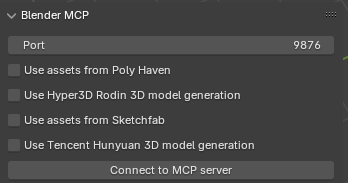
BlenderMCP extends this pattern by connecting Blender to Claude through the Model Context Protocol [1]. It exposes tools for scene inspection, object manipulation, material adjustments, asset retrieval from Poly Haven and Sketchfab, and arbitrary Python code execution. BlenderMCP explicitly positions itself as an AI-assisted 3D modeling companion, allowing high-level prompts like “create a low poly dungeon scene” or “make this car red and metallic.” Similar to BlenderGPT, however, its focus is on delegating actions to the model rather than teaching users how to perform those actions themselves.
These systems show that:
1. LLMs can successfully interact with Blender’s Python API; and
2. there is community demand for conversational, in-Blender assistants.
At the same time, they surface design and safety challenges discussed later in this chapter. For the purposes of this thesis, they serve as baseline examples of AI-powered Blender add-ons that emphasize automation. Suzanne diverges by centering instruction: instead of simply executing a scene change, it returns a small set of numbered steps (e.g., required mode, menu path, parameter values) and only optionally offers Python snippets behind explicit confirmations. In that sense, Suzanne is closer to MarmalAid’s in-context help [7] than to an autonomous copilot.
AI for Teaching and Tutoring
Beyond 3D modeling, there is a growing body of work on AI-based learning tools in higher education. Luo et al. synthesize studies of AI-enabled systems—ranging from chatbots and recommendation engines to adaptive tutors—and report generally positive effects on engagement, perceived usefulness, and, in some cases, learning outcomes [21]. They highlight that tools are most effective when they provide specific, actionable feedback aligned with course goals, and when they are integrated into students’ regular workflows rather than offered as optional extras.
The review also notes risks that are directly relevant to Suzanne: over-reliance on AI advice, inconsistent accuracy, and limited transparency about how suggestions are produced [21]. These concerns echo broader security and privacy issues raised by Das et al., who catalog a range of vulnerabilities in large language models, including data leakage, jailbreaking, and misuse across domains such as education and healthcare [8].
From the perspective of procedural skill learning, prior work on intelligent tutoring systems and worked examples (summarized in reviews like Luo et al.’s) suggests that step-by-step guidance with gradual fading can help novices internalize complex procedures rather than simply copying answers. While Suzanne does not implement a full student model or adaptive fading, its design is inspired by this literature: it presents short, numbered steps with explicit prerequisites, and encourages learners to repeat and modify these sequences in their own scenes.
Zawacki-Richter et al.’s systematic review of artificial intelligence in higher education adds an important caution to this optimism. They argue that much AIEd work has been framed from the perspective of technical capability rather than educator-centered pedagogy and critical reflection [30]. This observation matters for Suzanne because a Blender assistant can easily be treated as “AI in the viewport” without a clear instructional theory. The present thesis attempts to avoid that trap by grounding the add-on in specific educational claims: locality reduces context-switching cost, stepwise output supports worked-example learning, and strong guardrails preserve agency in a creative domain.
Educational Chatbots and AI Literacy
Recent systematic reviews of educational chatbots make the design space around conversational learning assistants more concrete. Kuhail et al. review chatbot use in education across roles such as teaching agent, peer agent, and tutor, and they report that many systems show promise for improving learning and subjective satisfaction while still varying widely in evidence quality, interaction design, and personalization [16]. Labadze et al. likewise identify strong potential for AI chatbots to provide immediate support, explanations, and additional resources, but they also emphasize persistent concerns around accuracy, ethics, and the fit between chatbot behavior and educational objectives [18].
These reviews are useful for Suzanne in two ways. First, they show that conversational assistance in education is not novel in itself; what matters is how the conversation is shaped, what role the assistant is meant to play, and how its claims are bounded. Second, they show that many educational chatbots are evaluated as generic conversation systems rather than as tightly situated tools embedded in a discipline-specific workspace [16, 18]. Suzanne differs by being deeply anchored to one tool, one documentation ecosystem, and one kind of procedural support. It is not intended to tutor “anything.” It is intended to support Blender micro-execution.
AI literacy research sharpens this point further. Long and Magerko argue that effective interaction with AI systems requires more than access; users need competencies for understanding what the system does, what data and models are involved, where the limits lie, and how to evaluate or question outputs responsibly [20]. In the context of Suzanne, AI literacy is not an abstract curricular topic. It influences interface design. The add-on should help users develop an accurate mental model that Suzanne is a Blender-oriented assistant capable of producing useful guidance, but also capable of omission, drift, and error. This is one reason the system emphasizes visible suggestions, status reporting, opt-in execution, and local documentation links instead of hidden autonomy.
Mixed-Initiative and Human-Centered AI Design
Long before the rise of modern large language models, mixed-initiative interface research explored how automated reasoning and direct manipulation might coexist productively. Horvitz argues that successful mixed-initiative systems must consider uncertainty, timing, interruption cost, user attention, and the importance of leaving people oriented and in control [15]. These concerns transfer naturally to creative software. An assistant that offers help at the wrong moment, acts without sufficient visibility, or obscures its internal assumptions can become a distraction instead of a support system.
Amershi et al. extend this line of work in the context of contemporary AI products by proposing 18 guidelines for human-AI interaction, including clarifying what the system can do, supporting efficient correction, handling failure gracefully, and improving over time [2]. These guidelines are directly relevant to Suzanne’s UI choices. The add-on surfaces status states such as recording, sending, and error; it validates missing inputs instead of failing silently; and it attempts to keep the assistant’s scope legible as Blender-specific instructional help rather than general-purpose omniscience.
Kulesza et al.’s work on explanatory debugging provides an even more specific precedent for inspectable AI assistance. Their interactive machine-learning system increased user understanding by exposing why the system behaved as it did and by giving users a way to correct that behavior [17]. Suzanne does not yet implement full explanatory debugging, but it adopts the broader principle that a user should be able to inspect the assistant’s output and decide how to respond. This matters especially when code is involved. Visibility before action is a core design value in a creative tool where scene state can be altered, lost, or corrupted.
Shneiderman’s human-centered AI framework adds a normative lens to these design choices. He argues that systems can combine high human control with significant computational assistance and thereby support reliability, safety, trustworthiness, mastery, and creativity [26]. That framing matches Suzanne more closely than the language of autonomous copilots does. Suzanne is not trying to replace the user as scene author. It is trying to provide bounded, inspectable, reversible help inside a workspace where the learner remains the final decision maker.
Retrieval over Trusted Docs: Grounding on the Blender Manual
Large language models are known to hallucinate or deviate from domain terminology when prompted without external grounding. Retrieval-augmented generation (RAG) is a widely discussed pattern for mitigating these issues by retrieving relevant documents before or during generation [12]. Gao et al. survey RAG architectures and show that conditioning models on retrieved passages can improve factual accuracy and alignment with specialized vocabularies, especially in technical domains [12].
Suzanne adopts this pattern by retrieving passages from the Blender Manual [6] for each user query and using them as context when generating instructions. In practice, this means that operator names, panel paths, and option labels are drawn from the same text that users would encounter if they opened the Manual directly. The system also surfaces links or section references back to the Manual, encouraging users to verify instructions and explore deeper explanations.
Grounding on the Manual further supports version transparency: when Blender’s UI or operator behavior changes, the documentation is typically updated first. By aligning Suzanne’s outputs with the Manual rather than with arbitrary web pages or forum posts, the system aims to remain closer to Blender’s official semantics, while still benefiting from the flexibility of language models.
Code Generation in End-User Tools: Safety and UX
As BlenderGPT and BlenderMCP illustrate, LLM-driven code generation in end-user tools offers powerful benefits but also introduces significant risks [1, 13]. On the positive side, generated Python can automate repetitive scene setup, create lighting and camera rigs, or scaffold shader node networks that would be tedious to construct manually. In scientific workflows, scripted pipelines built on Blender’s Python architecture have been used to generate synthetic imagery for digital image correlation experiments, demonstrating that Blender can support reproducible, research-grade pipelines [25].
However, arbitrary code execution inside a rich 3D environment is inherently risky. A single destructive operator (e.g., applying modifiers, deleting objects, or clearing transforms) can irreversibly alter a scene if the user does not immediately notice. BlenderMCP’s documentation explicitly warns users about the dangers of its execute_blender_code tool and recommends saving work before issuing commands [1]. Das et al.’s survey of LLM security concerns generalizes this problem, noting that models can be prompted—intentionally or accidentally—to produce harmful code, access sensitive data, or trigger unintended side effects [8].
From a UX standpoint, these findings suggest several design norms for mixed-initiative code generation:
* Transparency – users should see the generated script before it runs.
* Explicit confirmation – execution should be opt-in, not automatic.
* Scoped capabilities – tools should avoid file I/O, networking, and other high-risk operations in default modes.
* Reversibility – environments should support undo or rollback.
Suzanne adopts these norms by showing the generated Python snippet in a dedicated area, requiring explicit confirmation before execution, restricting code generation to a safe subset of Blender’s API (object creation, transforms, lights, cameras, shader nodes), and relying on Blender’s undo stack as a primary recovery mechanism. In contrast to BlenderGPT and BlenderMCP, which often treat code as the main output, Suzanne treats code as optional scaffolding that complements its primary product: human-readable, reproducible steps.
Portfolios, Artifacts, and Evaluation in 3D Learning
Although this thesis focuses on Blender rather than formal writing instruction, ideas from portfolio-based assessment transfer directly to 3D art education. Lam argues that “assessment as learning” reframes portfolios from static evidence of achievement to part of an ongoing cycle where students generate work, receive feedback, and reflect on their progress [19]. In portfolio-based classrooms, artifacts are valued not only for their final quality but also for the metacognitive skills students develop by revisiting and revising their work.
In 3D modeling and digital art, instructors and reviewers similarly evaluate students through bodies of work rather than isolated assignments. Hard-surface projects like those in Belec’s Blender 3D Incredible Models emphasize clean topology, consistent shading, and thoughtful presentation—qualities that are visible across turntables, wireframe renders, and breakdown images [5]. Scientific uses of Blender, such as generating synthetic image-correlation datasets, also rely on reproducible pipelines and documented workflows [25].
Suzanne is designed with these portfolio dynamics in mind. By helping learners execute common modeling, shading, and lighting tasks more reliably, it aims to increase the number of finished, portfolio-ready artifacts they can produce within a given time frame. Step-level guidance—explicitly naming modes, operators, and modifier order—supports repeatability: once a learner has successfully completed a workflow with Suzanne, they can apply the same pattern to new projects or adapt it to more complex scenes.
Ethical and Governance Considerations
The use of LLMs inside educational and creative tools raises ethical questions around privacy, security, and equity. Das et al. document a wide range of attack vectors and privacy risks for large language models, including data poisoning, prompt injection, and leakage of personally identifiable information [8]. When such models are integrated into classroom or portfolio workflows, these risks intersect with institutional responsibilities to protect student data.
Luo et al. note that many AI-based learning tools do not clearly communicate what data they collect or how it is used, which can erode trust among students and instructors [21]. They argue for transparent governance and explicit consent when deploying AI in higher-education settings. For open-source, locally installed tools like Suzanne, this translates into design choices such as keeping API keys on the user’s machine, avoiding server-side logging of prompts, and clearly warning users against sending sensitive content.
Equity and access are also central. Blender itself is free and open source [6], which has made it a critical tool for students and independent artists who cannot afford commercial 3D suites. By building Suzanne as a free add-on that runs inside Blender and by grounding its responses in publicly available documentation, the project seeks to support self-taught learners and students at resource-limited institutions. At the same time, reliance on third-party LLM APIs introduces cost and connectivity constraints; this thesis acknowledges those limitations and points forward to potential offline or on-device models in future work.
Synthesis
Existing literature and tools establish several important points. First, Blender’s power and open-source ecosystem make it attractive for education, portfolios, and even scientific workflows, but its interface and mode system pose significant challenges for novices [5, 6, 25, 27]. Second, interruption and multitasking research helps explain why even accurate external guidance can still be costly in practice: every browser search or tutorial detour imposes a reorientation burden that can disrupt momentum and increase stress [14, 22]. Third, worked-example and tutoring-system research suggests that granular, step-based instructional support is especially effective for novices when it is aligned to the learner’s current action rather than delivered only as a final answer [3, 28]. Fourth, mixed-initiative and human-centered AI research argues that useful assistance systems should preserve user control, make failure visible, and support inspection and correction over time [2, 15, 17, 26]. Fifth, educational-chatbot and AI-literacy research shows that conversational tools in learning environments are promising but must be designed with pedagogical fit, scope clarity, and ethical transparency in mind [16, 18, 20, 30]. Finally, portfolio-based assessment emphasizes cycles of production and reflection, placing value on tools that help students consistently produce and refine artifacts [19].
Within this landscape, there is still a clear gap: no existing system provides an in-viewport, step-by-step tutor for Blender that is explicitly grounded in the official Manual, designed around portfolio-oriented workflows, and equipped with safe, optional code execution. Current AI add-ons such as BlenderGPT and BlenderMCP prioritize automation and code generation [1, 13]; community tutorials and books provide rich instruction but remain external to the viewport [5, 24].
Suzanne is designed to address this gap by:
- Delivering short, numbered, operator-named steps inside the N-panel;
- Grounding those steps on retrieved passages from the Blender Manual [6, 12];
- Using worked-example and step-based tutoring logic to emphasize executable micro-steps over vague advice [3, 28];
- Preserving user agency through mixed-initiative, human-centered design choices such as visible status, opt-in execution, and recoverable failure [2, 26];
- Providing optional Python snippets under explicit guardrails informed by LLM security literature [8]; and
- Targeting modeling, shading, and presentation workflows that contribute directly to students’ and independent artists’ portfolios.
The next chapter details how these ideas are realized in the system’s architecture, including the N-panel UI, retrieval and grounding pipeline, safe code-execution model, and the evaluation framework used to assess Suzanne through software verification and task-based experiments.
Methods
This chapter explains how Suzanne was designed, implemented, and prepared for evaluation as an in-viewport Blender assistant. The Introduction established the core problem as micro-execution friction (mode, operator, panel path, and action order), while Related Work positioned Suzanne against two common alternatives: external learning resources and automation-first AI add-ons [1, 6, 13, 27]. Methods therefore focuses on how the system operationalizes those insights in software, interface behavior, and safety controls.
The project follows a design-and-build methodology common in applied HCI and educational tooling:
- Define requirements from literature and practice (Blender learning pain points, in-context tutoring needs, and safety constraints).
- Build an executable prototype inside Blender’s N-panel.
- Iterate on reliability and usability through repeated local testing in authentic modeling workflows.
- Prepare measurable outputs for a later experimental chapter (task time, completion quality, and perceived usefulness).
Rather than treating model responses as opaque outputs, the implementation treats each interaction as a reproducible pipeline: user input -> validated request -> model response -> formatted procedural output in the viewport. This pipeline orientation is central to the methodological goal of reducing context switching and improving repeatable task execution.
Development process
Phase 1: Requirement extraction
Requirements were extracted from three sources: (a) Blender documentation and interface behavior [6], (b) prior studies on beginner friction in Blender [27], and (c) AI-learning-tool findings emphasizing in-context and actionable guidance [21]. This phase did not produce a separate machine-readable requirements file. Instead, it produced a small design specification that was carried forward as explicit implementation criteria and is formalized later in this chapter through the requirement-to-implementation traceability table.
That design specification emphasized:
- Locality: assistance must appear in the active workspace, not in a separate website.
- Procedural clarity: responses should be short, ordered, and immediately actionable.
- Safety: no silent scene modifications and no hidden execution of generated code.
- Practical deployment: installation and operation should fit student hardware and software constraints.
Although compact, this specification was not ad hoc. It was shaped by several repeated findings across the literature. Worked-example research suggests that novices benefit when instruction segments procedure into explicit steps and keeps actionable information close to the task at hand [3]. VanLehn’s review of tutoring systems further indicates that step-based assistance is especially useful when feedback is aligned to the learner’s immediate action rather than deferred until the end of a task [28]. Interruption research suggests that moving away from a task to gather help imposes an additional reorientation cost, even when the information eventually found is useful [14, 22]. Human-AI interaction scholarship adds that assistance should preserve agency, expose failure, and remain inspectable and correctable [2, 15, 26]. In Suzanne, these findings were translated into specific implementation constraints: visible state transitions, concise procedural output, opt-in action, and location inside the active workspace.
Phase 2: Prototype architecture and implementation
The first implementation target was a Blender add-on written in Python against Blender’s bpy API and loaded through the standard add-on registration system (register() / unregister()). In the implemented add-on, register() registers the preferences class, interaction operators, diagnostic operators, and sidebar panel, then calls ensure_props() to attach runtime fields to bpy.types.Scene and creates the local recordings directory. unregister() removes those Scene properties with clear_props() and unregisters the same classes in reverse order so Blender does not retain stale UI state between enable/disable cycles.
Persistent interaction state is stored in Scene properties so the panel can redraw from shared runtime state after each operator call. Concretely, these properties include the current prompt, microphone-active flag, status string, last transcript, last response, selected conversation, context toggles, and the expand/collapse state of the N-panel cards. User-level configuration is stored separately in add-on preferences, including the API key, response model, transcription model, filename prefix, and conversation auto-save setting. Local conversation history is then persisted to a JSON store (suzanne_conversations.json) in the add-on’s data directory, with a temporary-directory fallback if the normal path is unavailable. This choice aligns with Blender’s architecture and keeps the workflow entirely in-app [6].
The implementation was divided into a small set of focused modules so that interface code, mutable state, and side-effecting operations could be reasoned about separately during debugging and testing. The add-on entry point (__init__.py) declares add-on metadata, imports the registered classes, and coordinates register() / unregister() calls. The sidebar UI is defined in panel.py; per-scene state registration and cleanup live in state.py; side-effecting actions such as text submission, microphone capture, diagnostics, and conversation management live in operators.py; add-on-level settings such as API key, model selection, audio device handling, and diagnostics UI live in preferences.py; and shared helpers for HTTP requests, Info-history capture, local storage, audio-device enumeration, and UI text cleanup live in common.py. This modular split made it easier to trace failures to either presentation logic, state wiring, or external-process/network behavior.
Core interaction paths were implemented as operators:
- Text path: submit prompt -> optionally attach recent conversation turns and Blender Info history -> receive response.
- Voice path: start/stop microphone capture -> transcribe -> optionally attach recent context -> submit transcript -> receive response.
- Conversation path: create, select, rename, delete, and preview local conversations.
- Utility path: API-key validation, model refresh, microphone/transcription diagnostics, and recordings-folder access.
Phase 3: reliability hardening
After the initial feature set worked end-to-end, iteration prioritized failure behavior rather than feature expansion. The main hardening tasks were:
- Clear status signaling (
Ready,Recording...,Sending...,Error). - Explicit handling for missing keys, missing files, empty transcripts, empty outputs, and HTTP failures.
- Local fallback logic for recordings and conversation storage when add-on directories are not writable.
- UI formatting logic for long responses, output previews, and empty states so multi-step instructions remain readable in the panel.
These hardening steps were chosen because the dominant user risk in educational contexts is not only wrong answers, but interrupted or confusing workflows that break learner momentum.
Phase 4: evaluation readiness
The final development phase prepared the system for controlled comparison in later chapters by stabilizing the feature surface and defining what is considered in-scope behavior for experiments. At this stage, Suzanne is treated as a mixed-initiative assistant: it recommends, the user decides, and all scene edits remain user-mediated.
System requirements and traceability
To keep claims testable, each major thesis goal was mapped to an implementation responsibility and observable system behavior.
| Requirement | Design decision | Observable behavior |
|---|---|---|
| In-viewport assistance | N-panel integration in VIEW_3D |
User never leaves Blender to ask for help |
| Procedural responses | Prompt shaping + UI formatting for numbered steps | Output appears as short action sequence |
| Input flexibility | Text prompt plus microphone-driven flow | Both typed and spoken intents are supported |
| Context-aware help | Optional conversation memory and Blender Info-history attachment | Responses can incorporate recent workflow context when enabled |
| API transparency | Explicit key entry in preferences and key-test operator | User can verify connectivity before tasks |
| Fault tolerance | Guard checks and HTTP/IO error handling | Failures are visible and recoverable |
| Safety-first behavior | No automatic scene mutation from generated text | User remains the final actor |
| Responsible deployment | Local storage of settings, conversations, and recordings with no telemetry path | Lower privacy exposure for student use |
This traceability table shaped coding priorities and chapter-level evaluation planning.
Pedagogical and interaction-design principles
Suzanne was not designed only as a software pipeline. It was also designed as an instructional and interaction artifact. The literature reviewed earlier can therefore be restated here as a compact set of operational design principles.
| Principle | Literature basis | Implementation consequence |
|---|---|---|
| Stepwise scaffolding | Worked-example and tutoring-system research [3, 28] | Prefer ordered procedures over abstract summaries |
| Workspace locality | In-context help and interruption research [7, 14, 22] | Deliver help inside Blender’s N-panel |
| Mixed-initiative control | Mixed-initiative and HCAI research [15, 26] | Keep the user as the final actor and decision maker |
| Visible system behavior | Human-AI guidelines and explanatory debugging [2, 17] | Surface status, errors, and inspectable outputs |
| Learner-readable scope | AI literacy and educational-chatbot literature [16, 18, 20] | Make capability limits and workflow assumptions explicit |
| Responsible deployment | AI ethics and privacy/security literature [8] | Minimize telemetry, constrain code, and warn about risk |
These principles affected both wording and mechanics. “Stepwise scaffolding,” for example, is implemented not only by asking the model for numbered responses, but also by cleaning and wrapping output so that each step remains readable in a narrow sidebar. “Workspace locality” is not just the choice of a Blender panel over a website; it also motivates storing status, transcript, and response state locally so that the interaction can be reviewed without leaving the viewport. Likewise, “mixed-initiative control” shaped the decision to separate advice from execution authority. Suzanne may generate a procedure or a script, but it does not silently act on the scene.
The AI literacy principle is especially important because the system is intended for beginners. Long and Magerko emphasize that effective interaction with AI requires realistic understanding of what the system can and cannot do [20]. In practice, this means Suzanne’s interface needs to teach two things at once: a Blender workflow and an appropriate mental model of AI-supported help. The add-on therefore uses concrete status language, explicit prerequisites, and visible failures so the user is less likely to mistake silence or hallucination for competence.
Finally, the educational-chatbot literature helped define what Suzanne should not try to be. Reviews by Kuhail et al. and Labadze et al. show that chatbot systems in education vary widely in role, design quality, and evidence quality [16, 18]. Suzanne was therefore intentionally constrained to a narrow role: a Blender-specific, step-oriented assistant for portfolio-relevant tasks. This narrower scope makes both implementation and evaluation more defensible because the system’s claims can be judged against a bounded set of behaviors.
System architecture
Suzanne is implemented as a Blender-resident, event-driven assistant with three layers:
- Interface layer: collapsible
Status,Ask,Voice,Context,Conversation, andLatest Outputcards in the N-panel. - Orchestration layer: operators that manage validation, request sequencing, recording toggles, conversation management, and state transitions.
- Service layer: network calls for transcription and response generation, local audio capture utilities, and local JSON-backed conversation storage.
The architecture is intentionally simple because reliability and transparency were prioritized over autonomous behavior. Instead of hidden background orchestration, each major transition is user-triggered and surfaced in the UI.
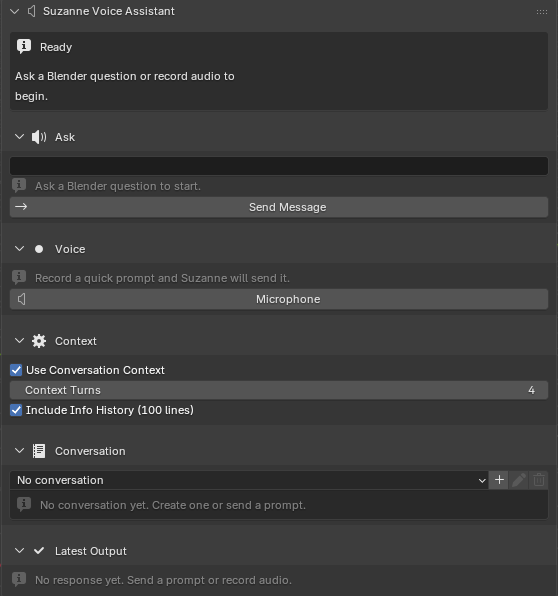
In the implemented pipeline, the assistant does not introspect the full scene graph automatically. Scene awareness is inferred primarily from user prompts plus optional attached context: recent local conversation turns and the last 100 lines of Blender’s Info history. This keeps integration lightweight while still allowing limited context-sensitive assistance, though it constrains precision for unusual scenes or workflows not visible in the recent interaction history.
Blender integration details
Add-on entry point and module boundaries
Suzanne is packaged as a conventional Blender add-on rather than as a standalone Python application. At load time, the add-on registers a preferences class, multiple operator classes, and a single sidebar panel class, then creates its runtime Scene properties and ensures that the recordings directory exists. This startup sequence matters methodologically because it determines which features are available immediately after enablement and which state fields Blender persists for the session. In concrete terms, the entry point first registers the preferences UI, then the interaction and diagnostic operators, and finally the VIEW_3D sidebar panel that exposes Suzanne inside Blender’s right-hand N-panel. Unregistration reverses that order and explicitly removes the Scene properties before class teardown so repeated enable/disable cycles do not leave stale state attached to Blender’s runtime.
The module boundaries were chosen to mirror the system responsibilities described earlier in the chapter:
__init__.py: metadata, Blender compatibility declaration, and class registration order.panel.py: N-panel layout, status rendering, collapsible-card drawing, conversation previews, and latest-output preview behavior.state.py: creation and cleanup of allSceneproperties used to drive runtime state and UI visibility.operators.py: text-send flow, voice-recording flow, diagnostics utilities, and conversation create/rename/delete actions.preferences.py: API key entry, model and device selection, storage options, and diagnostics display.common.py: shared helper functions for prompt construction, Info-history extraction, local conversation storage, audio tooling, and API transport.
Because these responsibilities are separated in code, later verification work could test panel behavior, state registration, and operator execution as distinct concerns rather than as one monolithic interaction.
Registration and state model
Suzanne follows Blender add-on conventions for class registration and property initialization [6]. During registration, the add-on registers all Blender-visible classes, calls ensure_props() to attach runtime properties to bpy.types.Scene, and attempts to create a local recordings directory. During unregistration, those properties are explicitly removed with clear_props() before classes are unregistered. This ordering was chosen to avoid stale UI state and to make repeated enable/disable cycles predictable during testing.
Runtime interaction data is maintained in Scene properties rather than in WindowManager properties because scene-bound state proved more reliable and naturally scoped the assistant’s state to the active .blend file. In implementation terms, the registered fields fall into four groups:
- Interaction state: microphone-active flag, status string, last audio path, last transcript, last response, and current prompt text.
- Context and conversation state: active conversation selection, whether conversation context is enabled, how many turns are attached, whether Blender Info history is attached, and the most recent captured Info-history block.
- Section-visibility state: booleans controlling whether the
Ask,Context,Conversation,Voice, andLatest Outputcards are expanded or collapsed. - Output-presentation state: selected output view (
responsevs.transcript) and the expand/collapse toggles for long transcript and response text.
The runtime interaction fields include:
- Current status string.
- Current message prompt.
- Last transcript text and last model response.
- Last recorded audio file path.
- Active conversation selection and conversation-context settings.
- Info-history attachment toggle and the last captured Info-history block.
- Latest-output view and transcript/response expansion state.
Configuration values (API key, response/transcription model selections, audio-device handling, file prefix, conversation auto-save behavior, and diagnostics feedback) are stored in add-on preferences. This separation was chosen so task state and configuration state remain distinct and easier to reason about during testing: scene properties describe what the current interaction is doing, while preferences describe how the add-on is configured in general.
For reproducibility, it is also useful to state the storage logic explicitly. Recordings are written first to an add-on recordings/ directory, and if that location is unavailable the method falls back to a temporary directory so microphone trials still complete. Conversation history is stored separately in a JSON file (suzanne_conversations.json) inside an add-on data/ directory, again with a temporary-directory fallback when necessary. This means a reproduction attempt can verify not only the visible panel behavior, but also whether the expected local artifacts were created after text and voice runs.
Panel design and interaction constraints
The panel is now structured around a set of Blender-native collapsible cards: Status, Ask, Voice, Context, Conversation, and Latest Output. This layout keeps the primary interaction loop visible while allowing supporting controls to remain compact until needed.
In implementation terms, each card is built with Blender’s layout.panel_prop(...) mechanism and is bound to a corresponding Scene boolean property. The implemented properties are suzanne_va_show_message, suzanne_va_show_context, suzanne_va_show_conversation, suzanne_va_show_recording, and suzanne_va_show_output. This means the expanded/collapsed state of a card is itself part of the assistant’s stored runtime state rather than an untracked UI detail. The design was intentional: a beginner who opens the Context or Conversation card for one task should be able to continue that task without re-opening controls every redraw.
Each card has a narrow functional role:
- The
Statuscard maps raw status strings such asIdle,Recording...,Sending...,Idle (sent), andIdle (error)to user-facing labels, icons, and alert styling. - The
Askcard presents the text prompt field and the send operator, and shows a disabled hint when the prompt box is empty. - The
Voicecard exposes a single microphone button that toggles between starting and stopping recording. - The
Contextcard exposes the toggles for attaching recent conversation turns and Blender Info history. - The
Conversationcard provides an enum selector plus create, rename, and delete operators, along with a short preview of recent saved exchanges. - The
Latest Outputcard can switch between response and transcript views and truncates long text unless the user expands it.
The Latest Output card is especially important for reproducibility because it makes the post-request state inspectable. Rather than replacing one output with another, the panel stores both the last transcript and the last response and lets the user choose which view to inspect. Separate expand/collapse toggles are maintained for each view so long outputs can be previewed briefly during normal use and then expanded during debugging or evaluation write-up. This small implementation detail matters because it preserves evidence of what the transcription model heard and what the response model produced without forcing the user to leave Blender to inspect logs.
The interaction loop is:
- Enter (or dictate) intent.
- Optionally attach recent conversation turns or Blender Info history.
- Send request.
- Read the latest transcript or step-oriented response.
- Apply steps manually in the scene.
A single microphone button toggles recording on/off to reduce control-surface complexity for beginners. The status card updates on each transition, functioning as lightweight feedback for asynchronous operations (recording, network request, response rendering). Empty states in the Conversation and Latest Output cards make it clear when no history or response is available yet, and long transcripts or responses can be expanded in place when necessary. The overall goal of this structure is not visual novelty; it is to keep prompt entry, context control, and response review spatially coupled so that learners do not need to leave the viewport to manage the assistant itself.
Cross-platform audio capture strategy
Because Blender is cross-platform and student devices vary, audio capture was implemented with OS-specific command paths:
- Linux:
ffmpegwith ALSA input, with PulseAudio candidates available as fallback. - Windows:
ffmpegwith WASAPI and DirectShow candidate paths. - macOS: bundled
atuncutility for capture.
Recorded files are normalized to mono 16 kHz WAV for consistent transcription behavior. Candidate recorders are tried in sequence until one remains alive, which makes the voice method more portable across personal laptops, lab machines, and OS-specific microphone stacks. If the add-on directory cannot store recordings, the system falls back to a temporary directory. This avoids hard failures in locked-down lab environments.
End-to-end interaction workflows
Text workflow
The text path was designed for direct, low-latency interaction from the viewport.
Algorithm 1: Text request handling
Input: user_prompt
Output: formatted procedural response in N-panel

1: if user_prompt is empty then
2:     show validation error in panel
3:     return
4: end if
5: read API key from add-on preferences
6: if API key missing then
7:     show key error and return
8: end if
9: collect optional conversation context and Blender Info history if enabled
10: apply Blender-only prompt prefix and build request payload
11: send request to response model endpoint
12: parse output_text (or structured fallback content)
13: store response in scene state and append local conversation exchange
14: render wrapped lines in response box
This workflow is intentionally explicit and synchronous from the user’s perspective. There are no hidden retries or silent fallbacks that could obscure what happened during a request.
In the actual implementation, this flow is handled by the SUZANNEVA_OT_send_message operator. The operator trims and validates the prompt, checks that an API key is present in add-on preferences, optionally captures the last 100 lines of Blender Info history, optionally appends recent conversation turns from the selected local conversation, builds a markdown-structured request block, and prepends a Blender-only domain constraint before sending the payload to the response endpoint. If the primary output_text field is absent, the code falls back through nested message content to reconstruct the response text. The operator then stores the prompt and response in Scene properties, resets the transcript/response expansion booleans, appends the exchange to local conversation storage, updates the status string, and triggers UI redraw.
This operator-level description matters because it reveals the implementation language of the method. The workflow is not handled by hidden JavaScript, web middleware, or a separate desktop service; it is implemented directly in Python as a Blender operator that can be inspected, invoked, and tested through Blender’s own event model. Another developer reproducing the tool would therefore need to reproduce not only the prompt design but also the operator lifecycle, Scene property updates, and redraw logic that make the response visible inside the viewport.
Voice workflow
The voice path extends the text workflow by inserting capture and transcription stages.
Algorithm 2: Voice request handling
Input: microphone toggle events
Output: transcript + procedural response in N-panel

1: on first press, start recording process and set status=Recording
2: on second press, stop process and wait for output file
3: if file missing then show error and abort
4: send audio file to transcription endpoint
5: if transcript empty then show error and abort
6: collect optional conversation context and Blender Info history if enabled
7: apply Blender-only prompt prefix
8: send transcript to response endpoint
9: store transcript, file path, response, and local conversation exchange
10: render transcript and response in panel
This two-press model was selected over push-to-talk hold behavior because it lowers motor-demand complexity for novices and allows longer utterances without continuous key holding.
In code, the voice path is implemented by the SUZANNEVA_OT_microphone_press operator, which uses a single-toggle model: the first press starts capture and the second press stops it and sends the result. The recording stage selects an operating-system-specific backend: ffmpeg with ALSA or PulseAudio candidates on Linux, ffmpeg with WASAPI or DirectShow candidates on Windows, and a bundled atunc utility on macOS. Candidate recorders are tried in sequence until one remains alive, which makes the method more reproducible across different lab and personal-machine setups. Audio is written as mono 16 kHz WAV; if the add-on directory is not writable, the recording path falls back to a temporary directory. After the second press, the operator terminates the recorder process, waits for the file to appear, submits it to the transcription endpoint, reuses the same conversation/context attachment logic as the text path, and then sends the transcript to the response endpoint. The operator writes the resulting transcript, response, and file path back into Scene properties and updates the panel state so the Latest Output card can render the result immediately.
This operator also clarifies an implementation choice the professor’s comment points toward: the collapsible cards and algorithms are connected through explicit state transitions rather than through a background service. The Status card is updated as the operator moves from Recording... to Stopping... to Sending... and finally to Idle (sent) or Idle (error). Because those statuses are ordinary Scene properties, the same UI elements that support normal use also expose the control flow needed to debug a failed reproduction attempt.
Network and model interaction layer
API endpoints and payload flow
The implementation uses HTTPS requests to model APIs for two tasks:
- Audio transcription (
/v1/audio/transcriptions) with multipart file payloads. - Text response generation (
/v1/responses) with JSON payloads.
A lightweight key-test operation (/v1/models) is provided in preferences to reduce setup uncertainty before first use. This small affordance significantly reduced setup friction during internal testing because users can distinguish key issues from prompt-quality issues.
Error handling and response robustness
The system treats network interaction as failure-prone and therefore includes guarded parsing and user-facing error messages for:
- Missing or malformed API keys.
- HTTP transport failures.
- Non-JSON or unexpected response structures.
- Empty transcripts or empty model outputs.
When primary response fields are absent, the parser attempts structured fallback extraction from nested output content. This improves resilience across model-response format differences while keeping the UI contract stable.
Grounding and response-formation strategy
A major methodological goal is grounding outputs in authoritative Blender language so instructions remain reproducible and verifiable [6, 12]. The full grounding strategy is defined in three layers:
- Domain constraint layer. An always-applied Blender-only prefix prevents off-domain drift and keeps responses task-focused.
- Terminology alignment layer. Prompting style favors explicit mode names, operator names, and panel paths.
- Retrieval layer. A retrieval-augmented extension is specified to inject relevant Manual passages before generation.
The current evaluated build implements layers (1) and (2) directly and is architected to accept layer (3) as a modular extension. This allows transparent reporting of what is already operational versus what is specified for the full thesis target.
Prompt contract and instructional shaping
Within the current implementation, prompt construction does more than relay raw user text to a model. It functions as a lightweight instructional contract. The domain constraint layer narrows the problem space to Blender-related help, reducing off-topic drift. The terminology layer nudges the model toward the language of modes, operators, panel paths, prerequisites, and ordered actions. Together, these layers attempt to transform a general-purpose conversational model into a more disciplined Blender tutor.
This design choice is rooted in the worked-example and tutoring literature. Atkinson et al. argue that examples are more effective when they foreground sequence and structural relationships rather than leaving the learner to reconstruct those relationships independently [3]. VanLehn similarly emphasizes the value of help aligned to immediate steps in problem solving [28]. Suzanne’s prompt shaping therefore encourages answers that resemble short procedural examples rather than broad essays. The assistant is asked, in effect, to behave less like a general explainer and more like a compact task coach.
Human-AI interaction research provides a second reason for this contract. Amershi et al. recommend making system behavior legible and supporting user correction [2]. A response that names a mode, identifies a menu path, and lists an ordered set of actions is easier for a user to verify and reject than a response that stays abstract. Procedural explicitness is therefore not merely about pedagogy; it is also about auditability. A learner can check whether “Object Mode > Add > Light > Area” exists in Blender more easily than they can validate a vague instruction such as “set up your light in the normal way.”
This contract also supports later evaluation. If Suzanne is consistently shaped toward ordered, mode-aware, operator-named output, then experiments can judge whether it actually delivers on that format. The model may still fail, but its failures occur against a more explicit target structure.
For the retrieval extension, passage ranking follows standard vector-similarity scoring [12]:
\[ \mathrm{score}(q, d_i) = \cos(\mathbf{e}_q, \mathbf{e}_{d_i}) = \frac{\mathbf{e}_q \cdot \mathbf{e}_{d_i}}{\|\mathbf{e}_q\|\,\|\mathbf{e}_{d_i}\|} \]
where \(\mathbf{e}_q\) is the query embedding and \(\mathbf{e}_{d_i}\) is the embedding of document chunk \(d_i\). Top-ranked chunks are then inserted into the generation context to reduce terminology drift and menu-path hallucination.
For example, if a user asks, “How do I add and configure a Subdivision Surface modifier?”, the retrieval extension would embed that query and compare it against stored Blender Manual chunks covering modifier basics, the Subdivision Surface modifier page, and relevant interface-path explanations. The chunks with the highest cosine-similarity scores would be selected, and Suzanne would insert those passages into the prompt context before generation. In practice, this means the response model would be grounded on the specific Manual text most relevant to that question, increasing the likelihood that the returned steps mention the correct mode assumptions, modifier name, and panel path rather than producing generic modeling advice. The same ranking process would apply to other queries, such as asking where to find shader-node settings or how to troubleshoot a missing operator in the current mode.
Response schema for procedural clarity
Regardless of input modality, the response format is designed to preserve instructional structure:
- Short, ordered steps.
- Explicit prerequisite states (mode, selection assumptions).
- Concrete operator/menu naming where possible.
- Troubleshooting branches when likely failure points are detected.
This schema reflects findings from AI-learning literature that actionable, context-proximate feedback is more useful than generic prose [21].
Safe code-assistance model
Related work showed that automation-first Blender copilots often execute generated code quickly, which improves speed but can increase risk [1, 8, 13]. Suzanne’s method is deliberately conservative:
- Primary output is human-readable procedure, not autonomous execution.
- Any code-like content is treated as optional scaffolding for user inspection.
- Scene changes remain user-initiated in Blender.
For the planned guarded execution extension, the policy model includes:
- Explicit confirmation before any run action.
- Restricted operation classes (object creation/transforms/lights/cameras/shader nodes).
- Blocked operations for high-risk file/network/system effects.
- Immediate rollback guidance using Blender’s undo stack.
By separating advice from execution authority, the method keeps user agency central and aligns with security guidance on minimizing model-side permissions [8].
Responsible-computing controls in implementation
Ethical concerns were translated into concrete implementation controls rather than left as abstract policy.
Privacy and data minimization
- API keys are user-supplied in local add-on preferences.
- No separate telemetry service is embedded in the add-on.
- Conversation history and recordings are stored locally on the user’s machine.
- Data sent externally is limited to explicit user inputs plus any context blocks the user chooses to attach (recent conversation turns and/or recent Blender Info history).
This local-first approach reduces unnecessary data propagation while acknowledging that third-party API processing remains part of the architecture [8].
Transparency and cost visibility
The system surfaces failures directly (e.g., key, quota, network, decode) instead of silently degrading output quality. Making failure modes visible helps users manage API budgets and prevents misattributing infrastructure issues to user competence.
Inclusivity by instruction style
UI output is cleaned and line-wrapped for readability, and markdown-heavy formatting is normalized before display. The intent is to improve clarity for novices and non-native readers by emphasizing operational language over stylistic flair.
Implementation environment and reproducibility
Software stack
The prototype runs as a Blender add-on for Blender 5.0.0+ [6], using Python within Blender’s runtime and Blender’s bpy API for registration, layout, operators, and persistent properties. Standard Python libraries handle process management, filesystem interaction, JSON storage, and HTTP orchestration. The evaluated implementation consists of one sidebar panel, multiple Blender operators, one add-on preferences class, and a set of helper utilities for prompt formatting, local storage, and API transport. External tooling dependencies are intentionally minimal:
ffmpeg(Linux/Windows) for microphone capture.- bundled
atuncutility (macOS) for microphone capture. - Network access to model APIs for transcription and response generation.
Within Blender, the preferences surface stores or selects the following configuration values: API key, response model, transcription model, system-default audio input device, recording filename prefix, conversation auto-save behavior, and diagnostics messages. Local persistent data is split across two locations: recordings are written to an add-on recordings/ directory when possible, while conversation history is written to a local suzanne_conversations.json store in an add-on data/ directory with a temporary-directory fallback when needed.
Reproducing the tool therefore requires more than matching model endpoints. A faithful rebuild would need: (a) the Blender add-on packaging structure, (b) Python classes for preferences, operators, and panel drawing, (c) Scene properties for status, prompt, transcript, response, context toggles, and card visibility, and (d) local storage paths for recordings and conversation JSON. These elements together are what make Suzanne an in-viewport assistant rather than a generic external chatbot.
Reproducibility protocol
To support repeatable demonstrations and evaluation setup, the following run protocol was used:
- Install Blender 5.0.0 or newer and enable the Suzanne add-on through Blender’s add-on manager.
- Confirm that the add-on appears in the
3D Viewport > N-panel > Suzannelocation and that registration created the expected sidebar controls. - Open add-on preferences and configure the API key, response model, transcription model, filename prefix, and conversation auto-save setting.
- Run the built-in diagnostics (
Test API Key,Test Microphone, andTest Transcription) before task execution so setup errors are separated from task-performance observations. - Verify that the local storage paths are working by confirming that the recordings folder can be opened from preferences and that local conversation storage is available.
- Choose whether to run a text trial, a voice trial, or both. For text trials, type the benchmark prompt in the
Askcard and submit it. For voice trials, press the microphone button once to begin recording and once again to stop and submit. - Set context options for the run: whether local conversation context is enabled, how many context turns are attached, and whether the last 100 lines of Blender Info history are included.
- After a request completes, inspect the
Latest Outputcard in bothresponseandtranscriptmodes, verify that the status string reached a successful idle state, and confirm that any expected local artifacts (WAV file or JSON conversation entry) were created. - Record environment metadata for each run, including Blender version, operating system, response model, transcription model, whether Info history was enabled, whether conversation context was enabled, whether normal or fallback storage paths were used, and which path (text or voice) was used.
- After each task, inspect the latest transcript/response, local conversation history, and any diagnostics output to document whether the pipeline behaved as expected.
Because Blender versions and OS audio stacks vary, environment metadata (OS, Blender version, selected models, whether conversation or Info-history context was enabled, and whether local storage used normal or fallback directories) is logged as part of experiment setup documentation. A reproduction attempt that omits this metadata would make it difficult to determine whether a difference in behavior came from the add-on itself or from the surrounding machine and Blender environment.
Public packaging and dissemination
As the artifact matured, reproducibility became a public-facing concern rather than only an internal one. Suzanne was packaged for external viewing and distribution through three dissemination channels: a public GitHub repository, a YouTube demonstration video, and a Gumroad beta deployment page [9–11]. These channels are not formal evaluation instruments, but they are methodologically relevant because they force the project to declare practical assumptions that can remain implicit in a private prototype.
The GitHub repository had to expose a coherent codebase, test suite, README, and version history that outside users could inspect directly [10]. The Gumroad page, for instance, had to state supported features, required Blender version, API key expectations, internet dependency, and platform-specific installation caveats such as ffmpeg on Linux [11]. The YouTube video had to present a coherent narrative of Suzanne’s intended workflow and show how a novice-facing user might understand the tool on first exposure [9]. In effect, public packaging acted as a secondary design check: if the system could not be described clearly to an outside user, then its instructional framing was probably still too vague.
This public dissemination does not demonstrate learning effectiveness on its own, and it should not be confused with a human-subject study or adoption metric. What it does demonstrate is that the project reached a level of documentation, packaging, and disclosure consistent with authentic trial use. That maturity is relevant to thesis evaluation because it shows Suzanne functioning not only as source code, but as a communicable artifact with explicit user-facing assumptions.
Onboarding and documentation as part of the method
For a beginner-oriented assistant, onboarding is not a peripheral concern. It is part of the system’s instructional method. If a user cannot determine which Blender version is supported, whether an API key is needed, how to test audio input, or what to do when the network fails, then the instructional value of the in-viewport assistant is undermined before the first real task begins. This is why Suzanne’s preferences panel includes key testing, microphone diagnostics, transcription diagnostics, and access to local storage locations. These controls are not merely maintenance conveniences; they reduce ambiguity at the boundary between installation and use.
Human-AI interaction research helps explain why these onboarding choices matter. Amershi et al. recommend that AI systems communicate capability, limitations, and failure clearly rather than leaving users to infer them indirectly [2]. AI-literacy research likewise argues that users need enough understanding of system scope and dependencies to interact with AI tools responsibly [20]. In Suzanne, this translated into documentation and interface elements that explicitly state what is required for normal operation: Blender 5.0 or newer, an OpenAI API key, internet access for API features, and platform-specific audio capture dependencies where relevant [10, 11].
The documentation burden also affected how beta limitations were framed. The Gumroad deployment describes Suzanne as an early beta and notes that text chat and conversation tools are functional while voice features may vary by operating system, microphone setup, and permissions [11]. This wording matters methodologically because it resists overclaiming. A public distribution page that promised a seamless universal experience would be rhetorically stronger in the short term, but it would be less faithful to the actual state of the artifact. Explicit beta framing is therefore a form of research integrity as well as user support.
From a thesis perspective, this onboarding work also reinforces the distinction between a concept and an artifact. A conceptual assistant can ignore installation friction, prerequisites, and diagnostics. A real assistant cannot. By requiring Suzanne to survive packaging, documentation, and first-use explanation, public dissemination added another layer of implementation scrutiny: the system had to be understandable not only to its developer, but to outside users encountering it for the first time.
Versioned capability statement
To avoid overclaiming, methods reporting distinguishes current implementation from scoped extension work.
| Capability area | Implemented in current build | Scoped extension |
|---|---|---|
| In-viewport text assistant | Yes | N/A |
| Voice capture and transcription | Yes | N/A |
| Blender-only domain gating | Yes (always-on prompt prefix) | Richer intent classification |
| Conversation/context support | Yes (local conversation memory + optional Info-history attachment) | Deeper scene introspection and richer grounding |
| Retrieval grounding from Manual | Partial (prompt-level alignment) | Full chunk retrieval + citation injection |
| Procedural step formatting | Yes | Adaptive difficulty/fading |
| Code execution inside add-on | No autonomous execution | Guarded, opt-in constrained runner |
| User safety controls | Yes (validation/status/errors) | Formal policy engine and audit trails |
This separation supports methodological integrity: the chapter captures both delivered engineering work and the explicit next-step architecture required to fully realize the thesis design goals.
Methods-level limitations
Several methodological constraints influence interpretation of later results:
- Scene-context inference is still indirect: it relies on prompts, recent conversation turns, and Info-history snapshots rather than full scene introspection.
- Grounding is currently strongest at terminology/prompt levels, with full RAG integration staged as extension work.
- API-dependent behavior introduces latency and availability variability outside Blender control.
- Microphone quality and device configuration can affect transcription quality and therefore downstream instruction quality.
These limits are not hidden defects; they are declared boundaries that shape valid claims in evaluation and discussion chapters.
Transition to evaluation
This Methods chapter established the system design and implementation pipeline used to operationalize Suzanne as an in-viewport instructional assistant. The next chapter evaluates this method through software verification and task-based experiments aligned with portfolio-relevant Blender tasks.
Experiments
This chapter evaluates Suzanne at two levels. First, it reports a completed software-verification pass over the Blender add-on implementation. Second, it presents four task-based experiments that demonstrate how Suzanne supports representative portfolio-oriented Blender workflows inside the viewport. This structure keeps the claims matched to the evidence: the automated suite evaluates deterministic software behavior, while the task experiments evaluate whether Suzanne can deliver usable instructional support for simple, complex, context-aware, and corrective workflows.
Experimental Design
Evaluation goals and research questions
The evaluation is organized around three practical research questions:
- RQ1: Reliability. Do Suzanne’s core interaction paths behave consistently enough to support repeated use inside Blender?
- RQ2: Task support. Can Suzanne provide usable in-viewport guidance for representative Blender tasks without forcing the workflow out into external search?
- RQ3: Instructional clarity and context. Do Suzanne’s responses remain clear, actionable, and context-sensitive enough to support learning-oriented Blender work?
These questions follow directly from the claims made in the Introduction and Methods chapters. Suzanne is not framed as a fully autonomous copilot; it is framed as an in-viewport instructional tool whose value depends on stable interface behavior, actionable task guidance, and user trust [7, 21].
Staged evaluation structure
The evaluation is staged across deterministic verification and task-based demonstrations.
| Evaluation layer | Purpose | Evidence presented here |
|---|---|---|
| Software verification | Confirm deterministic behavior of operators, panel rendering, preferences, and state transitions | Automated Python test suite with 65 passing checks |
| Task-based evaluation | Demonstrate usable in-viewport guidance across representative Blender workflows | Four authored experiments covering basic question answering, complex procedure generation, context-aware action reconstruction, and corrective error recovery |
This design fits the realities of Blender add-on development. Some claims are best tested through automation, such as whether blank prompts are rejected or whether an error state is rendered correctly. Other claims are best illustrated through concrete task runs in the Blender interface, where Suzanne’s generated guidance can be inspected directly as numbered in-panel instructions, longer procedural responses, or context-aware summaries of recent user actions. In this chapter, that evidence is presented through captured N-panel outputs and experiment summaries that pair each prompt with the returned guidance and the observed outcome.
Evaluation scope
This chapter reports completed software-verification results and task demonstrations executed inside Blender. Accordingly, the claims supported here are about system stability, procedural usefulness, and task coverage rather than population-level usability outcomes.
Qualitative success criteria
Because this chapter does not report an inferential user study, the task-based evaluation uses a transparent qualitative rubric rather than statistical outcome claims. The rubric focuses on dimensions directly tied to Suzanne’s thesis claims and to the prior literature on worked examples, tutoring systems, and human-AI interaction [2, 3, 26, 28]. Each task run is interpreted through the following dimensions:
| Dimension | What counts as High |
What counts as Moderate |
What counts as Low |
|---|---|---|---|
| Procedural correctness | Steps align closely with documented Blender workflow and contain no visible major error | Workflow is broadly plausible but may omit detail or require interpretation | Workflow is misleading, out of order, or visibly inconsistent with Blender behavior |
| Actionability | User can act immediately from the response with minimal inference | Response is partly actionable but requires some prior knowledge or guesswork | Response is mostly conceptual or too vague to execute |
| In-workspace locality | Help can be consumed and applied entirely from the N-panel context | Help remains in-panel but requires substantial scrolling or reformatting by the user | Help effectively breaks the in-viewport workflow |
| Transparency and user control | Status, response, and any suggested code remain visible and user-mediated | Most behavior is visible, with some ambiguity about assumptions | Behavior is opaque or implies action without user review |
| Context sensitivity | Output clearly uses relevant attached context when the task asks for it | Output shows some context use but remains partly generic | Output ignores or misuses provided context |
For the purposes of this chapter, a task run is considered successful when every task-relevant dimension is at least Moderate and no task-relevant dimension falls to Low. Context sensitivity is treated as not applicable unless the experiment explicitly depends on contextual features. This threshold is intentionally conservative: a response can be imperfect and still useful, but it cannot count as successful if it becomes misleading or operationally inert.
Evaluation
Completed software verification
Before the task demonstrations, the build was tested as a software artifact. The Suzanne repository includes a Python test suite covering operators, panel behavior, preferences, state registration, and shared utility functions. These tests use a mocked bpy environment so that Blender-specific logic can be exercised repeatably without manual clicking inside the UI. In practice, this means the test harness installs lightweight stand-ins for Blender’s Python modules and types, including fake bpy, bpy.types, and bpy.props objects, along with test versions of Scene, preferences, operators, and context state. The add-on code can then be imported and executed as if Blender were present, while the tests still control the prompt text, status fields, reports, and preferences values directly in Python. This is especially useful for edge cases that are tedious to reproduce by hand, such as missing API keys, offline requests, empty output panes, or repeated property registration.
The first set of checks verifies that Suzanne rejects invalid input early and with a readable message:
def test_send_message_execute_rejects_blank_prompt():
    modules = load_suzanne_modules()
    context = make_context(
        modules.common.ADDON_MODULE,
        scene=make_scene(suzanne_va_prompt="   "),
    )
    operator = modules.operators.SUZANNEVA_OT_send_message()

    result = operator.execute(context)

    assert result == {"CANCELLED"}
    assert operator._reports[-1][1] == "Please type a message first."
This test matters because a tutoring tool that fails opaquely can interrupt learner momentum faster than one that simply refuses an invalid request. The desired behavior is not only cancellation, but cancellation with a concrete, beginner-readable explanation.
The next example verifies that network failure surfaces a visible error state instead of silently failing:
with mock.patch.object(
    modules.operators,
    "_call_chatgpt",
    side_effect=modules.operators.URLError("offline"),
):
    result = operator.execute(context)

assert result == {"CANCELLED"}
assert scene.suzanne_va_status == "Idle (error)"
assert "Send failed" in operator._reports[-1][1]
This supports one of the main design goals established in Methods: failure should be explicit and recoverable. In a classroom or portfolio workflow, a user needs to know whether a poor outcome came from their Blender steps, their prompt, or the external service connection.
A third group of checks verifies that the panel communicates state clearly:
scene.suzanne_va_status = "Idle (error)"
assert sidebar._status_presentation(scene, False) == (
    "Error",
    "Idle (error)",
    "ERROR",
    True,
)
Even though this is a small UI test, it is directly relevant to the thesis argument. Suzanne is meant to reduce micro-execution confusion, so its own status language must stay simple and legible. The suite also checks other presentation branches, including Ready, Sending..., Recording..., conversation empty states, and the hiding of API-key details in preferences.
The 65 passing checks were not concentrated in one narrow path. When the suite was collected, it consisted of 23 operator checks, 25 shared-utility/helper checks, 8 panel/UI checks, 4 add-on registration/init checks, 2 preference checks, 2 state-lifecycle checks, and 1 support-harness check. The following table groups those counts into the main verification areas exercised across the add-on.
| Test family | Checks | What the checks verified | Why it matters |
|---|---|---|---|
| Shared utilities and helper logic | 25 |
Text cleanup, preview formatting, status mapping, Info-history helpers, storage helpers, HTTP wrappers, path resolution, and fallback branches in common utility code | Confirms the low-level support functions behave consistently before they are used by the UI and operators |
| Operators and interaction pipelines | 23 |
Prompt validation, send-message flow, microphone flow, diagnostics operators, conversation actions, API-key checks, and success/error branches across the main interaction logic | Confirms the core interaction loop works end to end and fails visibly when something goes wrong |
| Panel rendering and UI states | 8 |
Status-card presentation, collapsed/expanded cards, output previews, empty states, conversation previews, and general panel draw behavior | Keeps the interface legible and predictable during real task work |
| Registration and state lifecycle | 6 |
Add-on register() / unregister() behavior, property creation/removal, and repeated setup/teardown paths |
Prevents instability across repeated runs and supports reproducible Blender enable/disable cycles |
| Preference safety and setup | 2 |
API-key masking/reveal behavior and diagnostics controls in the preferences UI | Supports trust and safer configuration without exposing sensitive setup details |
| Support harness | 1 |
Test-harness module loading and import-path setup for the stubbed Blender environment | Ensures the automated verification setup itself can reliably import and exercise the add-on code |
Together, these categories account for the full breadth of the 65 collected checks. The significance of the test suite is therefore not only the number itself, but the spread of coverage across helper logic, interaction flow, UI behavior, setup safety, and add-on lifecycle management.
When the local test suite was executed, all 65 checks passed in 0.30 seconds. This is not the same as proving that every model-generated instruction is correct. What it does show is that the non-model scaffolding around Suzanne is stable: validation works, user-facing failures are surfaced, panel states are coherent, and repeated runs do not corrupt add-on state. For a system intended to support learners, this reliability layer is a necessary prerequisite for broader usability claims.
Task-based evaluation
The four task-based experiments below move from a simple instructional query to a longer procedural workflow, then to a context-aware reconstruction task, and finally to a corrective troubleshooting exchange after a user mistake. Together, they show how Suzanne behaves when used as an in-viewport guide for increasingly demanding kinds of support.
Experiment 1: Basic question answering in the Blender viewport
The first task-based experiment tests Suzanne’s most basic instructional path: whether a user can ask a simple Blender question inside the add-on and receive a correct, readable, and immediately actionable response without leaving the interface. For this trial, the prompt entered into Suzanne was, “How do I add a light to my scene in Blender?” This is a suitable first test because lighting is a common beginner workflow, the expected procedure is easy to verify, and the task exercises the core text-query pipeline from prompt entry to visible response.
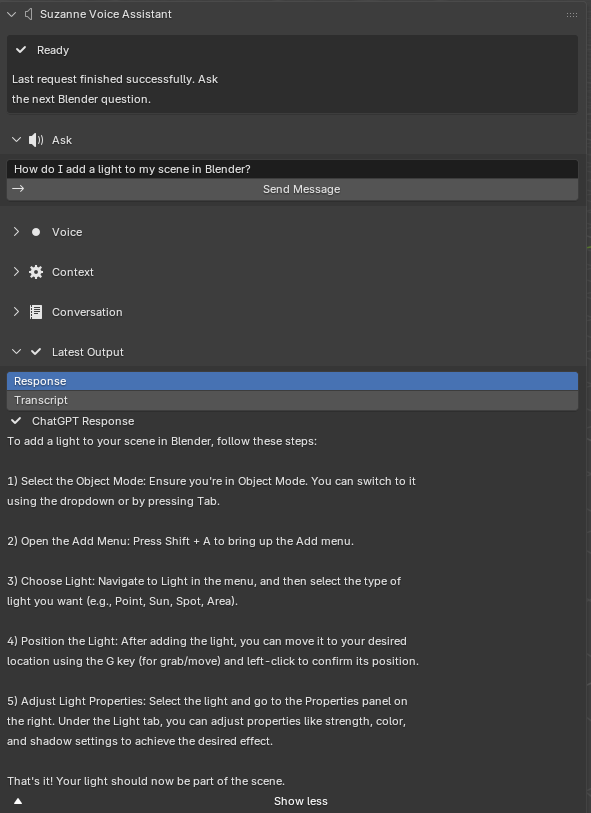
Suzanne returned a numbered, step-by-step answer that instructed the user to remain in Object Mode, open the Add menu with Shift + A, choose a light type, position the light, and then adjust its properties in the right-side panels. This response is functionally correct for standard Blender interaction and uses interface terms that match what a beginner would actually see on screen. Just as importantly, the answer is procedural rather than vague. Instead of describing lighting conceptually, Suzanne gives the user a sequence they can follow immediately in the same workspace.
| Aspect | Observation |
|---|---|
| Goal | Verify that Suzanne can answer a simple Blender question correctly inside the N-panel |
| Prompt | “How do I add a light to my scene in Blender?” |
| Observed output | Suzanne produced a short numbered procedure for adding, placing, and adjusting a light |
| Outcome | Successful |
| Interpretation | Suzanne’s baseline question-answering workflow functioned correctly and provided usable in-viewport guidance |
This experiment establishes that Suzanne’s simplest interaction loop is already useful at the point of use. Before the system can be trusted with longer workflows, it must first show that it can handle ordinary interface questions correctly and clearly.
Under the qualitative rubric, Experiment 1 scores strongly on procedural correctness and actionability. The steps correspond closely to a standard Blender lighting workflow, and the user can apply them immediately without reconstructing hidden prerequisites. In worked-example terms, this is the cleanest case for Suzanne’s design: the task is narrow, the solution is short, and the response can be consumed almost as a miniature recipe [3].
The experiment is also significant because it shows that keeping the answer inside the N-panel preserves locality well. The response fits the interface without becoming burdensome to read, so the user can move directly from question to action. This is the kind of low-friction interaction that external tutorials often fail to provide, even when their instructional content is correct, because the learner must still translate from another medium back into the active scene.
Experiment 2: Complex procedural guidance for fire simulation
The second task-based experiment tests whether Suzanne can support a more advanced Blender workflow that requires multiple ordered setup steps rather than a short, single-action answer. For this trial, the prompt entered into Suzanne was, “How do I create a basic fire simulation in Blender?” Fire simulation is a stronger stress test than the first experiment because it involves several connected systems, including a simulation domain, a flow emitter, physics settings, material setup, and baking or caching behavior. In other words, the task is complex enough that an incomplete or poorly ordered answer would be much harder for a user to apply successfully.
Because Suzanne’s response exceeded the visible height of the N-panel, the result was captured in two screenshots.
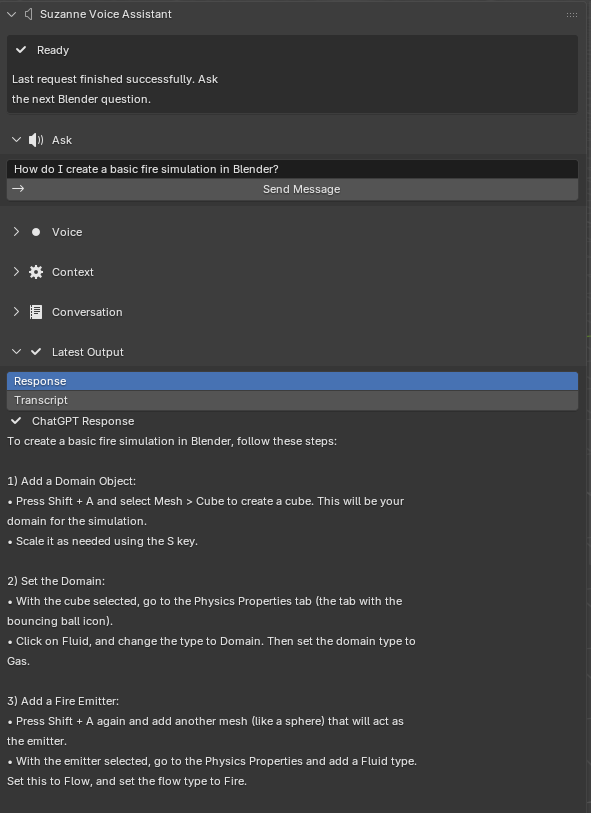
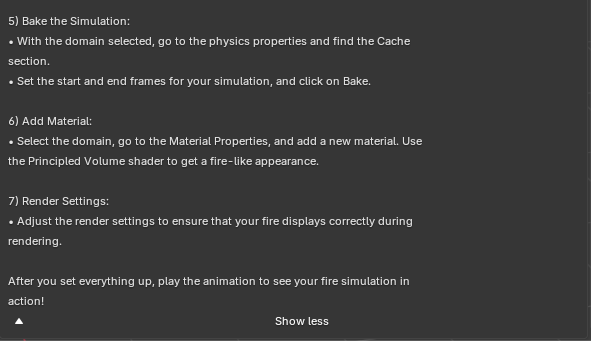
Suzanne returned a structured, ordered procedure that included creating a domain object, configuring the domain as a gas simulation, adding a separate emitter, setting the emitter as a fire flow source, baking the simulation, assigning a material, and adjusting render settings. This is the kind of longer procedural answer that Suzanne is intended to support: it keeps the user inside Blender while still presenting a workflow that would otherwise require searching across multiple external references.
The generated response is also broadly consistent with the standard workflow described in the Blender Manual, which explains that gas simulations require at least a domain object and a flow object, followed by material assignment and cache baking [6]. Suzanne’s answer therefore appears substantively correct at the workflow level, even though this experiment documents procedural completeness rather than a timed benchmark.
| Aspect | Observation |
|---|---|
| Goal | Evaluate whether Suzanne can provide usable guidance for a more complex Blender simulation task |
| Prompt | “How do I create a basic fire simulation in Blender?” |
| Observed output | Suzanne produced a multi-step workflow covering domain setup, emitter setup, bake steps, material assignment, and render considerations |
| Outcome | Successful as a complex-response test |
| Interpretation | Suzanne handled a longer, more technically demanding query and returned guidance that broadly matches documented Blender workflow |
This second experiment strengthens the evaluation by showing that Suzanne is not limited to very short beginner questions. It can also generate longer instructional sequences for tasks that involve several dependent setup stages, which is central to the thesis claim that in-viewport guidance can reduce friction for practical Blender work.
Experiment 2 also reveals an important trade-off. Procedural completeness improves actionability for a complex task, but it places pressure on the interface because the output extends beyond the visible panel height. In other words, the add-on succeeds on instructional granularity while partially stressing the locality dimension. The response still remains inside Blender, which is an advantage over external search, but long workflows begin to test how much step-oriented guidance a sidebar can comfortably hold at once.
This trade-off is methodologically useful rather than embarrassing. It shows that the main bottleneck in this experiment is not whether Suzanne can produce a relevant workflow, but how that workflow should be staged, chunked, or progressively revealed in the viewport. The result therefore supports the thesis while also motivating future refinements such as collapsible step groups, task phases, or lightweight checkpoint prompts. In human-AI terms, the assistant remains helpful, but the interface begins to mediate the quality of that helpfulness [2].
The experiment also demonstrates that success for Suzanne does not require autonomous execution. A fire simulation is exactly the kind of multistage task that an automation-first copilot might attempt to perform directly. Suzanne instead succeeds by producing an ordered scaffold that the user can inspect and follow. This keeps the model in an advisory role while still providing meaningful task support for a complex workflow.
Experiment 3: Context-aware reconstruction of recent Blender actions
The third task-based experiment evaluates Suzanne’s context feature rather than its general question-answering ability alone. In this trial, the Include Info History (100 lines) option was enabled in the Context panel, and the user asked, “what actions did I just perform in Blender? Please summarize them in order and explain what I was trying to do.” This is an important test because it asks Suzanne to infer recent activity from Blender session history instead of answering a generic procedural question from prior knowledge alone.
As with the previous experiment, the response extended beyond the visible panel height and was captured in two screenshots.
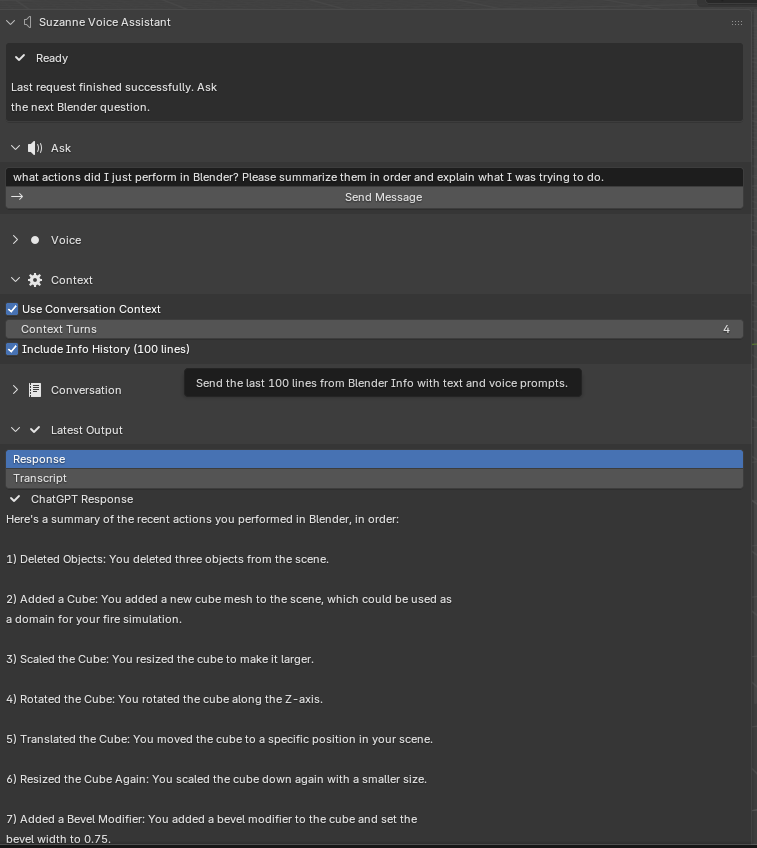

Suzanne responded with an ordered summary of recent scene operations, including deleting objects, adding a cube, scaling it, rotating it, translating it, resizing it again, adding a bevel modifier, and applying smooth shading. It then interpreted those actions as part of a likely modeling workflow, specifically suggesting that the cube may have been prepared as a domain object for a fire simulation. This is a meaningful result because it shows Suzanne using recent session context to produce a situationally grounded explanation rather than only returning generic help text.
Methodologically, this experiment is especially relevant to the thesis because it addresses one of the core limitations of many external help sources: they do not know what the user has just done. By contrast, Suzanne can incorporate Blender’s recent Info history and reflect it back into the conversation. In the captured session, conversation context was also enabled, so this example should be interpreted as evidence of context-aware assistance rather than as an isolated benchmark of Info-history retrieval alone. Even with that caveat, the response clearly tracks recent viewport activity in a way that ordinary static documentation cannot.
| Aspect | Observation |
|---|---|
| Goal | Evaluate whether Suzanne can use recent Blender session context to infer and summarize user actions |
| Prompt | “what actions did I just perform in Blender? Please summarize them in order and explain what I was trying to do.” |
| Observed output | Suzanne reconstructed an ordered sequence of recent modeling operations and inferred the likely purpose of the workflow |
| Outcome | Successful as a context-aware assistance test |
| Interpretation | Suzanne used recent session context to generate a grounded, workflow-specific explanation rather than only generic Blender advice |
Experiment 3 scores differently from the first two because its value lies less in procedural instruction and more in situated interpretation. The main success condition is context sensitivity: did Suzanne actually use the attached Blender history to reconstruct recent actions rather than falling back to generic language? The captured output suggests that it did. The assistant names concrete operations in sequence and offers a plausible higher-level explanation of the task being attempted. That is precisely the behavior the context features were meant to enable.
At the same time, this experiment exposes a distinct risk: interpretation can drift beyond observation. Suzanne does not merely repeat the action log; it infers likely intent. That inference is useful, but it is also less certain than simply listing an operator path. The experiment therefore illustrates a different trade-off from Experiment 2. There, the challenge was balancing completeness against panel space. Here, the challenge is balancing grounded description against over-interpretation. Because the inferred purpose remained plausible and clearly tied to visible actions, the run still counts as successful, but it also highlights why context-aware assistance should remain advisory rather than authoritative.
This context behavior is significant for the broader thesis because it addresses one of the strongest limitations of traditional tutorials: they rarely know what the learner just did. In practice, a browser tutorial or static manual page can explain a workflow, but it cannot usually summarize your recent workflow. Suzanne’s context-aware path is therefore not just an interface novelty. It is a capability difference that makes in-viewport assistance meaningfully more situated.
Experiment 4: Corrective guidance after a user mistake
The fourth task-based experiment evaluates whether Suzanne can support error recovery after a user follows a workflow incorrectly. This matters because many novice Blender problems are not failures to ask a first question, but failures to recover after applying the right idea to the wrong object, panel, or mode. In this trial, the user first asked Suzanne, “I already added a light to my scene and selected it. How do I change the light’s color to blue in Blender 5.0?” Suzanne responded with a short step-by-step procedure that directed the user to select the light, open the Properties editor, click the light-bulb tab, and change the Color field.
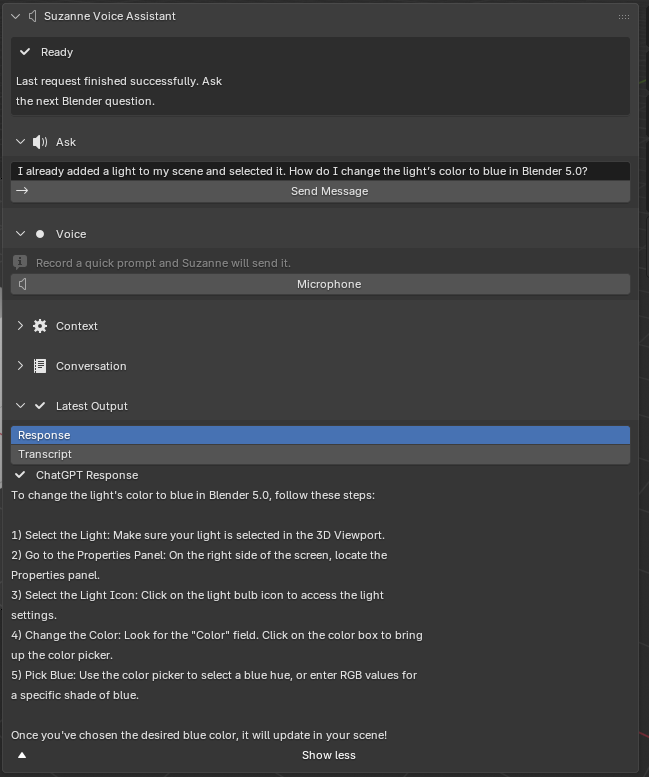
To test corrective behavior rather than only first-pass instruction, the user then performed the task incorrectly by changing the cube or material color instead of the light color. This is a useful stress test because it captures a realistic beginner confusion between object/material settings and light settings. The follow-up prompt was, “I changed the cube/material color instead of the light color. What did I do wrong, and how do I make the light itself blue?” Unlike Experiment 3, this task does not depend on Blender Info-history reconstruction; instead, it evaluates whether Suzanne can remain helpful once the user explicitly reports a mistaken intermediate step.
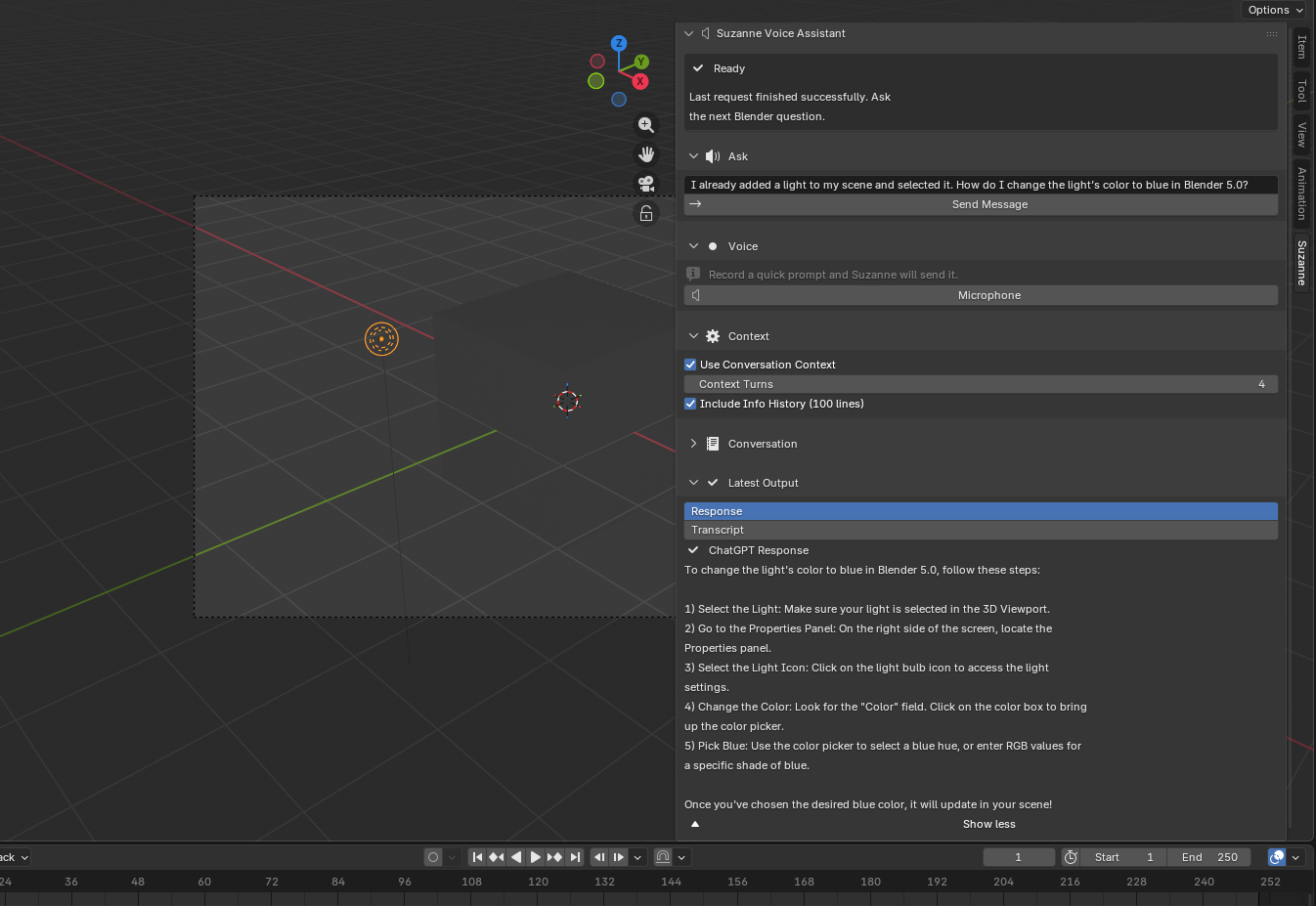
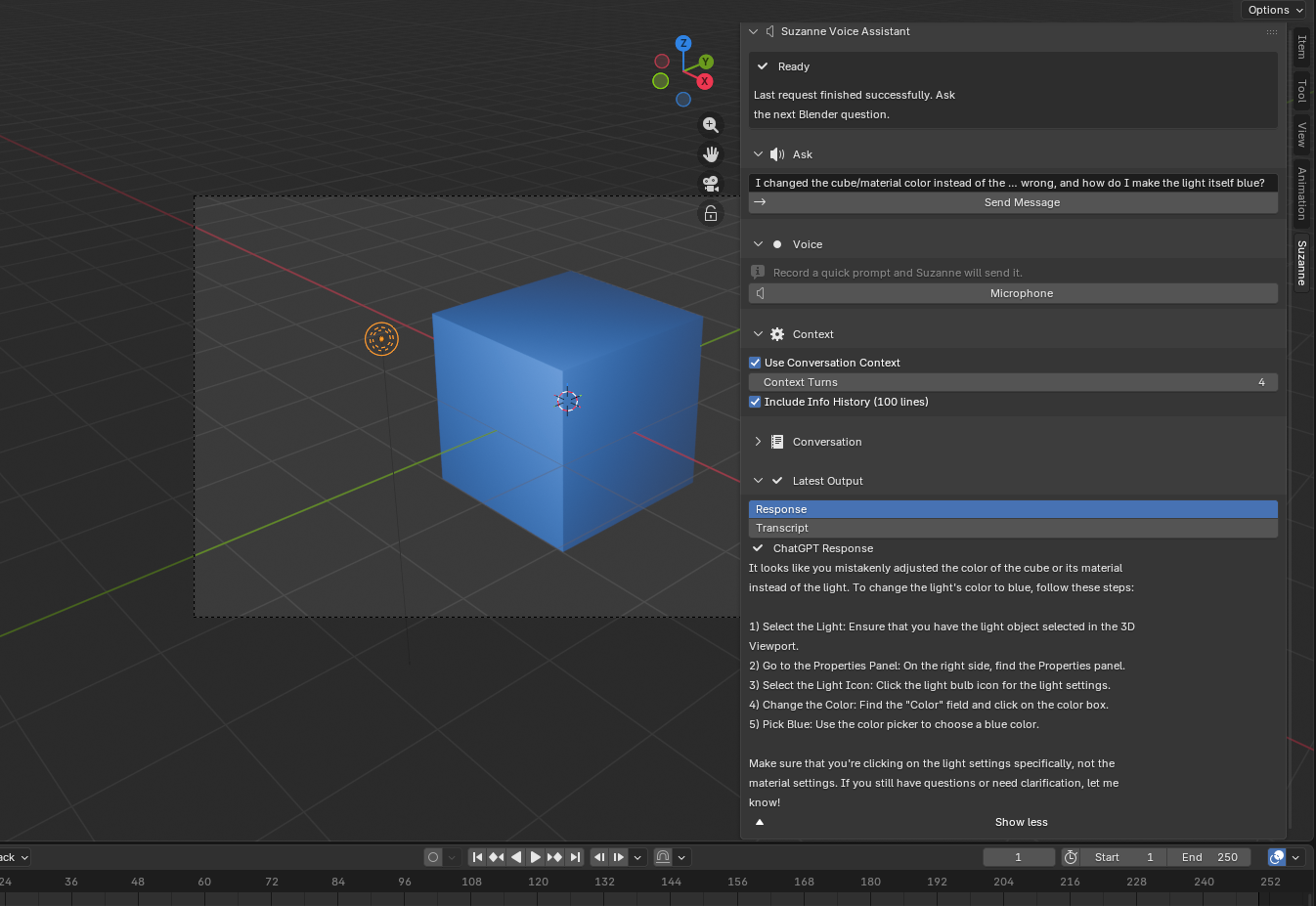
Suzanne’s correction response explicitly identified the problem as changing the cube or its material rather than the light. It then restated the relevant fix as a short ordered procedure: select the light object, open the Properties panel, choose the light icon, find the Color field, and set it to blue. This is the behavior the experiment was designed to test. Suzanne did not merely repeat generic lighting advice; it acknowledged the user’s reported mistake and redirected the workflow to the correct target.
| Aspect | Observation |
|---|---|
| Goal | Evaluate whether Suzanne can diagnose and correct a common novice mistake during a Blender lighting task |
| Prompt | “I already added a light to my scene and selected it. How do I change the light’s color to blue in Blender 5.0?” followed by “I changed the cube/material color instead of the light color. What did I do wrong, and how do I make the light itself blue?” |
| Observed output | Suzanne first gave a correct light-color procedure, then identified the wrong target and redirected the user to the light settings |
| Outcome | Successful as an error-recovery test |
| Interpretation | Suzanne supported conversational troubleshooting by correcting a realistic workflow mistake rather than only answering the initial question |
Methodologically, this experiment strengthens the thesis because it evaluates a different kind of usefulness from the previous three tasks. Experiment 1 showed that Suzanne can answer a short procedural question correctly. Experiment 2 showed that it can sustain a longer workflow explanation. Experiment 3 showed that it can use contextual signals to summarize recent actions. Experiment 4 adds a fourth dimension: corrective guidance after user error. In tutoring terms, that matters because helpful instructional systems do not only present the next step; they also help the learner recover when a superficially plausible but incorrect step has already been taken [2, 28].
At the same time, the evidence should be interpreted carefully. Suzanne did not independently inspect Blender state and discover the mistake on its own; the user described the mistake in the follow-up prompt. Even so, this is still meaningful evidence. Real help-seeking often takes exactly this form: a learner says what they tried, what happened, and what seems wrong. Suzanne’s ability to convert that report into a targeted correction supports the thesis claim that in-viewport assistance can reduce micro-execution friction not only at task start, but also during troubleshooting.
Together, the four experiments illustrate a clear progression of capability: basic question answering, longer procedural guidance for a complex task, context-aware interpretation of recent user actions, and conversational error recovery. That progression supports the thesis claim that Suzanne is not merely a generic chatbot embedded in Blender, but a more situated instructional assistant designed to reduce micro-execution friction inside the viewport.
Cross-experiment comparison and trade-offs
The four experiments can now be compared against the qualitative rubric to make their strengths and limits explicit.
| Experiment | Procedural correctness | Actionability | In-workspace locality | Transparency and user control | Context sensitivity |
|---|---|---|---|---|---|
| Experiment 1: Add a light | High | High | High | High | N/A |
| Experiment 2: Fire simulation | Moderate | High | Moderate | High | N/A |
| Experiment 3: Action reconstruction | High | Moderate | Moderate | High | High |
| Experiment 4: Light-color correction | High | High | High | High | Moderate |
Several patterns emerge from this comparison. First, Suzanne is strongest when the task is short and well-bounded (Experiments 1 and 4) or clearly grounded in recent context (Experiment 3). Second, longer workflows remain useful but place pressure on the viewport as a delivery surface (Experiment 2). Third, corrective follow-up turns appear promising even without autonomous scene inspection, provided the user can clearly describe the mistake that occurred (Experiment 4). Fourth, transparency and user control remain consistently strong across all four experiments because the interface keeps output visible, never mutates the scene automatically, and gives the user time to inspect before acting.
These results also show that “success” is not one-dimensional. A complex response can be valuable even when it is longer and harder to display compactly. A context-aware response can be valuable even when it is interpretive rather than directly executable. The rubric makes these differences visible and clarifies that Suzanne’s main contribution is not perfect factual certainty in every case, but a combination of locality, actionability, inspectability, and bounded contextual help.
Implications for portfolio-oriented workflows
The experiments also matter because they map onto different stages of portfolio-oriented Blender work rather than onto arbitrary prompts. Experiment 1 corresponds to a common baseline need in student and early-career creative practice: adding or adjusting light so a scene, asset, or render can be presented cleanly. Lighting is not an advanced specialty task in this context; it is part of the everyday presentation layer that determines whether a model reads as finished, unfinished, flat, or intentional. A tool that cannot help with this kind of task would struggle to support practical portfolio growth.
Experiment 2 maps to a different portfolio function: the production of a more technically ambitious showcase artifact. Simulation-based pieces, whether smoke, fire, cloth, or particles, often signal that a learner is moving beyond simple static modeling into a broader understanding of Blender’s systems. They also tend to involve multistage workflows with multiple points of failure. Suzanne’s success here is therefore meaningful not because fire simulation is the centerpiece of the thesis, but because it represents the class of workflows where scattered online searching is especially costly. When a task spans domain setup, emitter setup, baking, shading, and rendering, in-viewport scaffolding becomes much more valuable than in a one-step query.
Experiment 3 corresponds to still another aspect of portfolio development: reflective process explanation. In many educational and professional settings, finished renders alone are not enough. Students are asked to show breakdowns, explain their workflow, discuss troubleshooting, or document how an artifact was created. Suzanne’s ability to summarize recent actions from Blender context suggests that the assistant could eventually support not only execution but also retrospective explanation. That is especially relevant to portfolio-based learning, where process visibility and self-explanation are often part of evaluation [19].
Experiment 4 maps onto troubleshooting and iterative revision. Portfolio-oriented work is rarely linear; a learner may know the general effect they want, but still apply a change to the wrong object or panel along the way. Recovering quickly from those small mistakes can preserve momentum and reduce the discouragement that often comes from context-switching into external search. Suzanne’s success in redirecting the user from object/material color back to light color therefore matters as evidence of instructional recovery, not just initial instruction.
These four mappings can be stated more directly as follows.
| Experiment | Workflow type | Portfolio relevance | Main instructional value demonstrated |
|---|---|---|---|
| Experiment 1 | Basic scene setup and presentation | Supports readable renders and common beginner tasks | Fast, low-friction procedural reminder |
| Experiment 2 | Multi-stage technical workflow | Supports more ambitious showcase pieces and simulations | Longer scaffold for dependent setup steps |
| Experiment 3 | Reflective review and reconstruction | Supports process explanation, breakdowns, and troubleshooting | Context-aware summary of recent work |
| Experiment 4 | Troubleshooting and iterative correction | Supports recovery from common novice mistakes during scene refinement | Conversational diagnosis and corrective guidance |
This portfolio interpretation also helps clarify what the experiments do not claim. They do not show that Suzanne can make every user’s art better, replace dedicated instruction, or eliminate the need for practice. They do not show that the resulting render quality is automatically improved or that creative judgment becomes easier. Instead, the evidence supports a narrower but still meaningful claim: Suzanne can reduce some of the operational friction surrounding the kinds of tasks learners must repeatedly complete if they want to build and explain finished Blender work.
Another implication concerns transfer. If Suzanne repeatedly presents operator-named, mode-aware steps in the context of actual workflows, then the user may gradually internalize the sequence and require less help over time. That transfer is not directly measured in this chapter, but it is one of the reasons step-based assistance is attractive from a learning perspective [3, 28]. In other words, even when Suzanne is used as immediate task support, its outputs may still function as study material for later independent performance.
The experiments also suggest that different workflow types may benefit from different future interface refinements. Basic reminder tasks benefit most from speed and minimal panel friction. Complex procedural tasks benefit from chunking and checkpoint structure. Context-aware review tasks benefit from stronger provenance signals that distinguish observed actions from inferred intent. Treating these as separate workflow classes rather than as one undifferentiated “assistant use case” gives a clearer direction for future development and evaluation.
Answers to the research questions
RQ1: Reliability
RQ1 is answered positively. The software-verification layer shows that Suzanne’s core interaction paths behave predictably across input validation, request handling, failure recovery, panel presentation, preference controls, and state registration. The 65 checks matter because they cover the full support structure around the add-on rather than only a single happy-path request.
RQ2: Task support
RQ2 is also supported by the task-based evaluation. Across the four experiments, Suzanne kept guidance inside Blender for a beginner lighting question, a longer fire-simulation workflow, a context-aware explanation of recent user activity, and a corrective follow-up after a mistaken color adjustment. In each case, the output was specific enough to support continued work in the viewport rather than forcing the user out to search for the next step elsewhere.
RQ3: Instructional clarity and context
RQ3 is supported by the observed response quality. Suzanne’s outputs were readable, step-oriented, and aligned with Blender terminology. The third experiment showed that the system can incorporate recent Info-history context to produce situationally grounded guidance, while the fourth showed that it can also provide corrective follow-up guidance after a user-described mistake. Taken together, the experiments show that Suzanne is not only present in the interface, but capable of producing assistance that is concrete enough to be useful for learning-oriented work.
Threats to Validity
Internal validity
The task-based experiments use author-selected prompts and scene setups, so task choice can influence how strong Suzanne appears. Familiar workflows may naturally produce stronger outputs than unusual scenes or ambiguous prompts. External API availability and network latency can also affect response timing and wording across runs.
Construct validity
Time-on-task and perceived trust are not directly measured in this chapter, so the evaluation should not be read as a complete learning study. The automated test suite measures software reliability rather than pedagogical truthfulness, and the task demonstrations show procedural usefulness for selected workflows rather than long-term retention or transfer. Passing checks show that Suzanne behaves consistently as an add-on; they do not guarantee that every generated instruction sequence is correct in every Blender scene.
External validity
The selected tasks emphasize beginner and intermediate portfolio workflows. That is appropriate for Suzanne’s scope, but it limits generalization. Results from lighting setup, light-color correction, fire simulation, and modeling-context reconstruction should not be overstated as evidence for advanced rigging, simulation pipelines, compositing, or studio-scale production work. Generalization is also constrained by Blender version, English-language UI assumptions, prompt phrasing, and local hardware differences.
Conclusion validity
The evidence in this chapter is descriptive and qualitative rather than inferential. It supports claims about reliability and demonstrated task support, but it does not justify broad quantitative claims about efficiency gains or superiority over alternative tools. The defensible conclusion is that Suzanne is technically stable and demonstrably useful for the representative workflows evaluated here.
Overall, these validity threats do not negate the value of the evaluation. They clarify the kind of claim this chapter can support: initial evidence that a carefully scoped, in-viewport Blender assistant is technically reliable and practically useful for reducing micro-execution friction on common portfolio-building tasks.
Conclusion
This thesis began from a practical problem: Blender is powerful, but beginners often lose momentum not because they lack creative ideas, but because they get stuck on micro-execution. They need to know which operator to call, which mode to use, which panel to open, and what order to follow. Existing help systems often answer these questions outside Blender through manuals, videos, forums, or automation-heavy AI tools. Suzanne was developed as a different response to that problem: an in-viewport instructional assistant that lives in Blender’s N-panel, keeps help close to the active scene, and returns short, actionable guidance rather than opaque automation.
Across the thesis, Suzanne was framed not as a fully autonomous copilot, but as a mixed-initiative learning tool shaped by three design priorities. First, it keeps assistance local to the workspace, reducing the need to switch away from Blender [7]. Second, it emphasizes procedural clarity through step-based responses aligned with Blender terminology and interface structure [6, 21]. Third, it preserves user control through explicit feedback, bounded scope, and the refusal to silently modify scenes or execute arbitrary actions without oversight [8].
Summary of Results
The implemented system shows that this design is technically viable. Suzanne now supports typed prompts, microphone-based prompt capture, local conversation memory, optional inclusion of recent Blender Info history, status-aware interface feedback, and a structured Latest Output review workflow. The Methods chapter demonstrated that these features are not just interface decoration; they are part of a reproducible interaction pipeline with clear validation, state transitions, and recovery behavior. In architectural terms, Suzanne successfully operationalizes the central thesis idea that AI guidance can be embedded directly into Blender without collapsing into hidden automation.
The strongest completed evidence in the thesis is the software-verification layer. The automated test suite passed all 65 checks, covering prompt validation, send behavior, failure handling, panel rendering, preference safety, and state lifecycle behavior. This does not prove that every generated instruction is always correct, but it does show that the non-model scaffolding around Suzanne is stable enough to support repeated use and task-based evaluation. That reliability matters because instructional tools fail pedagogically when their own interface behavior is confusing or inconsistent.
The three use-case experiments also support the thesis argument at a practical level. The first experiment showed that Suzanne can answer a straightforward Blender question with a clear, usable procedure inside the N-panel. The second showed that Suzanne can generate a longer workflow for a more complex task, in this case a basic fire simulation, without collapsing into vague or purely conceptual advice. The third showed that Suzanne can use recent Blender session context to summarize what the user has just done, suggesting a path toward more situationally grounded assistance. Together, these results support the claim that Suzanne is more than a generic chatbot embedded in Blender. It functions as a scoped, context-sensitive instructional add-on aimed at reducing friction in portfolio-oriented Blender work.
At the same time, the thesis remains methodologically careful about what has and has not yet been proven. The current evidence is strongest on implementation quality, reliability, and demonstrated task support. The most defensible conclusion is that Suzanne is a credible and well-scoped prototype with clear evidence of technical stability, practical usefulness in representative Blender workflows, and a design that aligns with both prior literature and practical Blender learning needs.
Public Dissemination
An additional sign of project maturity is that Suzanne moved beyond a private development artifact during the thesis process. I published a public GitHub repository for the add-on [10], released a demonstration video, ChatGPT Inside Blender? Meet Suzanne AI - Free Blender Addon, on YouTube [9], and deployed a downloadable beta page, Suzanne AI Voice Assistant for Blender, on Gumroad [11]. These releases matter because they required Suzanne to be explained to real users in concise, practical language rather than only in academic prose.
The GitHub repository, in particular, made the implemented artifact inspectable as software rather than only as a demo or download page: outside readers could review the code, tests, documentation, and versioned history directly [10]. The Gumroad deployment forced the project to disclose its actual operating assumptions: supported Blender version, use of the user’s own API key, internet dependence, and platform-specific installation caveats such as ffmpeg on Linux [11]. The YouTube video likewise required the add-on’s workflow to be demonstrated coherently from a first-time user’s perspective [9]. In that sense, public dissemination served as a secondary validation of communicability and packaging. A system that cannot be clearly described or responsibly packaged for outside users is not yet a strong instructional artifact.
These public-facing materials should not be mistaken for a formal study of adoption or learning impact. They do not tell us how many users completed tasks faster, retained knowledge longer, or trusted Suzanne appropriately. What they do show is that the project reached a stage where it could be distributed, explained, and evaluated by people beyond the immediate development context. That strengthens the thesis claim that Suzanne is a viable artifact rather than only a speculative design.
Public release also changes the ethical meaning of the project. A prototype kept on a developer’s machine mainly poses internal questions about correctness and feasibility; a prototype placed on public platforms immediately raises questions about disclosure, onboarding, and responsible expectation-setting. Once a user can download Suzanne from Gumroad or encounter it through a YouTube demo, the burden to communicate limitations becomes much higher. It is no longer enough for the developer to privately know that voice capture is platform-dependent or that API-based features can fail because of quota, connectivity, or permissions. Those limits must be visible to the user before frustration or over-trust occurs. In that sense, public dissemination reinforced one of the core lessons of the thesis itself: helpful AI tools are not defined only by what they can generate, but also by how honestly they frame their own boundaries.
That lesson is especially important for student-facing software. In educational settings, even small ambiguities about setup, cost, or reliability can be misread by learners as personal failure rather than as characteristics of the tool. Making those boundaries explicit is therefore part of both sound interface design and responsible pedagogy.
Broader Significance
Suzanne also matters beyond its immediate implementation because it represents a specific design argument about AI in creative software. Much of the public conversation around AI assistants centers on speed, automation, and replacement: can the system take over the task, act autonomously, or generate the artifact directly? This thesis argues for a different center of gravity. In many creative and educational contexts, the most helpful AI may not be the one that does the most on the user’s behalf. It may be the one that reduces friction while preserving understanding, authorship, and control. Suzanne therefore contributes not only a Blender add-on, but also a concrete example of what a narrower, more inspectable, mixed-initiative assistant can look like in practice.
That argument is especially relevant in an open-source ecosystem. Blender is free, widely documented, and used across entertainment, research, engineering, and education [6, 23, 29]. Because access to the core tool is not gated by an expensive license, improvements to the learning experience can have a disproportionately broad effect. A commercial 3D package may also benefit from intelligent assistance, but Blender occupies a different social position: it is often the first serious 3D environment available to students, hobbyists, and independent artists who are still developing both technical skills and professional identity. In that setting, lowering micro-execution friction is not just a convenience feature. It can affect whether learners persist long enough to finish work, share work, and build confidence through visible artifacts.
Suzanne also suggests a productive middle ground between static documentation and autonomous action. Official manuals are authoritative, but they are typically written to cover a broad space of functions rather than to respond to the learner’s immediate local problem. Community tutorials are rich and often generous, but they usually live outside the workspace and vary in version relevance, pacing, and assumptions about prior knowledge. Automation-first assistants go further by trying to act directly, but they introduce risks of opacity, over-trust, and silent scene mutation. Suzanne occupies the space between these models. It borrows the authority of documentation, the responsiveness of conversation, and the convenience of in-context UI, while deliberately refusing the strongest form of automation. That positioning is one of the thesis’s main conceptual contributions.
From a human-computer interaction perspective, the project also extends mixed-initiative and human-centered AI ideas into a creative-software learning context. Horvitz’s mixed-initiative principles, Amershi et al.’s human-AI guidelines, Kulesza et al.’s explanatory-debugging work, and Shneiderman’s human-centered AI framework are often discussed in the abstract or through systems outside 3D art practice [2, 15, 17, 26]. Suzanne shows how these ideas can be translated into very concrete interface decisions: keep assistance in the active workspace, expose status changes, allow inspection before action, constrain high-risk capabilities, and frame the assistant as a collaborator in understanding rather than an invisible replacement for user judgment. These are small decisions individually, but together they produce a distinct interaction philosophy.
The thesis also contributes to educational discussions about what AI support should look like for procedural, tool-mediated learning. Much attention in AI and education focuses on text-based tasks such as writing, assessment, or general conversational tutoring. Suzanne demonstrates that creative software learning has a somewhat different profile. Here, the crucial challenge is often not open-ended ideation but procedural execution inside a complex interface. That makes worked-example logic, step-based tutoring, and context-sensitive troubleshooting especially relevant [3, 28]. By centering operator names, modes, panel paths, and ordered actions, Suzanne aligns the assistant with the actual grain of difficulty encountered by Blender novices. This is a useful reminder that “AI in education” is not a single design problem; different domains demand different instructional shapes.
There is also a research-method significance to the project. Suzanne combines design argument, implemented software artifact, automated verification, task-based demonstrations, and public dissemination. None of these alone would be sufficient to support the thesis fully. A design argument without code would remain speculative. Code without testing would remain fragile. Testing without real workflow examples would say little about instructional usefulness. Public packaging without methodological restraint could drift into marketing rather than research. The value of the project lies in bringing these layers together. Suzanne is credible because it is argued for, built, exercised, bounded, and communicated as one coherent system.
Finally, Suzanne points toward a wider possibility for open-source creative tools: AI assistance that teaches rather than merely performs. In a domain like Blender, that distinction is not philosophical excess; it is practical. Learners need finished renders, but they also need transferable skill, reliable habits, and enough understanding to debug their own future work. An assistant that simply acts may help in the moment while leaving the learner dependent. An assistant that scaffolds action, names the relevant concepts, and keeps the learner in the loop may contribute to longer-term independence. Suzanne does not prove that this outcome always occurs, but it does offer a working example of how such a direction can be pursued responsibly.
Future Work
The most immediate next step is to complete the planned human-facing evaluation. A within-subject comparison between Suzanne and external-search workflows would make it possible to measure time-on-task, completion quality, context switching, recovery burden, and perceived usefulness under controlled conditions. That study would be especially valuable for testing whether the instructional advantages suggested by the current experiments translate into measurable gains for students and early-career creators working on realistic Blender tasks.
The new public dissemination channels also create a practical path toward future evaluation. A YouTube demo and Gumroad release make it easier to recruit real Blender learners, collect structured feedback, and observe which parts of the onboarding and workflow explanation remain confusing [9, 11]. If handled ethically and with explicit consent, these channels could inform later revisions to installation instructions, prompt guidance, troubleshooting affordances, and feature prioritization.
Another valuable future study would compare multiple language models under the same Suzanne interface to ask a more specific question: which model is best suited for Blender support, not in the abstract, but for this particular instructional use case. Because Suzanne already separates its interface and prompting logic from the underlying response model, the add-on could be used as a controlled testbed for evaluating different models on the same prompt set, Blender tasks, and context settings. Such a study could compare step accuracy, Blender terminology alignment, menu-path correctness, hallucination rate, response latency, and cost per useful answer. This would help clarify whether the strongest model for general conversation is also the strongest model for grounded, in-viewport procedural support, or whether a smaller, cheaper, or more retrieval-compatible model might actually be the better fit for Blender learning workflows.
Beyond evaluation, Suzanne itself has several natural expansion paths. One major direction is deeper grounding. The current build already aligns strongly with Blender terminology and can attach recent interaction context, but a fuller retrieval layer over the Blender Manual could improve menu-path accuracy, reduce hallucinated steps, and make it possible to cite or surface specific documentation passages alongside responses [12]. Another direction is richer scene awareness. Right now Suzanne infers context indirectly through prompts, conversation memory, and Info-history snippets. Future versions could inspect selected objects, active modes, visible modifiers, material slots, or render settings directly, allowing the assistant to tailor guidance more precisely to the user’s actual scene state.
Another important future direction is adaptive pedagogy. Suzanne currently returns concise procedural steps, but later versions could adjust explanation depth for different learners, provide optional troubleshooting branches automatically, or gradually fade support as users become more confident. For example, a beginner-facing mode might emphasize every prerequisite and panel path, while a more advanced mode could focus on only the critical actions or likely failure points. This would move Suzanne closer to a true tutoring system while preserving its in-viewport usability.
The future I find most exciting, however, is broader than Suzanne alone. This project suggests the beginning of a family of Blender add-ons built around the same philosophy: small, safe, in-context tools that reduce friction for creators without taking control away from them. Suzanne could grow into a wider ecosystem that includes add-ons for portfolio review, lighting critique, material setup guidance, scene-preparation checklists, topology analysis, or pipeline documentation. One add-on might help users prepare clean presentation renders; another might explain shader nodes in plain language; another might assist with organizing assets or documenting reproducible scene workflows. In that sense, Suzanne is not only a single tool but also a proof of concept for a broader design pattern in Blender add-on development.
That larger add-on ecosystem could also support my own future work as a developer and researcher. Rather than building one increasingly monolithic assistant, I can imagine creating a set of specialized tools that share a common design language: clear status feedback, grounded terminology, strong safety guardrails, and support for learning through doing. Suzanne can remain the general in-viewport tutor, while other add-ons explore adjacent needs in 3D creation. This would allow future projects to remain focused and maintainable while still contributing to the same overall goal: making Blender more approachable, more teachable, and more productive for students and independent artists.
Future Ethical Implications and Recommendations
If Suzanne or future related add-ons are released more broadly, ethical considerations will remain central. The first major issue is privacy. Because prompts, audio, and optional context may be sent to a third-party provider, users must understand what leaves their machine and what does not. Future public versions should continue to make API usage explicit, avoid hidden telemetry, and clearly label any contextual data attached to a request. In educational settings, users should always have a non-AI alternative so that students are not forced into third-party processing to complete coursework [8, 21].
The second issue is reliability and over-trust. Even when grounded on documentation, language-model outputs can still be incomplete, outdated, or slightly misaligned with a given scene. Future versions should therefore keep Suzanne’s advisor role visible. The system should continue to present suggestions as suggestions, preserve opt-in behavior for any code execution, and encourage verification against Blender’s official documentation when appropriate [6]. As richer scene awareness or automation features are added, the design should remain conservative: visibility before action, confirmation before execution, and undo-friendly workflows wherever possible.
The third issue is equity and access. Tools like Suzanne can help lower the barrier to Blender, but they can also create new inequalities if they depend on paid APIs, stable internet access, or English-only documentation. Future development should therefore prioritize cost transparency, graceful degradation when AI services are unavailable, and eventual exploration of cheaper or local model options. If I expand into additional add-ons, I should carry forward the same principle: the tool should help learners build skill and confidence, not create new hidden dependencies that only some users can afford.
Overall, this project argues that AI in creative software is most promising when it is narrow enough to be trustworthy, visible enough to be inspectable, and supportive enough to help users keep ownership of their work. Suzanne does not solve every Blender learning problem, and it is not yet the final form of an intelligent in-viewport tutor. What it does show is that there is real value in designing AI assistance around instructional clarity, user agency, and workflow locality. That combination offers a practical foundation not only for Suzanne’s continued growth, but also for a wider future of Blender add-ons that teach, assist, and empower rather than simply automate.