PathMaker:A Tool For Analyzing, Developing and Benchmarking Path-finding Algorithms.
Pathfinding algorithms are fundamental to navigation systems, video game AI, and robotics. However, developers and researchers currently lack dedicated tools for analyzing, developing, and benchmarking these algorithms in controlled environments. Existing solutions range from educational visualizers lacking analytical capabilities to full-featured game engines with steep learning curves. This paper presents PathMaker, a specialized tool for pathfinding algorithm analysis built using Rust and SDL2. PathMaker enables users to create, edit, and save two-dimensional grid-based maps with configurable obstacles, weighted terrain, and multiple agent/goal configurations. The tool includes implementations of several pathfinding algorithms, including A*, Breadth-First Search, Greedy Search, and Jump Point Search with caching (JPSW). PathMaker provides comprehensive benchmarking through metrics such as computational time, memory allocation, step count, and total path cost. It also calculates the Weight Complexity Factor (WCF) of generated maps using Sobel operations to quantify terrain difficulty. To support controlled experimentation, PathMaker includes map generation capabilities with adjustable parameters for obstacle density and weight distribution, along with validation to ensure solvable configurations. The tool aims to bridge the gap between basic visualizers and complex game engines, providing a focused research environment for pathfinding algorithm development and analysis.
Introduction
What is PathFinding?
Pathfinding is a computational process that determines an optimal route between two or more points within a defined environment. This concept is widely utilized across various industries, including navigation systems (e.g., GPS applications such as Google Maps), video game development for controlling non-playable characters (NPCs), and artificial intelligence (AI) for decision-making tasks. The pchrimary objective of pathfinding algorithms is to identify the most efficient path, often minimizing distance, cost, or other relevant metrics, depending on the application context.
When evaluating pathfinding algorithms, both the choice of algorithm and the method of environmental representation are critical. In three-dimensional environments, such as those found in modern video games, navigation meshes (NavMesh) are commonly employed to characterize walkable areas. This project focuses on grid-based pathfinding, wherein the environment is modeled as a graph composed of nodes representing coordinates, obstacles, starting points, and goals. In grid-based systems, movement costs are either uniform where each node has the same traversal cost or weighted where each node can have varying costs, this is to better reflect real world applications where terrain difficulty may be a factor.
A* Algorithm
The A* (A-Star) algorithm is a widely recognized method for determining the shortest path between a designated start and goal within a graph. It operates by estimating the total cost of a path and prioritizing nodes based on this estimate. Fundamentally, A* extends the principles of depth-first search by evaluating neighboring nodes and assigning heuristic values that reflect the estimated cost to reach the goal. The algorithm selects the node with the lowest estimated cost for exploration, thereby optimizing the search process [12].
Dijkstra Algorithm
Dijkstra’s algorithm is another foundational approach in pathfinding, distinguished by its ability to compute the shortest paths from a single source to all other nodes within a graph. This property makes it particularly suitable for static environments where precomputation of paths is feasible. Dijkstra’s algorithm maintains a set of unvisited nodes, each initialized with an infinite cost, and iteratively updates these costs as shorter paths are discovered. Upon completion, the algorithm yields the shortest path to every accessible node from the starting point [6].
Weighted Grids
There are also weighted grids which have different values depending on a coordinate. In a normal grid moving one space over can simply be represented by 1 no matter where it is on the grid. Weighted grids differ as moving one space over may have a cost of 2 or 3 or any number depending on how the weighted grid is set up. There are also situations where there’s a dynamic environment where the map is always changing or the location the algorithm is trying to navigate is always changing thinking of something like self-driving car or a Roomba. These things normally have a set path they follow but need to be able to react to changes in the environment, so they don’t crash or in a more minor case a Roomba runs into someone’s leg. In this situation just using one algorithm doesn’t work it needs to be able to react to a changing environment. Then there’s also situations with multiple agents where they need to avoid colliding with each other but aim to achieve the same goal.
Issues with Pathfinding
Pathfinding at its basic form is a very simple problem however it very quickly becomes computationally expensive. For example while getting a path between two points is simple on it’s own what if you start adding more points that need to be visited in the mean time. What if you then need to return to the original starting point. This then quickly becomes a traveling salesmen problem which for a large amount of instances can be computed it is computationally expensive and inefficient. This leads to many uses of pathfinding algorithms being modified using different algorithms depending on the use or relying on a large amount of precomputed paths and possible paths.
Probabilistic Maps
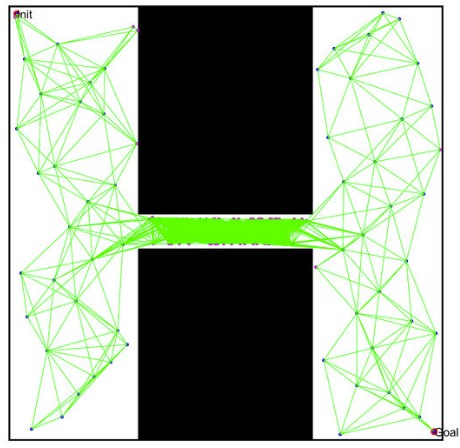
Another way information can be represent is a probabilistic map. Where a map is generated by take multiple different nodes placing it someone where on the map. It then will check if the node is within an obstacle space if it isn’t it keeps and attempts to connect to other viable nodes. It does this by finding a path through another path-finding algorithm like Dijkstra or A* Usually using Dijkstra due to its nature of finding multiple paths to different nodes making it more ideal for generating a map. it then checks if that line collides with an Obstacle at any point. It does this multiple times until it has a comprehensive map of nodes with paths connecting each one to each other without colliding with an obstacle. This allows every possible movement path to already been calculated and you use another path-finding algorithm on top of that to know which nodes to go to get to a specified destination. You can see this in the figure above of points be being placed in unobstructed areas and the path being found between those nodes to allow for more complicated routes in the future.
Navigation Mesh
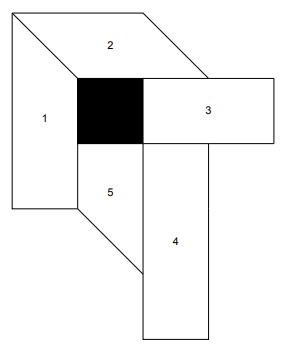
A navigation mesh (NavMesh) is a polygonal representation of walkable regions in a two-dimensional or three-dimensional environment [4]. Instead of using grid cells a Navmesh represents walkable space into polygons in which a agent can navigate unobstructed. It will often use a pathfinding algorithm such as A* to run between nodes that represent one of the polygons. These are often in used in videogames as there reduce search complexity and videogames often allow for precomputation for prebuilt maps allowing for less computation when running[4]. The figure above shows a simple visual representation of this, each numbered shape can be traveled to and between in order to traverse around the obstacle.
Scope of PathMaker
This project focuses exclusively on weighted and unweighted, two-dimensional grid environments. Such grids provide a simple, controlled experimental setting and avoid the substantial pre-computation required for probabilistic roadmaps and navigation meshes. Although limited in representational power, this choice facilitates clear visualization and benchmarking, making the tool suitable for algorithmic analysis.
Project Overview
This project presents a tool designed for the development visualization and performance analysis of pathfinding algorithms algorithms operating on two-dimensional, grid-based environments. The tool allows users to create, edit, generate and save maps made from cells representing obstacles, open space, start positions and goal positions. Since PathMaker allows the creation and editing of maps users can design specific test environments to evaluate algorithm behavior under varying circumstances.
The program analyzes the results through benchmarking by recording metrics such as grid complexity, time, computational steps required for a solution, overall cost of path found, and memory usage. It then stores this information for later analysis. The hope for this project is that it makes testing and analyzing path-finding algorithms easier and to have a dedicated tool to that purpose instead of using a secondary feature of something like a game engine or having to make your own testing environment.
PathMaker allows for testing and visualization without requiring integration into a larger software. PathMaker functions as a research environment allowing for controlled experimentation with pathfinding algorithms. Another goal of PathMaker is to be easy to set up and use without pre-installed libraries or dependencies being required. Leading to how PathMaker was implemented the reason behind those choices.
Implementation Details
Rust
The software is implemented using the Rust programming language. Rust is a statically typed, compiled language that emphasizes memory safety, zero-cost abstractions, and concurrency through a strict ownership model[23]. On top of Rust’s package manager providing an integrated build system and dependency manager, enabling modular development and reliable project configuration, Making projects easier to maintain and build for multiple computer systems such as Windows,Linux and MacOS. As for the visualization and UI.
SDL2
As for the visualization and UI, the graphical interface and input handling rely on the Simple DirectMedia Layer 2 (SDL2), a low-level multimedia library originally implemented in the C programming language. The reason for using SDL is because of it cross-platform capability on top of it’s window creation, event and input handling, and rendering. This makes it suitable for lightweight visualization tools and games[22]. It giving low level access to inputs and graphics offers more precise control then something like a full featured game engine allowing analysis to be more accurate due to less overhead.
Current State of the Art
Visualizers
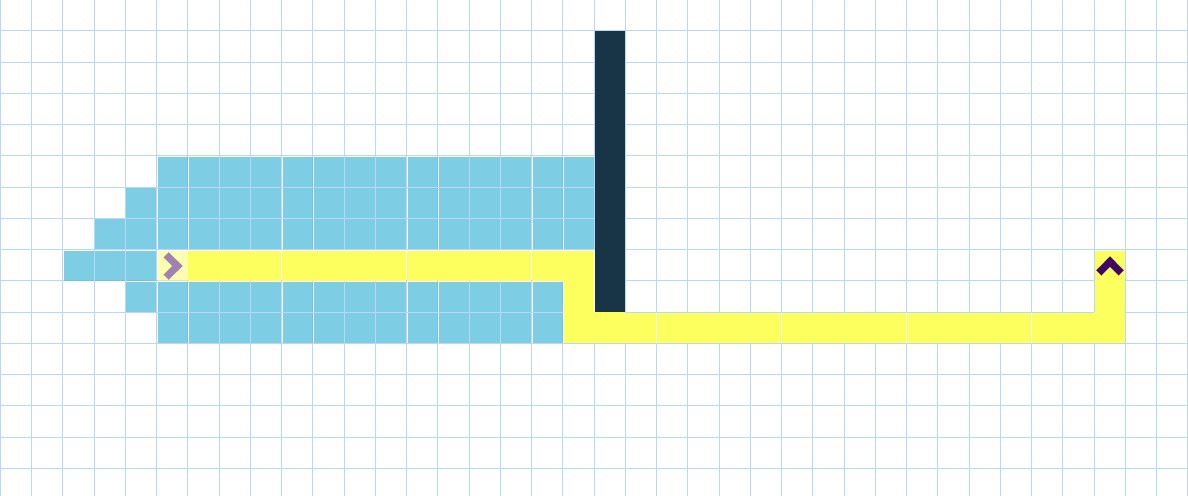
Currently there are things like path-finding visualizers that you can find online these are mostly for education purposes and given a visualization on how these algorithms actually work and find the path. These often don’t have any benchmarking capability and if they do it’s simply tracking time to find path. They are also often very finnicky and unresponsive but that is a more of a result as a lot of them just being fun side projects of someone’s and not being a professionally made tool.
Game Engines
There are also Game Engines like Unreal, Godot, Unity along with games created in those engines are often used as testbeds for path-finding algorithms as they can provide bench marking and the ability to create and control their own environments[11]. However, this isn’t their main purpose and game engines can be difficult to use, especially something like the unreal developed by epic games. This leads to an issue where a tool isn’t powerful enough to be used as a proper way to analyze something or it has a major learning curve on how to create a map and implement code because of it having a broader purpose and not being focused on analyzing path-finding algorithms.
Multimedia API
There are also APIs such as SDL/SDL2/SDl3 and something like Microsoft DirectX which are libraries built for interacting with a computer’s hardware to display images, create windows, play sound and track inputs. These are often used to make simple and high-performance games directly while also often being used as an important component for more complex and powerful game engines[22].
Benchmarking Libraries and Maps
There is also libraries such as Warthog that are used for running experiments on Algorithms and comparing with others, while also providing test maps and varying scenarios to run experiments on[16]. As well as maps designed to test algorithms on such as the Moving AI Repo [24].
Motivation
So why do you even make something like this and why is it important? When developing or trying to create a modified version of an existing algorithm i.e. A* developers and researchers often use video games as a test bed and their engines to implement the algorithm and test its performance. This can result in a steep learning curve in understanding the engine and doesn’t normally have extensive benchmarking built into it and isn’t focused solely on the algorithm itself. While game engines do provide a great environment to test path-finding algorithms they aren’t solely built for it so a lot of the analysis must be done by the developers themselves using known techniques. My program aims to be easy to use and give extensive data on the performance of these algorithms by not testing them on a singular map but by giving it multiple different circumstance’s tracking what those differences are and how it performs to help come up with how this an algorithm succeeds and its shortcomings and if it’s a good fit for the problem you’re trying to solve whether it’s finding routes on a real life map or trying to control AI in games to have affective path-finding these require different types algorithms with tradeoffs and my tool hopes to make this process easier.
Having a tool that is easy to use, and in-depth benchmarking would be very useful as it cuts out a lot of the learning curve for more complex game engines while also providing more in-depth analysis of these algorithms. Benchmarking can help determine if an algorithm you’ve created or you’re wanting to implement is right for your circumstance. For example if I use something like A* while A* is very accurate and fast for how accurate it is, It’s not great for a path that changes on the fly so if you want to implement in a more dynamic environment there is a lot of pre-computation time required which is the issue that is often found in 3D video-games and the their use of navigation meshes requiring hours of pre-computation per map before the NPCs or AI is effective at navigating the map. This type of thing isn’t an issue for larger companies and is useful in many of these circumstances as once it’s computed you don’t need to worry about it again. This does however increase file size and may not be Ideal for a smaller project or simpler project.
In-depth benchmarking is essential for determining whether a specific algorithm is appropriate for a particular scenario. For example, A* is highly accurate and efficient in static environments, but its performance degrades in dynamic environments where obstacles or goals change over time. In these cases, A* often relies on extensive precomputation, such as the generation of navigation meshes (NavMeshes), which requires memory and computational resources in three or two dimensional environments [4]. Large commercial game studios can accommodate these costs and once computed have been shown to decrease the cost of pathfinding, but smaller projects or procedurally generated worlds may find this approach impractical due to memory constraints, loading-time limitations, or file-size restrictions as NavMeshes can take up a large amount of memory and don’t perform as well in dynamic environments.
For example, Terraria, a very popular game made by Re-Logic, doesn’t use navigation meshes or a pre-computed map. One reason for this is that it can’t, as Terraria generates a unique world upon first loading in meaning if it were to try and create a navigation map or probabilistic map beforehand it could increase loading and performance do to the environment being constantly changing as result of player and AI actions and the layout of the map being unknown making a Navmesh impractical. So instead different enemies have different defined behaviors one of the most commonly used behaviors is referred to as the fighterAI, which allows entities to follow the player and navigate basic terrain features[25]. This works great for the majority of enemies but when it comes more complex entities, such as bosses, are often programmed to ignore obstacles entirely, enabling continuous pursuit without requiring costly path computation[26].
Every path-finding algorithm has intrinsic trade-offs, a tool that enables users to construct their own maps and observe algorithmic performance helps users make decisions on what algorithms to use while also gleaming a better understanding of these algorithms and how much resources they take, How accurate they are in terms of finding the shortest possible path. How their abilities are affected when in a dynamic environment or the issues and what kind of environmental structures influence performance.
Additionally, many developers and organizations may choose not to rely on fully featured game engines. They may instead develop custom engines or work with lightweight multimedia frameworks such as SDL as used in PathMaker or toolkits such as Microsoft XNA. These frameworks provide rendering and input-handling capabilities but do not include comprehensive environment-creation tools or built-in pathfinding systems. As a result users must construct their own testing environments from the ground up. If they later transition to a full engine such as Unreal Engine, significant re-implementation is required, making algorithmic testing undesirable in some instances. A tool like PathMaker would make it easier to make these decision without having to fully integrate a testing framework within the software the user is using.
Having a dedicated and easy-to-use tool reduces these obstacles by enabling fast environment setup and direct algorithm integration without the need to build or learn an entire engine framework. While such a tool does not replicate all features of a full game engine, it offers a practical and efficient method for preliminary analysis, allowing researchers and/or developers to make informed decisions about algorithm selection before attempting integration into a larger system.
Goals of the Project
The goal of this project is to make a functional and robust tool that as said before allows for the creation of 2D grid-based maps. The ability to modify and save maps is Important for users to accurately represent the environment they want to use a path-finding algorithm in.
I want this project to also be able to aid in the analysis of algorithms in general and just decide when they should be used. So, the ability to randomly generate maps and running a series of benchmarking aims to achieve this goal. This goal is also why allowing the implementation of modified or new algorithms is important as only allowing well known algorithms can provide little value as a large amount of information is already known about how they behave in different scenarios and there isn’t much that could be gleamed from PathMaker alone that wasn’t already known.
Overall, PathMaker should give an easy to understand and in-depth analysis of a path-finding algorithm to aid in understanding and general analysis and research as well as helping to decide if the algorithm is the right fit for the situation someone might want to implement it in.
While a lot of these functions can already be achieved to some extent with other tools such as game engines as mentioned before, they are not specifically designed with pathfinding solely in mind. While they’re a suitable test bed there’s an additional learning curve in how to design and create maps and how to implement a program within the engines. This learning curve varies depending on the engine as something like Godot is inherently simpler than Unreal but there still is a large amount of functionality and complexity in the map creation. Along with implementing a program can lead to a confusing experience.
Ethical Implications and Assumptions
Accuracy
It’s important for PathMaker to work properly and accurately. If it doesn’t provide accurate information with tested and researched methods, it runs the risk of giving untrustworthy data and results. PathMaker’s whole purpose relies on accurate results and if it’s not accurate it fails its purpose, so it needs to be thoroughly tested and needs to use well researched methods when it comes to analyzing path-finding algorithms.
Transparency
Since this is a tool made by one person and not a professional product or application it’s important to acknowledge that PathMaker isn’t going to be perfect it’s going to have issues. There may be some mistakes when it comes to analysis, they may have performance issues. There may be parts of the tool that are flakier than others so being transparent about what the issues are and where bugs are important for keeping PathMaker reliable and informing people on how it should be used.
Future Development
As PathMaker uses SDL2 and older version of SDL the development of PathMaker could be stunted in the future if it is not transitioned to SDL3 as access to SDL2 may be limited in the future making it difficult to work on the tool without already having the required libraries to develop and run the program.
Security
There is also the issue of having it as a downloadable binary this could pose a security risk to people computers the download needs to be secure, or it can run the risk of installing malware. If it’s on GitHub if GitHub ever has a security breach, then the tool could be compromised and could be modified without permission. This is a cause for concern but given the circumstances there’s little work around for the situation. I wouldn’t be able to make something more secure than GitHub downloads by myself.
Accessibility
Since PathMaker is an application, it needs accessibility options for those who are visually impaired or mechanically impaired so having keyboard shortcuts, font setting to change font sizes and font style is important to ensure as many people can use the tool as possible. Having the option for color-blind colors is also a consideration but the goal of the tool is to mostly use neutral colors to try and limit the amount of changes the tool would need.
Method of approach
History
There are multiple parts to PathMaker development of PathMaker originally started as a simple pygame where you play tag against a computer and the goal is to avoid the computer for as long as possible. The idea for this project stemmed from this as a question on how should I handle the Pathfinding was constant because there was a dynamically changing environment so pre-computation like with a nav-mesh was not feesible. A-star needed to much time to complete when the computers goal was constantly changing.
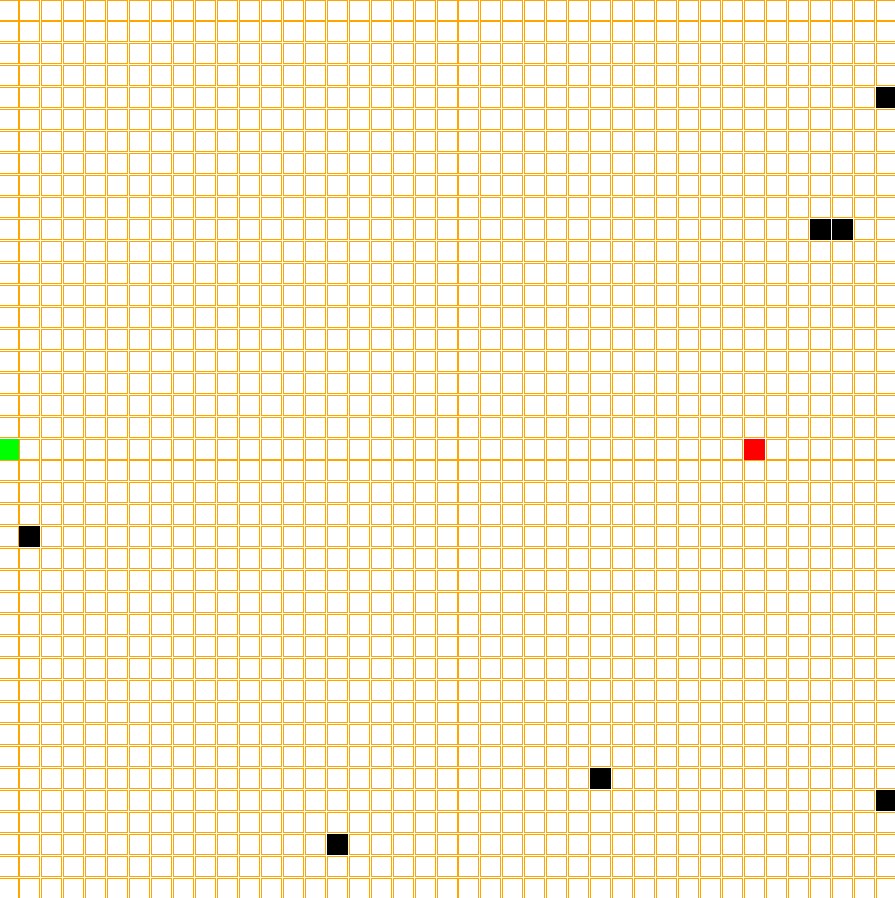 The grid system implemented in the PathMaker is based off of this pygame and is the original inspiration for this project.
System Architecture
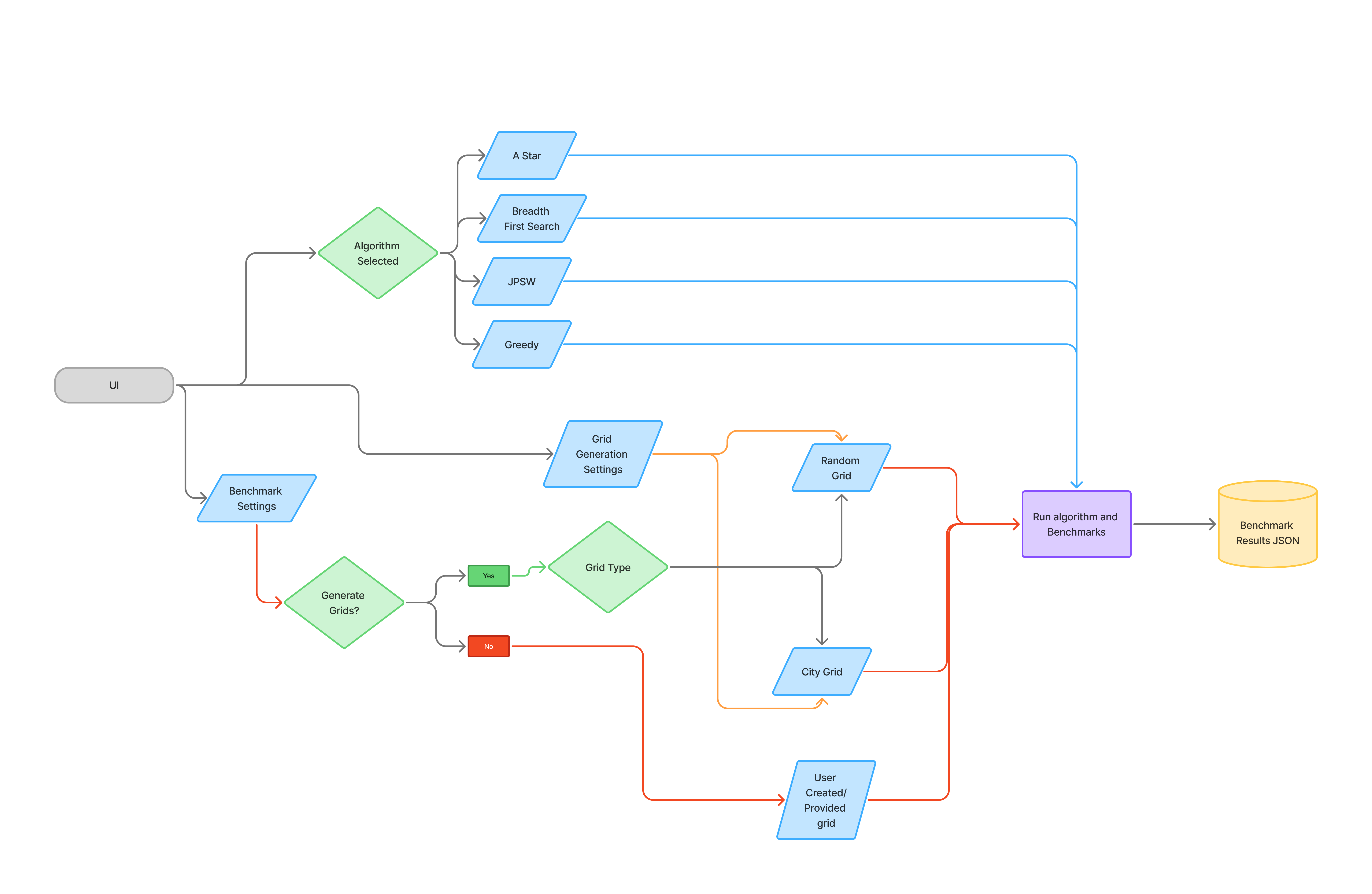
PathMaker has two main pieces being the UI and the Benchmarking components, The UI is used to change settings and update the board as well as create boards for the benchmarks to be run on and also to select how many times a benchmark should be run. I’m going to start by explaining the UI as it’s the largest part of PathMaker despite being a secondary feature and not it’s main purpose.
User Interface
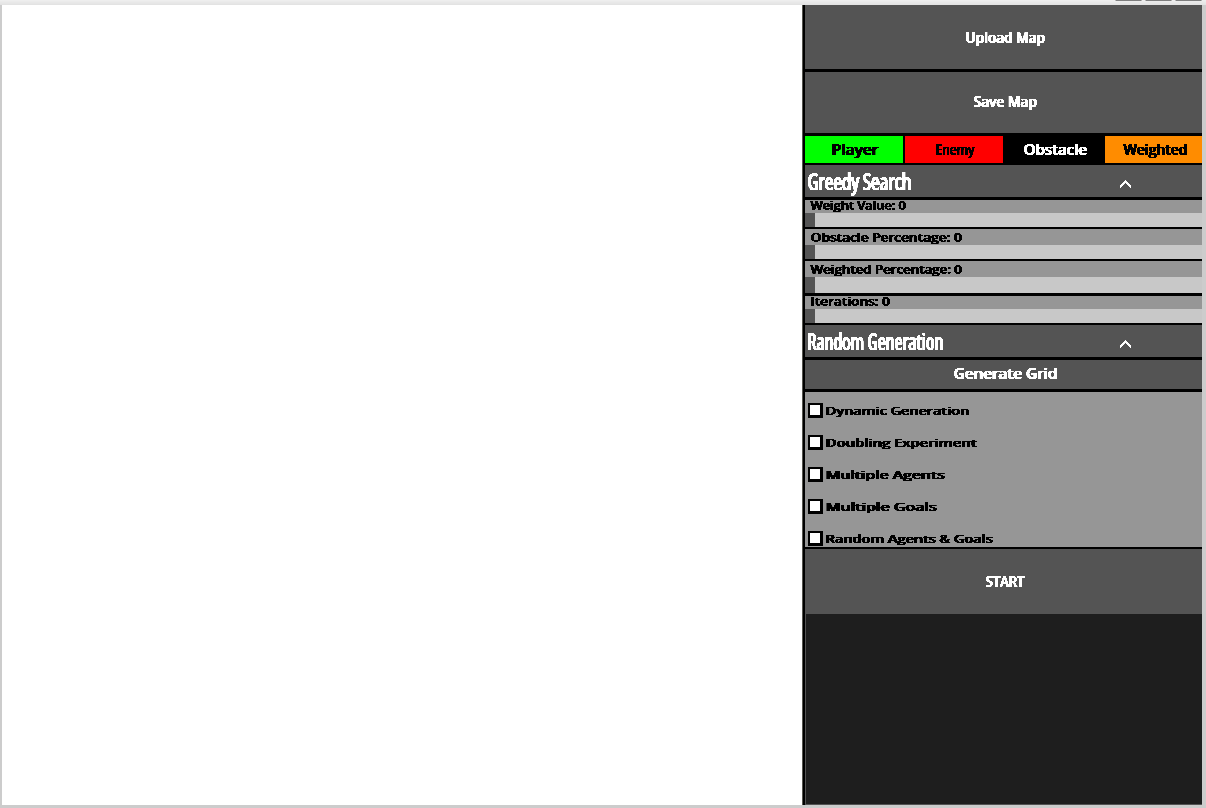
Components
Most of the code for PathMaker is user interface the result of which you can see above, as this project doesn’t use very many libraries or external crates to function. This implementation solely relies on SDL2 as mentioned in previous chapters. This means that things such as buttons, sliders, text boxes, dropdown menus and checkboxes all needed to be implemented manually. These were all originally separately programmed and didn’t share any common traits. This made it very difficult to add new features and modify existing ones. This is where the component trait comes in. All of these items are very similar in there structure and functions they may just display differently or in the case of dropdown menu uses the standard button within it’s code. All of these share a trait which in rust is a shared characteristic or function that everything with that trait must implement. This allows for PathMaker to iterate through a list or vector as there called in rust with items that have multiple types as while you can’t have a vector or data container with multiple types such as a list of strings and integers, with traits you can have the list be dynamically typed and you can have vector of things that have the same trait. This allows the compiler to know what to expect so since everything with the component trait has a draw function with the same arguments and return type. I can iterate through that vector and call the draw function. This makes it a lot easier to track user inputs and clicks instead of having to separate a standard button from a dropdown they can all be stored with in the same container and checked iteratively since everything with component trait has an on click function. This leads into a bit higher level implementation of these items.
Complex Components and Interface
There are more complex interface components such as a file explorer or dropdown that may have other components stored within them and have vastly different functionality then something like a checkbox or standard button.
Sliders
Sliders allow for a controlled numbered input for allowing users to control things such as the weight of specific tiles or the range of weights that program generates when generating a board. This allows for a much more controllable input then something like a text input where a user can type what the value they want. This allows PathMaker to put limits on what can be inputed and lowers the possibilite of errors if they aren’t properly handled if an invalid or unexpected input is giving. But there are Input boxes that users can type in select circumstances.
Input Box
Input boxes are simply components where a user can type information into and it saves what is typed. These are mostly used in the file explorer in order to be able to jump to a location in a users computer without having to click through a ton of buttons. These work by when they are clicked_on they are considered active and it activates SDL’s built in text-input subsystem allowing things to be typed. Then when a user presses enter it deactivates and depending on the purpose of that Input box act accordingly.
File Explorer
In order for users to be able to save and select files for use in PathMaker it needed to have a way to retrieve the files from computers. Usually an easy way to do this is to use a computers built in file explorer, however as most of development of PathMaker uses WSL or Windows Subsystem for Linux. This caused issues with opening the proper file explorer and trying to retrieve files from a part of the computer that doesn’t use the same path conventions and the program not being able to properly get what operating system the computer uses. So instead PathMaker has it’s own file explorer that walks through a users files before running and splits them into a Hashmap with each key, value pair having the path to that location and any children so files or other directories that are located within the part of the computer. At first the file explorer just displayed every single file at once and would have a dropdown for directories to get to more files. This caused major performance issues because of how many files the program would have to render at once so in order to fix this it now uses the hashmap as said before and which ever directory is currently the set display it displays the children of that key and if it’s a directory it’s changes the key and displays that directories children then if it’s a file it attempts to retrieve the information of that file. In order to speed up loading times it only starts with the root directory of the user and then when clicking on a directory it will then get the children of the directory and adding it to the hashmap this removes the need to get every file on a users system and instead opting to only load the files explored.
Widgets
While being able to draw and check if something is clicked on easily was solved by the component and interface traits respectively. There was another issue on how the UI is formatted and what are the size of the buttons where do they appear on the screen how to they react to the window size changing. This is where widgets come in, widgets are like a container for the interface components similar to something like a flex box or grid in HTML. These allow for easy implementation of new UI components and menus as you can set the overall size of the widget and location. Give it a vector of components and where you want them to formatted within the widget and widgets will calculate the size, location and layout of all of them allowing for things to be easily grouped together and well formatted and also allowing for a more reactive UI for different screen sizes.
Widgets also make checking which button is clicked easier. This is because widgets format things by taking how many rows and columns it needs to be formatted it in, so if I give the format information and it’s two cells high and three cells wide it will divide those by the widgets height and width to know how large each cell in the widget is. It then makes a hashmap based on the location of these cells with a value of which interface component is associated or located within that cell. Since every cell is the same height and width you can calculate what is the origin location of the cell or the top left corner of it and immediately know witch component was clicked on without having to iterate through everyone and seeing the mouse location is within there specified bounds.
let rows = self.layout.len() as u32; // Get number of rows
let cols = self.layout[0].len() as u32; // Get number of columns
let cell_height = self.height / rows as u32; // Get the cell height for the widget
let relative_x = mouse_state.x() - self.location.x(); // get mouse position x in comparison to widget location
let relative_y = mouse_state.y() - self.location.y(); // get mouse position y in comparison to widget location

if relative_x < 0 || relative_y < 0 {
  return result; // Checks if mouse is within the widgets bounds
}

let cell_x = relative_x / cell_width as i32; // Gets the cell x the mouse position corresponds too
let cell_y = relative_y / cell_height as i32;  // Gets the cell y the mouse position corresponds too

if cell_x >= cols as i32 || cell_y >= rows as i32 {
  return result;  // Checks if mouse is within the widgets bounds
}
let pos: (i32, i32) = (cell_x, cell_y);
This makes the program run a lot smoother and faster as there is no iteration required and there is now a constant amount of time it takes to find the button clicked on. So widgets make the program easier to add features and menus as well as make PathMaker more efficient in how it knows which button was clicked.
Marking Components as Dirty
As mentioned previously before the board and store a value known as dirty in order to know if a component needs to be redrawn. This is so the program doesn’t waste time on drawing components that haven’t changed from a previous iteration and therefore wouldn’t change in appearance to the user if redrawn. SDL doesn’t remove things every frame and when drawing something new it’s simply drawn on top of what was previously there. This means that if a menu pops up when the menu is exited everything behind that menu needs to be marked as dirty in order to be drawn on top have the menu actually hidden from view of the user. This causes another issue where components may sometimes overlap, so as a result you need to check if the component is active/currently usable. Below you can see this where if a component is marked as drawn it will return early in it’s draw function and not render the component again, at the end of the draw function the component marks itself as drawn and can be changed by hovering over the button for standard buttons or by moving or changing the size or text of the component necessitating it to be redrawn.
fn draw<'a>(
        &self,
        canvas: &mut Canvas<Window>,
        texture_creator: &'a TextureCreator<WindowContext>,
        mouse_position: Point,
        font: &mut ttf::Font<'_, 'static>,
    ) {
        let hovering = self.mouse_over_component(mouse_position);
        if self.is_hovering() != hovering {
            self.change_drawn(false);
            self.change_hover(hovering);
        }
        if self.is_drawn() { // If component is drawn don't render again.
            return;
        }

        // Draw code here
}
Checking if a component is active
Each component also has an active value which similar to dirty is either true or false. Since SDL simply draws things on top of others and doesn’t actually remove things from the window. Lets say I’m on the base menu and I wan’t to save file when I click save file it loads a different menu but that menu is location above the board so if the board wasn’t deactivated the program would think the board was being clicked an update accordingly despite the part being clicked on not being visible to the user. So to solve this components don’t react to being clicked on unless they are considered active.
fn on_click(&mut self, mouse_position: Point) -> (bool, Option<String>) {
        return (
            self.mouse_over_component(mouse_position),
            Some(self.get_id()),
        );
    }

    fn mouse_over_component(&self, mouse_position: Point) -> bool {
        let component: Rect = self.get_rect(self.location);
        return component.contains_point(mouse_position) && self.active;
    }
Storing component information after first draw
In many of the component there is something that says something like pub cached_texture: Option<Texture<'static>> or cached_rectangle: Option<Rect>. Once a component is drawn it may cache some of the information computed by the draw function so it doesn’t have to be computed later unless necessary so if the texture for the text displayed on a button has already been created it won’t have to be computed again unless it changes or in the case of tile or gameboard storing the the rectangle that is used to draw them so it doesn’t need to be computed again unless it’s location or size changes. The gameboard also caches grid information as the grid is set up by the board and has to be computed leading to code that looks something like this.
fn ensure_grid(&self) {
    if self.cached_grid.borrow().is_some() {
        return;
    }
    let size: usize = (self.tile_amount_x * self.tile_amount_y) as usize;
    let mut grid = Vec::with_capacity(size);
    let tile_width = self.tile_width();
    let tile_height = self.tile_height();
    for tile in 0..size {
        let num: u8 = 1;
        grid.push(Tile::new(
            util::get_coordinate_from_idx(tile, self.tile_amount_x, self.tile_amount_y),
            TileType::Floor,
            tile_height,
            tile_width,
            num,
            true,
             WHITE,
        ));
    }
    self.cached_grid.borrow_mut().replace(grid);
}
The Game Board
The main feature of PathMaker or at least the central visual component the gameboard functions very similarly to a widget. The game board itself is a component so it has an on_click function and the ability to change the height and width of it like every other component. It however isn’t an interface trait and implements its own personal draw function and has a lot of functions specific to the game board. The game board is made up of tiles tiles are structure that track the TileType, height,width, weight and also cached tile. The board has a flat vector that stores each tile and the index of the tile corresponds to it’s position on the board.T his allows the gameboard to functionally to be a manager of the tiles and similar to the Widgets every tile has the same size meaning when clicked on it uses a similar system to the widgets the point that’s given is transformed into an index through the following code let pos_idx = (tile_y * self.tile_amount_x as i32 + tile_x) as usize;. Which will then get the corresponding Tile to the index allowing it to be changed directly. The Game board has the most amount of parts to it out of any of the components meaning it is very important to make sure it isn’t being updated and iterating through the tiles unless absolutely needed. Each tile also stores a value called dirty that is either true or false, this is used to tell the program if a tile needs to be redrawn or not. So if the TileType changes or the location of the board changes the tiles would be marked as dirty and be redrawn on the next iteration of the program. While the board still needs to iterate through all the tiles to check if they need to be drawn it does save time to not have to draw every single one if not necessary. Widgets and the other interface components use a similar system where they are marked dirty if the need to be redrawn.
Tile Structure
pub struct Tile {
    pub position: (i32, i32),
    tile_type: TileType,
    height: u32,
    width: u32,
    pub weight: u8,
    dirty: bool,
    cached_rectangle: Option<Rect>,
    cached_color: Color,
}
Saving and Loading Game Boards
The game board can also be saved as a json file below is an example of what that file looks like although shortened as they can be a couple thousand lines long.
{
  "height": 800,
  "width": 800,
  "tile_amount_x": 40,
  "tile_amount_y": 40,
  "starts": [
    [
      17,
      25
    ]
  ],
  "goals": [
    [
      18,
      6
    ]
  ],
  "multiple_agents": false,
  "multiple_goals": false,
  "tiles": [
    [
      "3,8",
      "Floor",
      "1"
    ],
  ]
}
In order for PathMaker to achieve this it uses the serde crate for rust allowing for the easy creation and parsing of json files. The gameboard implements the Serialize and Deserialize traits from serde,this allows the board information to be automatically written and formatted into a json using the functions provided by said crate and can also be read and converted into a game board structure. The file doesn’t save everything else about a board can be computed during runtime and doesn’t need to be known before hand.
// Reading a json file and creating a board structure from it
let result: Board = serde_json::from_str(&board_json).expect("yes");
// Save board information as json formatted string.
let json = serde_json::to_string_pretty(&self)?;While the UI is the largest part of the program for PathMaker and is primarily what user’s will interact with it is not the main purpose of PathMaker. That comes in the form of actually benchmarking the environments and algorithms created by the user. So how does PathMaker actually do that?
Implementing Pathfinding Algorithms
PathMaker has a couple of built in pathfinding algorithms such as a modified greedy search, A* and Breadth-first-search. Greedy search is the simplest implementation and it’s performance isn’t affected by weight complexity but it also has the most pitfalls.
Finding Possible Moves
In order to ensure consistency each algorithm uses the Possible_Moves function in order to get a list of possible moves that can be reached from a position on the grid. This is necessary because since PathMaker allows diagonal movement if a orthogonal direction is blocked by an obstacle then corresponding diagonals are also impossible to reach from the given position. possible_moves uses a bitmask to determine if a move is possible it has 8 different possible directions it will check if each neighboring tile is traversable meaning it’s not an obstacle. If it is has a bitmask and inserts 1 and shifts it to the left.
For example if it checks the fourth neighbor which is the left direction and the bit mask previously were all not traversable. So it would look something like 0b00000000. It will then set it to 0b00000001 then shift the 1 three spaces over making it now equal 0b0001000. The 1 meaning the tile is traversable. But lets say it’s the same situation but the tile is an obstacle there for not traversable there is another array that stores which value’s should be blocked since an orthogonal obstacle blocks more than itself. The block mask is set up as follows
const OBSTACLE_BLOCK_MASK: [u8; 8] = [
    0b0000_0001, // 0 NW: only itself
    0b0000_0111, // 1 N:  NW | N | NE
    0b0000_0100, // 2 NE: only itself
    0b0010_1001, // 3 W:  NW | W | SW
    0b1001_0100, // 4 E:  NE | E | SE
    0b0010_0000, // 5 SW: only itself
    0b1110_0000, // 6 S:  SW | S | SE
    0b1000_0000, // 7 SE: only itself
];
So once again if the fourth neighbor checked is an obstacle which corresponds to index 3 of the block mask which is West or the left direction it will return 0b0010_1001 meaning NW(top-left), W(Left) and SW(Bottom left) are all not reachable from the current point. Keep in mind the traversable and blocked values are both just a single u8 and it won’t change any of the bits back to zero so it can only change them to 1 so once there set to 1 they stay that way for the next neighbor. After all the neighbors are iterated through it will compare the bits of traversable and blocked. with let valid = traversable & !blocked;. So if traversable = 0b0110_0101 blocked would then equal 0b1011_1111 so not blocked = 0b0100_0000, Valid in this case will equal 0b0100_000*. The logic being that the bit in valid is equal to 1 only if the bits at same location in traversable and not blocked both equal 1 which is illustrated in the following table.
| Mask | SE | S | SW | E | W | NE | N | NW |
|---|---|---|---|---|---|---|---|---|
| Traversable | 0 | 1 | 1 | 0 | 0 | 1 | 0 | 1 |
| Blocked | 0 | 1 | 0 | 0 | 0 | 0 | 0 | 0 |
| Valid | 0 | 1 | 0 | 0 | 0 | 0 | 0 | 0 |
But how are the algorithms themselves implemented? I’ll start with explaining Greedy search as it is the most modified from it’s original and also the simplest to explain.
Greedy Search
Greedy search is the only algorithm that doesn’t take into account tile weight as greedy search is basically if something gets it’s closer to it’s goal then it will take that step even if that sets it back in the long run. So using something like tile weights and having it go to the tile with the smallest weight around it wouldn’t try to reach the goal. So instead greedy search is purely location based so if a tile next to it is closer to the goal it will go to that one not accounting for weight the code for this is below.
for neighbor in &neighbors {
    if (neighbor.0 - goal.0).abs() < (current.0 - goal.0).abs()
        || (neighbor.1 - goal.1).abs() < (current.1 - goal.1).abs()
        {
        good_moves.push(*neighbor);
        break;
    } else {
        bad_moves.push(*neighbor);
    }
}
This system works for grids with a minimal amount of obstacles a problem occurs when it runs into a situation where no move it can make gets it closer to the goal. This would result in the algorithm getting stuck and not making another move, in order to solve this if this occurs it will pick a random move and put the previous tile in a blacklist so it no longer considers that tile a possible move.
if let Some(chosen_move) = good_moves.choose(&mut rand::rng()) {
    current = *chosen_move;
    path.push(*chosen_move);
} else if let Some(chosen_move) = bad_moves.choose(&mut rand::rng()) {
    black_list.push(current);
    current = *chosen_move;
    path.push(*chosen_move);
}
This works to get around a majority of obstacles but as the board increasingly fills with obstacles there can be an issue where the algorithm blacklists a tile that is required to reach it’s goal making it impossible and causing the algorithm to run forever. As a result greedy search can cause an infinite loop within the program if a grid has too many obstacles or it is put into a specific situations. Algorithms like A* and Breadth-First don’t have such issues.
Breadth-first-search
Breadth first search is very simple in concept but functions in a lot more situations then something like greedy search. PathMakers implementation works by using a VecDeque which in rust is basically a list but it has an end on both sides. This makes it easier to get the first value in a list of items and remove it. Essentially BFS works by getting the start tile getting it’s neighbors checking if there the goal and then checking the neighbors of those neighbors until it finds the goal.
let neighbors = get_possible_moves(current, map, width, height);
for neighbor in neighbors {
    if !visited.contains(&neighbor) {
        visited.insert(neighbor);
        parent.insert(neighbor, current);
        queue.push_back(neighbor);
    }
}
BFS is the same as greedy search in which the weight of a tile is unimportant to it as it is not designed to find the shortest but to find a path in general. It still has it’s uses as a feature of BFS is that it only checks a tile once making it useful for seeing if a giving grid or path is possible, which is used extensively within PathMaker. Unlike BFS and Greedy search there are algorithms where finding the shortest path is the goal and are implemented in PathMaker such as A-star.
A-star
A-star works by estimating the path cost of every node when searching. So at the start node it will get the manhattan distance between the start and the goal ignoring obstacles. This is stored in a BinaryHeap to function like a priority queue meaning it orders the heap by a value which in this case is the cost of a node. Which at the start is the Manhattan distance of the node. It will then get the last value in the heap and since it is ordered the last value is the lowest cost. At the start this doesn’t mean much but it will then get all the neighbors of that current tile and iterate through them it will then track there weight. It will then try and estimate a g_value which for each tile is stored in a HashMap if the tile hasn’t been explored yet it won’t have a g-value and it will default to the maximum value allowed by a i32 integer. It will then get the g-score of the current tile which at the start is zero and the weight of the current neighbors weight to that value this is known as the tentative_g. It then checks if the tentative_g is less than the neighbors g-score which once again if the neighbor hasn’t been visited yet is guaranteed to be higher. If this is true it will then set the cost of that neighbor to the tentative_g + the manhattan distance between the neighbor and the goal as seen below.
let tentative_g = g_score.get(¤t).unwrap_or(&i32::MAX) + move_cost;
if tentative_g < *g_score.get(&neighbor).unwrap_or(&i32::MAX) {
parent.insert(neighbor, current);
g_score.insert(neighbor, tentative_g);
let f = tentative_g + heuristic(neighbor, goal);
open_set.push(Node {
cost: f,
position: neighbor,
});
}It does this for every neighbor and then it will search the neighbor with the lowest estimated cost first. It continues to repeat this until the goal is reached. This method guarantees the A-star finds the shortest path between to points every time. A-star search is a very efficient algorithm but if it is a given an impossible path it can get stuck or run forever.
JPSW
Overview
JPSW operates as an A*-like search over a set of waypoints called jump points. At each visited node, we compute which directions lead to pruned successors by examining the local 3×3 neighborhood. We then “jump” along each valid direction until reaching a meaningful waypoint—either the goal, an obstacle,edge of the map, or a change in terrain or in this case weight value.
Successor Pruning
At each node, it’s determine which of the eight possible directions (including diagonals) constitute valid successors. Rather than expanding to all traversable neighbors, we identify directions that can be eliminated via a local Dijkstra search over the 3×3 neighborhood surrounding the current position.
The 3×3 neighborhood is encoded as a hash of tile weights and traversability, which serves as a cache key. The local Dijkstra computes the shortest path from each neighbor back to the parent direction. A neighbor is retained as a successor only if its shortest path passes through the current node—meaning there exists no shorter route that bypasses it. This pruning eliminates redundant expansions in open areas.
The result is stored as an 8-bit bitmask where bit i corresponds to direction i in the movement delta array.
Jumping
For each valid successor direction, we compute the next jump point by traversing in that direction until one of the following conditions is met:
Orthogonal jumps proceed in a cardinal direction (horizontal or vertical). The jump terminates when the next cell is blocked or out of bounds, the goal is reached, the tile weight differs from the starting weight, or a perpendicular neighbor changes (indicating a forced path deviation).
Diagonal jumps proceed diagonally while ensuring both adjacent orthogonal cells are traversable (preventing corner-cutting violations). The jump terminates on reaching the goal, weight transition, or when an orthogonal jump from the current position would succeed—indicating a path deviation point.
Cost Function
Movement cost between two tiles is computed as a weighted average of their terrain costs. For orthogonal moves, cost = (weight_from + weight_to) / 2. For diagonal moves, we include the two side cells in the average and multiply by √2 to account for the longer traversal distance.
Search Procedure
The main search maintains a min-heap prioritized by f-score (g + heuristic). We store g-scores, parent pointers, and a closed set. At each iteration, we pop the node with lowest f-score, compute pruned successors via the neighborhood analysis, then jump in each direction to identify the next waypoint. If the new g-score improves on a previously visited position, we update its parent and push it to the heap.
The heuristic uses diagonal distance: \[ \text{diagonal distance} = d × \sqrt{2} + (\text{max(dx, dy)} - \text{d}), \text{where d} = \text{min(|dx|, |dy|)} \]
Path Reconstruction
JPSW returns only the sequence of jump points rather than every cell in the path. To reconstruct the complete trajectory, we fill in intermediate cells between consecutive jump points by iterating with the sign of each direction component. This is not tracked when benchmarking and is run in order to display a proper visualization of the path found.
Caching
Two caches accelerate repeated queries. The successor cache stores pruned direction bitmasks keyed by parent direction and neighborhood hash. The orthogonal jump cache stores results keyed by position index, direction, and starting weight. Both caches must be cleared when the map changes.
Benchmarking
The benchmarking in PathMaker takes inspiration from Guards a benchmarking framework designed for weighted grids and designed to help developers decide on what algorithms to use within a videogame[21]. While PathMaker doesn’t use actual guards as described in the paper which are essentially points on a map that effect the weight areas around which is essentially the traversal cost a higher traversal cost equaling difficult terrain or some sort of difficulty navigating. PathMaker does use a weighted grids,obstacles and calculates the WCF value of given maps or generated ones. WCF being the weight complexity of a grid this is calculated by taking the weight gradient of tiles or how much tiles close together weights differ from one another and calculating how complex or how difficult it would be for something like A* to navigate or find the shortest path. Weight gradient is important because having drastically different weights actually lowers complexity because if a weight is too high it functionally acts as being impassable and algorithms like A* will functionally ignore it. So having minor difference in weights actually makes it more difficult because it becomes harder to tell which path has a better chance of leading to a the shortest path. The gradient is calculated using the Sobel operation[13]. This gives tiles directly next to the tile a higher effect on it’s gradient you then iterate through all usable tiles ignoring impassable ones like obstacles. You essentially add the weights of all tiles withing the current operation multiply them by there given weight values which can be -2,-2,0,1 and 2.
WCF Value
The Sobel operation uses two different convolutions to represent vertical changes and horizontal changes you calculate both for each passable tile on the board. \[ Gx = \begin{bmatrix} -1 & 0 & +1 \\ -2 & 0 & +2 \\ -1 & 0 & +1 \end{bmatrix} * M \]
\[ Gy = \begin{bmatrix} -1 & -2 & -1 \\ 0 & 0 & 0 \\ +1 & +2 & +1 \end{bmatrix} * M \]
You can then get the total weight gradient for that tile by squaring the vertical convolution and horizontal convolution adding them together and getting the square root.
\[ G = \sqrt{G_{x}^2 + G_{y}^2} \]
\(n = \text{Passable tiles}\) \[ C_i = \begin{cases} 0, \text{if}\space G_i\space \text{is}\space 0 \newline 1 - 0.01 * log_2(G_i) \end{cases} \] \[ WCF = \frac{\sum_i^n C_i}{t_m} \]
Memory used and Time Taken
PathMaker also track the amount of allocated memory taken up by the algorithm being run. This is done using the jemallocator crate, this allows for PathMaker to track allocated memory on specific threads allowing for easier tracking and less errors as it can cause a problem if total memory is being tracked and it can equal more than the memory allocated within the current thread. Currently PathMaker keeps track of the amount of memory allocated in bytes but it does not track ram usage. Time is tracked by using the rust standard time library and tracking how much time passes when the pathfinding algorithm is run.
let now = Instant::now();
epoch::advance().unwrap() // Update memory statistics
let before = allocated.read().unwrap().get();
let (path, steps) = get_algorithm(algorithm).find_path(self.start, self.goal, &map);
epoch::advance().unwrap(); // Update memory statistics
let after = allocated.read().unwrap().get();
let time = now.elapsed();
Steps taken
The built in algorithms count each step taking and return it when the find a path. This allows PathMaker to track how many steps it took for an algorithm to find a path or complete.
Total path cost
After the algorithm specified by the user is done computing a path that path is sent to function to take all of the moves stored within the path and getting the weights from the grid and summing them together to get the overall traversal cost of the path found.
fn get_overall_path_weight(
    path: &Vec<(i32, i32)>,
    map: &Vec<Tile>,
    width: u32,
    height: u32,
) -> u32 {
    let mut total_weight: u32 = 0;
    for moves in path {
        if let Some(tile) =
            util::get_idx_from_coordinate(*moves, width, height).and_then(|idx| map.get(idx))
        {
            total_weight += tile.weight as u32;
        }
    }
    return total_weight;
}
Generating randomized boards
In order to track how WCF effect things like memory used steps taken and overall path cost there needs to be multiple grids tested. PathMaker has the ability to generate randomized grids with a specified weight range, amount of obstacles and amount of weighted tiles as well as the ability to run doubling experiments with said generated grids.
Parameters
- Weight Range: Decides the range within weighted tiles can generate with max is 0 - 255
- Obstacle Count: Amount of obstacles placed on generated board
- Weighted Tile Count: Amount of non obstacle tiles with a weight greater than 1
These parameters are important for controlling board complexity as the goal is to have boards generated with similar parameters to have a similar weight complexity. Higher weight range on average decreases weight complexity, Obstacle count often increases weight complexity as the board functionally becomes smaller, and the amount of weighted tiles increases complexity the more there are. Board size also has a significant impact on weight complexity with smaller boards being a lot more sensitive to changes in weights and larger boards if not weighted having a naturally lower wcf value.
The game board does not generate random locations for the start and goals though are decided by the user, so a user specifies where the start and goals are and the PathMaker will generate different grids with those in mind. There is a problem with generating randomized grids depending on the amount of obstacles specified to be on the board and especially with doubling experiments it may become impossible to find a valid path to a goal which can cause an infinite loop for algorithms if not caught. The estimated weight complexity for 40x40, 100x100,500x500 with all tiles having a weight of 1 is listed below.
40 x 40 (WCF): 0.1056 100 x 100 (WCF): 0.0404 500 x 500 (WCF): 0.00789
Avoiding Impossible Game Boards
In order to get around this, there was really only one option for each start and goal pair specified on the board PathMaker will run a breadth first search without tracking any of the benchmarks and if the number of steps ever equals or goes above the amount of passable nodes it considers it impossible to find a path. This works because breadth first search will search every possible tile until a path is found and will only check a tile once, so if the amount of steps ever equals the amount of passable tiles and nothings has been found then it’s safe to assume there is no possible path to be found. There are other equations that can calculate every single possible path within a grid but these are computationally expensive and would be preferred if the board wasn’t expected to change immediately afterwords so for a constantly changing board it would be inefficient to do this. But if an impossible board is given the program will generate another one until it is possible for all agents on the board to find there to there specified goal.
There has also been a limit placed on doubling experiments because at some point it will become impossible or extraordinarily unlikely. So the amount of obstacles able to be on a board is currently capped by the equation below \[ \text{Max number of Obstacles} = \frac{\text{Number of Tiles}}{2 * \text{Number of Agents}} \]
Another way to do this would be to just make sure the minimum number of tiles to reach the goal is always present, the problem with this is that it still runs into the problem of being extremely unlikely to find a possible board and even if a possible board is found, the resulting board wouldn’t be representative of real life and wouldn’t make algorithms make any decisions as the only tiles they can move to will always be the correct one.
Outputs
{
  "0": {
    "wcf": [
      0.9010537801054535
    ],
    "memory": [
      4495208
    ],
    "time": [
      {
        "secs": 0,
        "nanos": 151865279
      }
    ],
    "steps": [
      49521
    ],
    "path_cost": [
      295545
    ],
    "avg_wcf": 0.9010537801054535,
    "avg_memory": 4495208,
    "avg_time": {
      "secs": 0,
      "nanos": 151865279
    },
    "avg_steps": 49521,
    "avg_path_cost": 295545,
    "total_memory": 4495208,
    "total_time": {
      "secs": 0,
      "nanos": 151865279
    },
    "total_steps": 49521,
    "total_path_cost": 295545
  }
}
The above example is what would be given as result of running the benchmarks in PathMaker, it gives the wcf value, the memory used in bytes,time,computational steps taken, overall path cost and then the averages which in this case are the same but would avg the results if there were multiple agents on the board.
Experiments
This chapter describes your experimental set up and evaluation. It should also produce and describe the results of your study. The section titles below offer a typical st ## Experimental Design
Grid Configurations
To analyze PathMaker’s ability to run different environments and different types of grids and get an accurate result. I set up a function with the following Parameters in order to generate different configurations to run experiments on.
| Variable | Description | Possible Values |
|---|---|---|
| Grid Size | Determines the overall grid size and total amount of tiles | 64,128,256,512 |
| Obstacle % | The percentage of the grid that is obstacles | 0,25,50 |
| Weighted % | The percentage of the grid that has weighted tiles | 0,25,50,100 |
| Range of Weights | The range of weights a weighted tile can be generate with | 1,10,100,255 |
I then take all the possible different combinations of these bundling Weighted % and Range of Weights together as they are directly related, to get a total of 196 different possible configurations to generate. As for the chosen values of these variables Grid size maxes at 512 because often benchmarks on pathfinding algorithms are on a 512 * 512 grid and any higher would make the experiments take possibly hours to days, the lower values I simply implemented doubling experiment so decreasing by half each time to get a good idea of how things change at different sizes. Obstacle percentage maxes out at 50% and is also set up as a doubling experiment as the program doesn’t allow above 50% as mentioned previously in order to limit the amount of impossible grids generated. Weighted percentage goes up to 100% and set up like a doubling experiment again as weighted tiles have no affect on the possibility of a grid they can go up to 100%. The weight range however starts at the minimum possible values and has 255 as the max as that is the highest a weight can get, 10 and 100 are not doubling experiments but I chose them to help get a better idea of what a low weight range that isn’t one and a high that isn’t the max and how it affects the grid generation. I would do more values but as stated this can increase the time the program takes drastically and I believe these to be enough to get a good understanding of the program. Outside of these configurations there is also two different grid types that were generated for these experiments
| Type | Description | Parameters for Generation |
|---|---|---|
| Random | Completely randomized grid with not set rules for how it should be generated | Grid size, Obstacle %, Weighted%, Weight Range |
| City | Generates a manhattan style city with roads and buildings as stand ins for obstacles | Grid Size, Max road spacing, Building Density, Max building size |
This is to help better represent real life scenarios a pathfinding algorithm may be used in to see how PathMakers benchmarks perform and if they are accurate giving different types of grids.
After getting all the configurations and generating a grid I ran every built in algorithm to PathMaker on each grid generated 10 times, this is to get a good average of there performance as performance can very depending on circumstances and isn’t a constant. I did this for both city and random grids and had the results stored in a large csv file that stores the parameters and the memory,time,WCF, steps taken and overall path cost for each time an algorithm was run and successful an example of which can be seen below. If a grid was generated that deemed to be impossible or an algorithm wasn’t able to complete the task in a reasonable amount of time then that run was omitted from the results. As for analyzing and evaluating the data this was done by graphing the results in R.
algorithm,grid_size,obstacle_pct,weighted_pct,weight_range,run,wcf,memory_bytes,time_ms,steps,path_cost
A* search,64,0,25,10,0,0.496161,327656,13.5531,1405,510
Breadth First Search,64,0,25,10,0,0.496161,8200,6.3206,58,765
Test Cases and Coverage
As for running experiments on how the PathMaker itself runs and how well it is tested and how well users can create there own maps and can run benchmarks. The best way to do that outside of having people use the tool is test cases and seeing how well those tests encapsulate the entirety of the code base. For this I created multiple test cases for PathMaker and used the llvm-cov crate to track the code coverage and to run tests to see if anything fails. I can’t test 100% of the code base as it relies on key inputs and requires SDL2 to handle that making it very difficult to actually test parts of the code that rely on it, I can however test the backend to help make sure that things work as intended when interacted with on the backend level. As well as provide examples to prove that features work.
Algorithm Testing:
| Category | Tests | What is Verified |
|---|---|---|
| Movement | 5 | get_possible_moves handles open grids, corners, obstacles, and corner-cutting prevention |
| Weight Calculation | 3 | Path weight computation with uniform and weighted tiles |
| Algorithm Factory | 5 | get_algorithm returns correct implementations by name |
| BFS | 4 | Shortest path correctness, edge cases (start=goal, blocked grids) |
| A* | 4 | Optimal path finding, weight-aware navigation |
| Greedy | 2 | Heuristic-driven search, failure on impossible paths |
| JPSW | 8 | Jump point detection, path reconstruction, move cost calculation, caching |
| Agent | 4 | Goal detection, bidirectional path existence checking |
| Cross-Algorithm | 4 | All algorithms agree on reachability; maze scenarios |
Correctness Criteria:
Each pathfinding test verifies that returned paths: 1. Start at the specified start position 2. End at the specified goal position 3. Contain only adjacent traversable tiles 4. Never revisit previously visited nodes
To ensure correctness, algorithms where also compared to each other on an empty grid with a straight to make sure they all agree that a path is possible and find a path in a reasonable amount of time. This helps makes sure the algorithms can reach known possible paths given a simple grid in the case of greedy as a result of it being able to get stuck.
Board Module Tests:
The board module contains 29 test cases covering tile behavior, grid generation, serialization, and component interaction:
| Category | Tests | What is Verified |
|---|---|---|
| Tile | 14 | Position scaling, traversability for all tile types, dirty flag behavior, rectangle calculation |
| TileType | 3 | Equality comparisons, serialization roundtrip for all variants including Weighted |
| Board Core | 10 | Tile dimension calculations, grid creation and caching, component active state, mouse detection |
| Serialization | 3 | JSON save/load preserves dimensions, starts, goals, and grid structure |
| Grid Generation | 4 | Random grid creates obstacles, city generation handles agents, cache population |
| File I/O | 1 | Board saves to file and file is created at expected location |
Each tile test verifies that position scaling works correctly (grid coordinates multiplied by tile dimensions) and that all non-obstacle tile types are traversable. The serialization tests confirm that boards can be saved to JSON and loaded back with all metadata intact, including start/goal positions and grid dimensions.
The grid generation tests verify that random and city-style maps are created according to specified parameters, with obstacles appearing at the expected frequencies. File I/O tests confirm that the save functionality writes valid JSON files that can be read back without data loss.
Evaluation
Overall Avg for Different Grids
You can see on average A* has the lowest path cost, greedy is the most efficient when it comes to memory and speed, while JPSW has on average the highest memory cost. This is all to be expected and it’s important to take into account that greedy and breadth first search don’t account for weighted tiles like *A** and JPSW making them have significantly less calculations to worry about and they not worrying about path cost simply finding a path. Based on the results you may think that greedy is a great option for a lot of cases which is true but it’s also important to keep in mind that greedy has a higher failure rate then the rest and was unable to complete as many grids as the other algorithms.
All of these are all features that are known about these algorithms and are important when considering when making a decision. But what does this actually say about PathMaker, Based on the paper introducing JPSW, JPSW is slower then A* without using full caching and extensive pruning [18].So the result of it being slower while also finding comparable path costs is to be expected unless PathMaker were to implement heavier caching and pruning which would increase the already high memory cost of JPSW.
Time and Memory Comparisons when taken WCF into account
Another goal of PathMaker is to be able to generate a wide array grids with varying complexities and to be able to compare algorithms based on grid complexity. Based on these plots of the data collected by PathMaker It can be used to make comparisons between algorithms is there and effective however the ability to generate grids of varying complexity is questionable especially when looking at randomized grids they are either a very low complexity or high complexity and almost no grids were generated
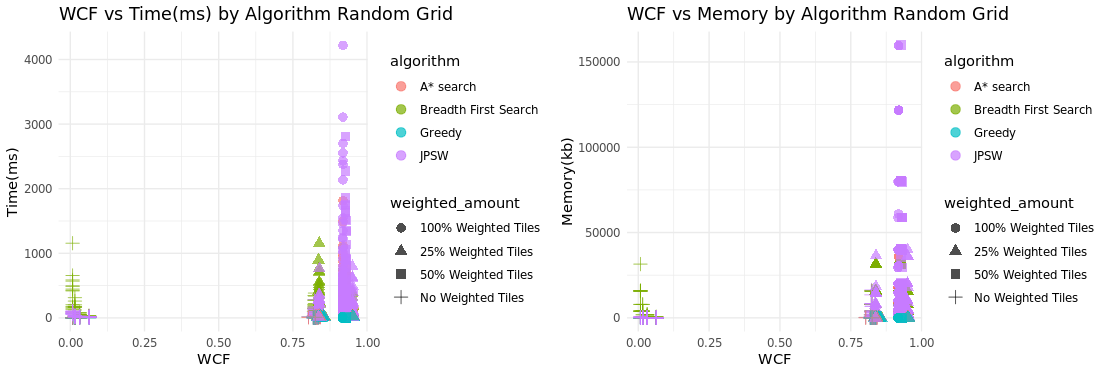
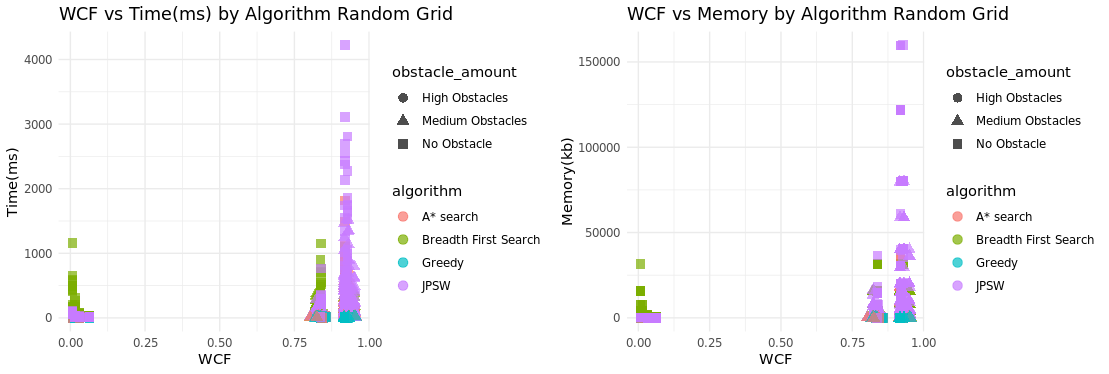
To take a closer look at what type of situations the algorithms preform better in, I tracked the wcf value with the amounted of weighted tiles and obstacle tiles and compared what often had the highest completion time and memory usage. Overall JPSW had the highest completion time and memory usage. Based on the results this occurs with a large amount of weighted tiles and minimal obstacles. This is to be expected and is a known downside of JPSW if there are constant changes in weights between tiles then it’s main advantage being able to jump over multiple points is never used because it changes the direction it jumps when running into a different weighted tile.
Testing and Coverage
PathMaker’s correctness was verified through a comprehensive unit test suite implemented directly in Rust. The llvm-cov tool was used to measure code coverage during test execution. The coverage report is shown below
General Results
| Filename | Regions | Missed Regions | Cover |
|---|---|---|---|
| benchmarks.rs | 696 | 170 | 75.57% |
| cmp/board.rs | 1710 | 490 | 71.35% |
| cmp/button.rs | 2588 | 905 | 65.03% |
| cmp/file_explorer.rs | 624 | 198 | 68.27% |
| cmp/inputbox.rs | 451 | 152 | 66.30% |
| cmp/widget.rs | 821 | 233 | 71.62% |
| fileDialog.rs | 398 | 55 | 86.18% |
| main.rs | 2284 | 1313 | 42.51% |
| pathfinding.rs | 1982 | 106 | 94.65% |
| settings.rs | 214 | 15 | 92.99% |
| util.rs | 370 | 1 | 99.73% |
| TOTAL | 12138 | 3638 | 70.03% |
Overall the total coverage from unit testing is 70.03% covered. Coverage being how much of the code has been tested not how many of the tests passed. The components all hover around 70% covered as they also heavily rely on mouse clicks and buttons presses.
Test Results
As for the actual tests themselves PathMaker Passes 358/358 of them showing that most if not all of the backend is working as intended as far as the tests can tell.
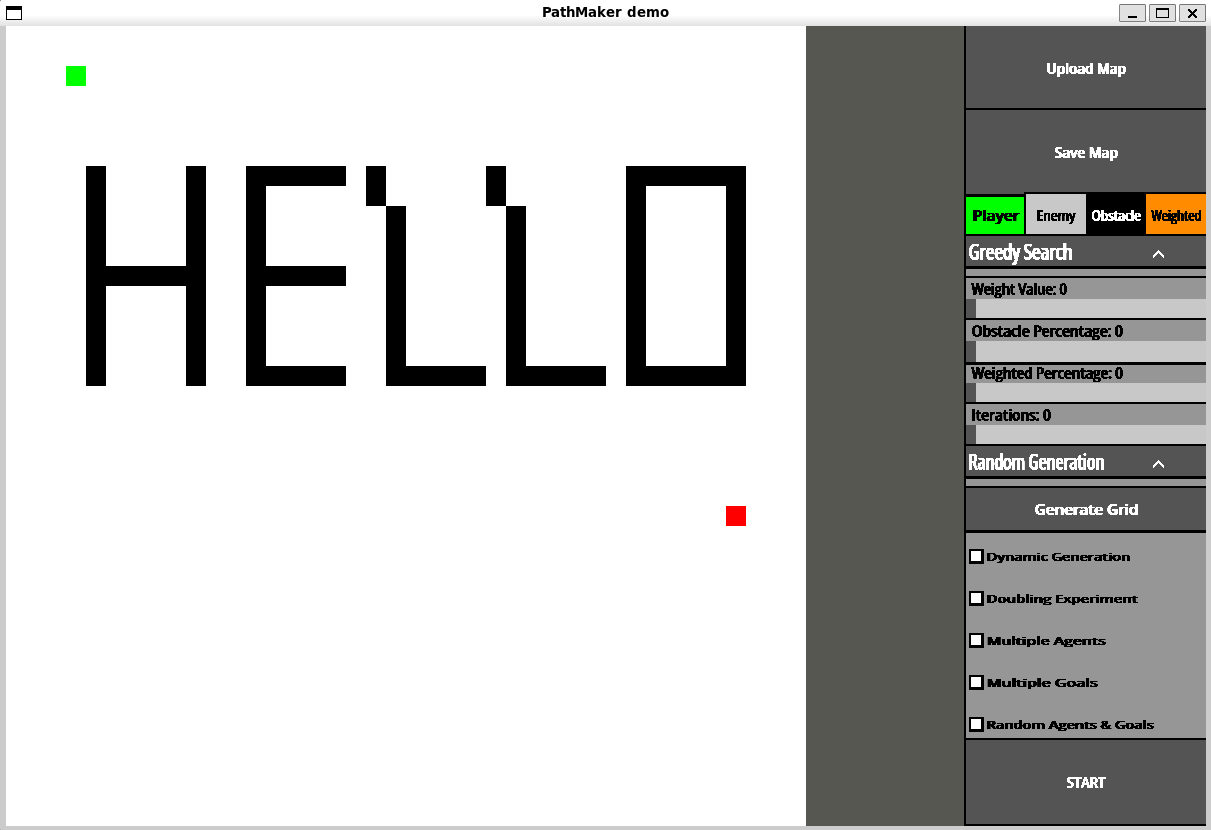
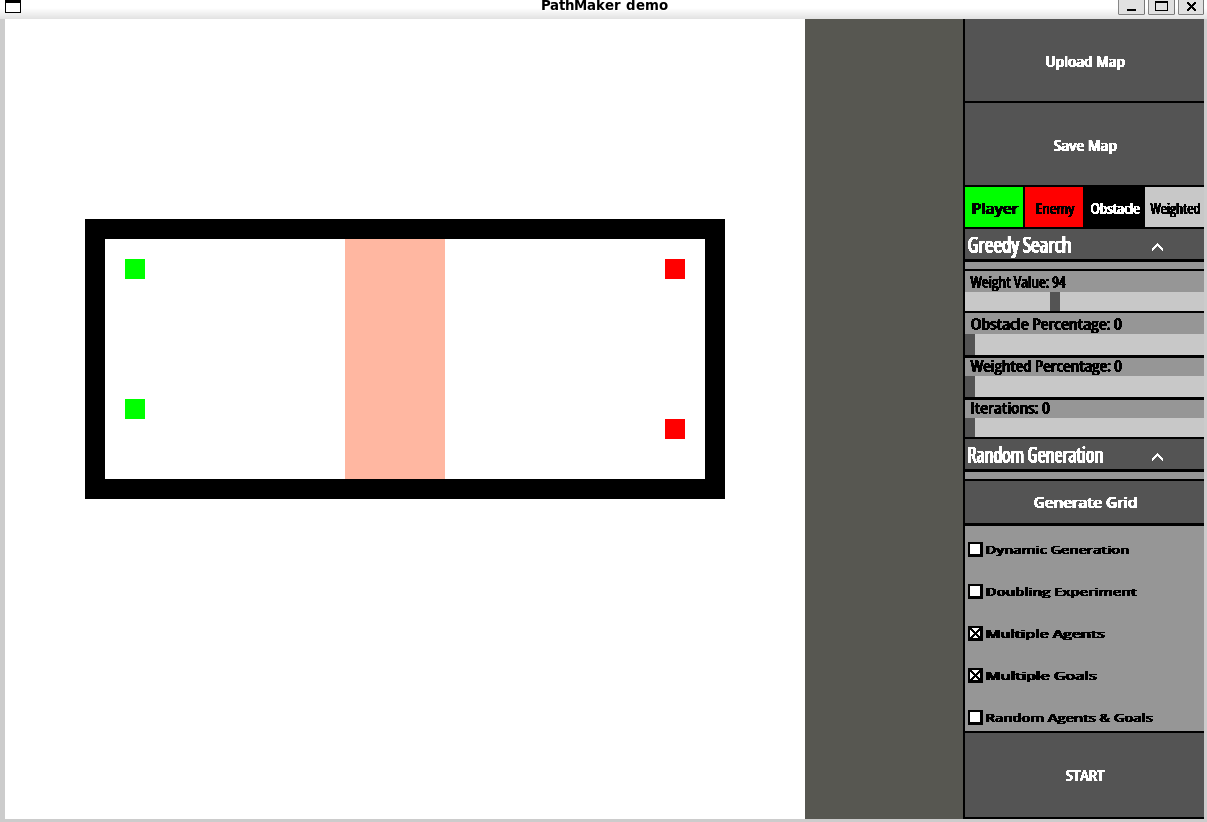
User Created Maps
For testing created maps and showing results there are test cases for this but as this is mostly a visual feature it’s likely better to create some and show those created maps below using the PathMaker tool.
Threats to Validity
Reliance on Crates and C-Libraries
As with most tools PathMaker relies on rust crates and the SDL2 C-libraries while the rust crate for SDL2 is actively being worked on and maintained SDL2 itself is no longer being maintained and they have moved on to SDL3. This isn’t a huge issue for PathMaker as while the UI is important there are many things that can replace SDL2 if it ever becomes unusable such as SDL3 or possibly as rust base graphics library.
Changes to Operating System
OS updates also pose a threat to PathMaker as libraries may be deprecated for example if Mac stops using HarfBuzz and it becomes deprecated on new Mac systems this will immediately break Pathmaker for MacOs because SDL2_TTF relies on HarfBuzz for font implementation. Most of this can be avoided by static linking every dependency for Pathmaker so users don’t need to install outside libraries to run it. But if a library that is natively installed on a OS that PathMaker relies on is removed or deprecated this would cause problems and would have to be manually installed by the user.
Unable to upload maps directly from other tools
While PathMaker allow users to create, save and upload maps created within the tool. If someone has a map created in something like a game engine they can’t currently upload the map to Pathmaker without manually drawing it out on the board. Making it difficult to test already created maps and making it a chore to make new ones.
Flaws with PathMaker
Threats to validity are related to the generated nature of maps for the experiments as while there’s an attempt to have as much control as possible over what is generated while keeping it relatively random. It’s still not perfect and could make testing algorithms and making sure there implemented correctly more difficult then using set grids. But based on the results of the running many different scenarios the results of the algorithm are consistent with how there expected to preform leaving me with confidence that they are correctly implemented.
Conclusion
Summary of Results
Accuracy
Since PathMaker is primarily a benchmarking tool, it needs to be shown to be accurate and give expected results given the environments it was tested in. In this regard PathMaker has shown to be accurate with how it benchmarks algorithms as it shows similar results to previous studies and has behavior consistent with what is was shown in previous papers See figures [\(\ref{fig:rg_avg}\)][\(\ref{fig:cg_avg}\)][18]. The environment has been shown to be well tested and robust there is no sign of algorithms skipping spaces or looping endlessly[\(\ref{fig:t_result}\)].
Ease of Use
Another goal of PathMaker is to be easy to use and not require extensive set up. PathMaker is available on Windows,Linux and MacOS PathMaker also has an easy to use standalone environment where users can make maps and run algorithms on them, or generate maps extensively and run many different scenarios while collecting the results for each one. In this regard PathMaker succeeds as it can be run as a standalone binary on all supported systems and easy to run and get started with.
Future Work
Improving Data representation and User customization
While the analytical abilities of PathMaker work and it can give in-depth benchmarks and analysis. The system in which the information is stored and presented is flawed. PathMaker’s ease of use is questionable while actually using the tool is easy, getting information worth while and actually analyzing it still relies mostly on the user’s abilities and other tools such as excel.
Generating Graphs and Tables
PathMaker doesn’t currently have a good way to physically represent data with graphs and tables so feature to create graphs and tables from the benchmarking results could be useful to help a user visualize how it performed and to help them make an informed decision on what situations an algorithm should be used in or if there algorithm is effective, without having to use outside tools such as excel or R.
Ability to select how the data is stored
Another issue with PathMaker is the way the data is formatted can be difficult to read and interpret so having the option to change how it’s saved like in csv, which it can do but no way for a user to access that function would be useful and give the user more control on how they want things to be represented to them, it would also improve PathMakers synergy and ease of use with working with different tools, if the user decides that want to use a different tool to make graphs.
Scan maps in through pictures or other file types
For example one of the main issues with PathMaker currently is that creating maps can be time consuming and clunky, If someone already has a map they want to test there is no way to directly upload it unless it was already made in PathMaker a way to improve this process is to have an ability to scan images or other file types of a maps environment and be able to convert that into a grid in PathMaker, this would significantly improve this process and make it much easier to test environments and create maps allowing people to leverage other tools to create maps easier than PathMaker for example this would also allows users to use known benchmarking maps such as the Moving AI Repo[24] allowing to directly upload theses maps and run tests with them.
More grid generation types
PathMaker struggles to properly generate grids of different complexities specifically with a fully random grids[\(\ref{fig:wcf_tm}\)]. It’s either not very complex or very complex, this makes it difficult to see how it performs in situations within the middle of the road. While city grids do not struggle with this city grids can also only get so complex as they only have two different weight values on the grid, that being the road weight and terrain weight. Currently there are only two types of grids the can be generated, a city map and completely random map. While these are a good start having something like a terrain map generator or maze generator would be useful and allow for more analyses in different situations as well giving PathMaker a more broad array of maps in terms of weight complexity.
Custom Algorithm Implementation
Users currently can’t easily implement there own custom algorithm while PathMaker is open source so users could install the repo and manually add it into the source-code, this isn’t ideal and can be a lot of work. Ideally this is a feature within PathMaker where a user can upload a file with the code in it and it will be able to run and get benchmarks from it. So a way to upload a file and run it and also have functions the user can use outside the tool to properly implement into PathMaker. This would give users more customization and allow them to set up the environment in the way the way the would expect it to run in whatever they would use an algorithm in.
AI Integration
AI integration would be another possible step, to give summaries of the benchmarking data or give suggestions on when an algorithm should be used. This wouldn’t be a major part of the tool but it could help with making decisions by giving a summary of the data and providing input to the user on what it could mean. This would be something that could help but wouldn’t be main focus and isn’t neccesary for the use PathMaker but could be a possible avenue to take in the future
Improving ease of access and Use
While PathMaker has shown to be accurate in what it However one thing holding this aspect of PathMaker back is to properly generate grids of different complexities specifically with a fully random grid. It’s either not very complex or very complex, this makes it difficult to see how it performs in situations with in the middle. While city grids do not struggle with this city grids can also only get so complex as they only have two different weight values on the grid, that being the road weight and terrain weight.
Web-assembly version of PathMaker
In order to make PathMaker more available have less OS specific issues having a webassembly version that can be run on a users browser would be helpful and make it significantly easier to access as well as making it easier to run. Currently PathMaker get’s flagged by the security systems on computers as it’s from an unknown publisher and can’t be verified a web assembly version wouldn’t have an issue with this could be simply run on a person browser by going the url.
Future Ethical Implications and Recommendations
Being Flagged as Malware
As mentioned previously when talking about a web-assembly version, PathMaker is currently flagged by the Windows and Mac security systems while this isn’t a huge deal on windows as there is an easy way around it for mac this requires the person to go to there security setting and approve the program anytime they want to run it. The way to fix this is to sign the tool and have it verified by windows and Mac the problem is this is a service you have to pay for making the idea of a web assembly version more feasible and less expensive in the long run.
Difficulty testing on Multiple Operating System
Currently as one person it’s very difficult to properly test on different operating systems, while I have the ability to test on Linux and Windows easily, MacOS present a problem as not only does mac work significantly differently then linux and windows when it comes to how it interacts to SDL2 but it’s also the hardest to test in verify due to most apple products being very proprietary and being difficult to have a virtual machine of a MacOS.
Final Thoughts
PathMaker main goal was to make an easy to use tool for benchmarking and analyzing pathfinding algorithms, to help aid in research and game development. While I think this certainly can do that, it needs to be easier to use and have more features in order to really be useful. As it stands there isn’t much user choice and while it gives an easy framework to build maps and test algorithms on them and it does give more in-depth benchmarks than other tools, it does not make this data easier to understand interpret or analyze by itself. Overall PathMaker is an incomplete tool as it stands and needs to add other features in order to completely fulfill it’s goals of being easy to use and allowing for easy testing of pathfinding algorithms. There are many ways to improve pathmaker in the future to help achieve these goals.