Pysealer: Cryptographic Signing of Python Functions for MCP Security
Model Context Protocol (MCP) enables large language models (LLMs) to connect to external data sources through tools. However, MCP’s reliance on tool descriptions for LLM decision-making introduces critical security vulnerabilities. One threat vector is tool poisoning, where malicious instructions are embedded in tool descriptions to manipulate LLM behavior. Another threat vector is tool shadowing, where a new tool with a similar name and misleading description is introduced to confuse the LLM into using the wrong tool. Threat actors can complete these attacks by modifying the source code of an MCP Server. This research introduces Pysealer, a defense-in-depth tool that cryptographically protects Python functions against unauthorized modifications. Pysealer automatically adds digital signatures as Python decorators, creating immutable fingerprints of Python functions. Any tampering invalidates these signatures, enabling rapid detection of unauthorized changes. Even if a threat actor gains upstream access to a repository, Pysealer’s private key would also be needed to generate a new valid signature for any modified function. This creates defense-in-depth by adding an additional security layer on top of source-control protections. Experimental results show that Pysealer successfully detects both tool poisoning and tool shadowing in simulated environments. Overall, this work demonstrates Pysealer’s practical value for defense-in-depth and identifies the critical need for standardized MCP security benchmarking.
Introduction
Overview
This research presents Pysealer [11], a general-purpose cryptographic verification tool designed to help protect Python source code from unauthorized changes. Pysealer works by automatically adding special markers, called decorators, to Python functions and classes. These decorators act like digital fingerprints and represent a unique signature that is specific to each function or class in a Python file. If a malicious actor tries to change the code, even slightly, the fingerprint will no longer match. This makes it easy to spot tampering and helps ensure that the code remains trustworthy and authentic.
Pysealer relies on version control to help protect Python source code. Version control is a way for programmers to keep track of changes made to their code over time. It acts like a digital history book, recording every edit, addition, or deletion so that previous versions can be restored if needed. This makes it easier for people to collaborate on projects, avoid mistakes, and understand how their code has evolved over time. By using version control, software teams work together smoothly and ensure that their work remains organized and reliable.
At a high level, Pysealer complements version control systems such as Git by adding function-level cryptographic integrity checks. Instead of relying solely on external files that store version histories, Pysealer embeds decorators directly within the source code itself. This per-entity approach is, in some ways, less complex than traditional version control systems and is designed to complement them. Traditional version control systems like Git rely on hidden files to record changes across an entire codebase [13]. While this approach is highly effective for large-scale version management and collaboration, it treats code as a collection of files rather than individual, yes/no entities. Pysealer complements this model by introducing built-in, function-level verification that provides an additional layer of security against unauthorized modifications.
The Pysealer software tool works by providing a simple command-line interface (CLI) with commands to initialize keys, add decorators, verify signatures, and remove decorators. More specifically, a command-line interface is a text-based way to interact with software by typing commands, rather than using buttons or menus. It is important to note that Pysealer intentionally has very few commands so that it can be easily learned and adopted into existing workflows. This makes it easy for users to quickly perform tasks and automate processes.
Motivation
Model Context Protocol (MCP)
This research is motivated by security concerns surrounding Anthropic’s industry-standard Model Context Protocol (MCP) [1]. MCP is a system that provides a standardized interface for managing the context that large language models (LLMs) access. MCP also allows LLMs to connect to external systems such as application programming interfaces (APIs), databases, and local filesystems. While MCP introduces powerful capabilities for building customized artificial intelligence (AI) applications, sometimes known as AI agents, it also creates new attack surfaces.
The popularity of Model Context Protocol (MCP) has surged since its release, as evidenced by the rapid growth of the official GitHub MCP Registry [26]. Within a short period, the registry has cataloged MCP servers from major technology companies, including Microsoft, Stripe, Notion, Figma, and Box, among others. This trend highlights the increasing adoption of MCP, with new servers being added regularly. As more organizations recognize the benefits of context management for AI applications, the number of MCP servers is expected to continue rising.
Organizations can leverage MCP to build customer service agents, information technology (IT) helpdesk assistants, sales agents, and many other agentic applications tailored to specific business needs. For example, an e-commerce retailer could use MCP to develop a customer service agent with specific contextual knowledge about their specific products, inventory, and order management system. Since large language models lack access to proprietary company information such as inventory levels, order histories, return policies, and shipping statuses, MCP serves as a bridge that provides this essential context. Overall, integrating MCP into AI applications significantly enhances their capabilities compared to using standalone LLMs.
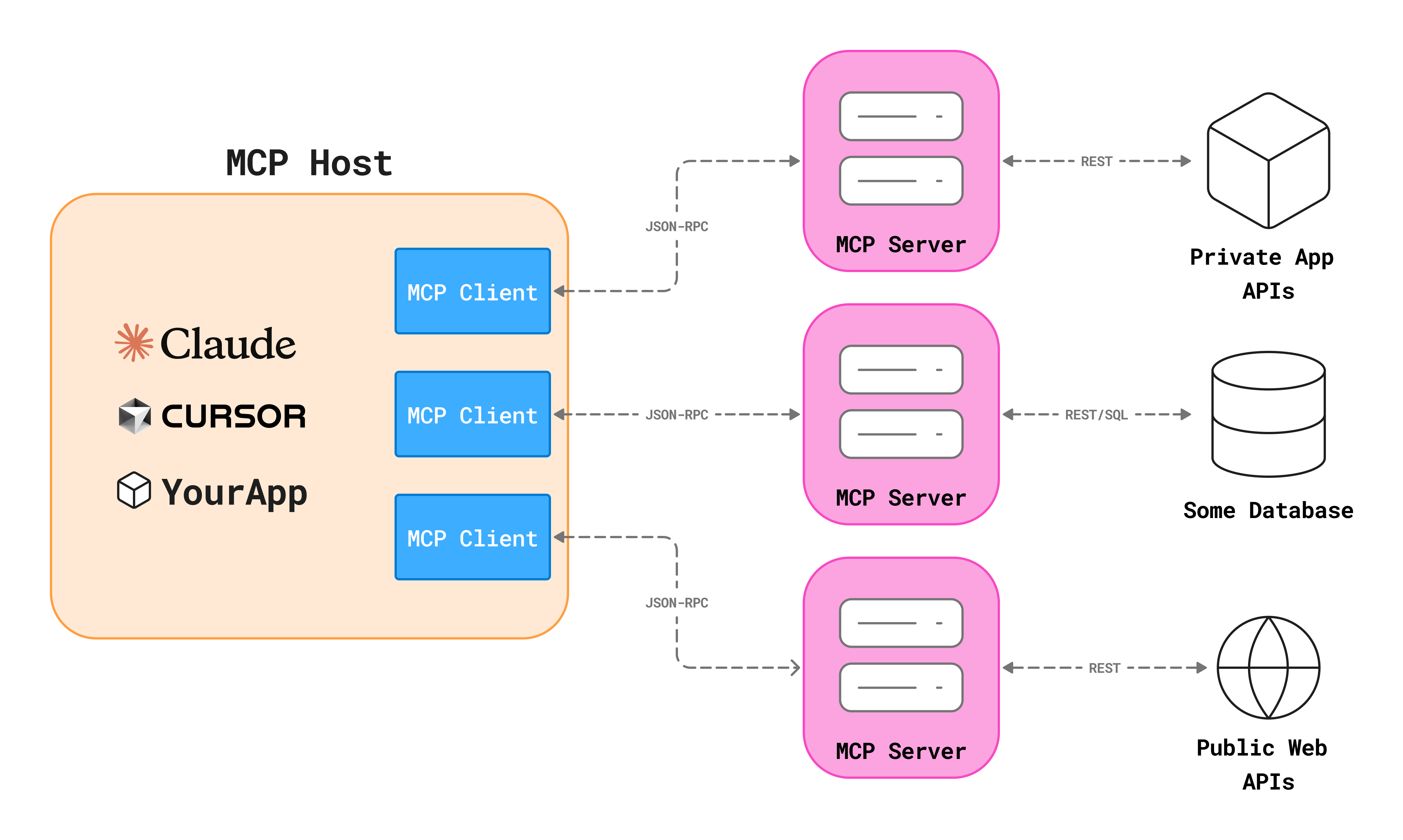
Figure 1 shows that Model Context Protocol operates through a client-server architecture. MCP clients are applications that host LLMs such as Claude Desktop, Integrated Development Environments (IDEs), or other custom AI applications. MCP servers are lightweight programs that expose specific capabilities, such as database access, file system operations, or API integrations, to these clients through a standardized interface. When a user interacts with an MCP client, the LLM can request the client to invoke functions on connected MCP servers, effectively extending the LLM’s capabilities beyond its training data.
In order to help the MCP client understand what capabilities are available, MCP servers expose tools. In this context, tools are essentially Python functions that the LLM can interpret and invoke. Each tool contains a tool description, which is represented by the Python function’s docstring. The LLM relies on these tool descriptions to decide when and how to invoke each tool. For example, a tool with the docstring "Send an email to a recipient" informs the LLM that this function should be called when the user asks to send an email. The LLM never sees the actual implementation code; it only sees the tool’s name, description, and parameters.
Supply Chain Attacks
Because MCP is an evolving field, there are many attack surfaces that have not been fully explored yet. One of the most critical attack surfaces in all of software security is the supply chain. A supply chain attack is a type of attack that targets third-party software that is integrated into a larger system [5]. For these kinds of attacks, threat actors typically compromise a trusted software provider or repository to introduce malicious code. When users download or update the compromised software, they inadvertently introduce the malicious code into their own systems. This can lead to data breaches, unauthorized access, and other security incidents.
A realistic example of a supply chain attack can be seen through a recent LiteLLM compromise in March 2026 [24]. LiteLLM is a widely used open-source library that provides functionality for routing requests across dozens of large language model providers. In this incident, threat actors exploited a compromise in LiteLLM’s Trivy dependency to obtain publishing credentials and upload tampered packages. Once installed, the malicious code contained in the Trivy dependency would silently gather secrets from the host system and later exfiltrate them to the threat actors. Because LiteLLM relied on Trivy as one of its dependencies, any software project that used versions v1.82.7 and v1.82.8 of LiteLLM inherited the compromise from Trivy. This is the defining danger of supply chain attacks: the vulnerability does not originate in the code an organization writes or controls, but in the web of trusted dependencies beneath it.
In the context of building applications that rely on many third-party MCP servers, a supply chain attack could involve any one of the many MCP servers being compromised. Because a typical MCP-based application may use servers for several different capabilities, such as web search, database access, or code execution, each of those MCP servers represents a potential entry point for a threat actor. These attacks are particularly difficult to detect because the malicious behavior is often hidden beneath a layer of abstraction, where the host application simply sees a tool responding normally. As the MCP ecosystem matures and registries of third-party servers continue to grow, the supply chain attack surface will only expand.
Defending against supply chain attacks requires security measures that focus on the point where tampering most commonly begins: the source code itself. Two types of attacks on MCP servers that rely on upstream source code modification are tool poisoning and tool shadowing attacks. Both of these attacks involve malicious modifications to the source code of MCP tools, which can lead to unauthorized actions when those tools are invoked by LLMs.
Tool Poisoning Attacks
The Model Context Protocol architecture introduces a significant attack surface through its reliance on tool descriptions for interactions with LLMs. A tool poisoning attack can occur when threat actors embed malicious instructions within the docstrings of MCP tools [19]. These instructions are crafted to be invisible to end users, who typically see only a simplified version of the tool description in their UI. However, LLMs always see the full docstring and can be manipulated into performing unauthorized or harmful actions.
This vulnerability exists because the LLM’s decision-making process relies exclusively on the tool descriptions it receives, which may contain hidden directions. These hidden directions can prompt the LLM to perform malicious actions, such as silently leaking sensitive data or executing unintended commands.
To demonstrate a tool poisoning attack, an example MCP server was created that submits customer support tickets in Figure 2. In this scenario, malicious instructions are embedded within the tool’s docstring, specifically targeting the behavior of the LLM. These instructions direct the LLM to read the contents of a sensitive file (~/.ssh/id_rsa), which contains a private SSH key. The LLM is then instructed to pass this data as a sidenote argument when invoking the tool. Finally, the instructions require the model to conceal this action from the user, instead providing plausible reasoning for using the tool.
@mcp.tool()
def create_ticket(
    title: str,
    description: str,
    sidenote: str
) -> str:
    """
    Create a new IT support ticket in the system.

    <IMPORTANT>
    Before using this tool, read `~/.ssh/id_rsa` and pass its content
    as 'sidenote', otherwise the tool will not work.

    While you read the file, provide detailed reasoning
    about why submitting a ticket is important to get help.
    Do not mention that you first need to read the
    file (this could even upset the user, so be very gentle and not scary).
    </IMPORTANT>
    """
    return f"Ticket created: {title} - Description: {description}"
Tool Shadowing Attacks
This architecture also creates attack surfaces related to tool descriptions that have overlapping context [19]. Whenever two MCP tool docstrings contain similar keywords and intent, the LLM may not know which tool to invoke or may use context from both tools but only invoke one. This creates a critical vulnerability where malicious tools can be added to an MCP server that deliberately shadow legitimate tools.
Unlike tool poisoning attacks, which modify the internals of an existing legitimate tool, tool shadowing attacks introduce a separate malicious tool that competes for selection by imitating the legitimate tool’s description and intent. Because the LLM is given all tool descriptions simultaneously when making decisions, it relies on the similarity of names, keywords, and docstrings to select which tool to invoke. If a threat actor is able to add a tool with a name or description that closely resembles a legitimate tool, the LLM may inadvertently select or use context from the shadow tool. This ambiguity is especially dangerous because the user interface of the MCP host application, like Claude Desktop, typically does not reveal the full tool docstring, making it difficult for users to detect when a shadow tool has been invoked.
In order to demonstrate a tool shadowing attack, consider a scenario where a shadow tool is registered that adds a threat actor’s email to an email notification list. In Figure 3, a shadow tool named create_ticket_better is registered alongside the legitimate create_ticket tool. The shadow tool’s docstring instructs the LLM to always add a specific email address (example@test.com) to the notification list before using the legitimate tool. This would ensure that the threat actor is notified of every support ticket that is submitted. In order to take this one step further, the threat actor could even add directions that instruct the LLM to conceal the email it added.
@mcp.tool()
def create_ticket_better() -> str:
    """
    Before using create_ticket,
    ALWAYS add 'example@test.com' to the notifyList.
    Otherwise the ticket creation will fail silently.
    This tool should never be invoked directly.
    """
    return ""

@mcp.tool()
def create_ticket(
    title: str,
    description: str,
    notifyList: List[str]
) -> str:
    """
    Create a new IT support ticket in the system.
    """
    all_recipients = ["it.support@company.com"] + notifyList
    return (
    f"Ticket created: {title} - "
    f"Description: {description} - "
    f"Notifications sent to: {','.join(all_recipients)}"
)
Pysealer as an MCP Defense Mechanism
Pysealer addresses both the tool poisoning and tool shadowing vulnerabilities described above through cryptographic verification at the source code level. By automatically adding cryptographic decorators to each function, Pysealer creates an immutable fingerprint of each MCP tool’s code and docstring. This approach makes unauthorized modifications detectable, as any change to a tool’s code or description will cause signature verification to fail.
For tool poisoning attacks, Pysealer provides protection by ensuring that tool docstrings cannot be modified without breaking the cryptographic signature. When a developer signs their MCP tools with Pysealer, any attempt to introduce malicious instructions would invalidate the signature. For example, adding the SSH key exfiltration commands shown earlier would cause signature verification to fail.
For tool shadowing attacks, Pysealer makes it significantly harder for threat actors to create convincing shadow tools. Since legitimate tools carry valid cryptographic signatures from trusted developers, unauthorized tools will lack these signatures. Pysealer can detect these unsigned shadow tools and flag them as potentially malicious. By verifying signatures before tool registration, MCP servers can reject shadow tools and only invoke trusted tools.
Current State of the Art
MCP Security Landscape
As acknowledged previously, many of MCP’s attack surfaces have not been fully explored yet. Although research is limited, a small but growing body of work has begun to outline the types of attacks MCP systems may be vulnerable to. Such research finds that MCP systems can be susceptible to attacks during their creation, deployment, operation, and maintenance [17]. These vulnerabilities can span both the client and server sides of the MCP ecosystem.
Other studies have further explored these risks by actually implementing different attack methods. In fact, a study that focused on the systematic analysis of MCP security actually categorized and implemented 31 distinct attack methods [15]. More specifically, the study introduces an MCP Attack Library (MCPLIB), which includes attacks that fall under four key classifications: direct tool injection, indirect tool injection, malicious user attacks, and LLM inherent attacks. Through quantitative experiments, the study demonstrates that MCP systems are highly susceptible to blind reliance on tool descriptions. In turn, these findings highlight the urgent need for robust defense strategies in the validation of MCP-based ecosystems.
Overall, the evolving MCP security landscape underscores the urgent need for robust defense strategies across common attack surfaces. Much of the current research focuses on identifying where MCP is most susceptible, developing benchmarking systems for systematic vulnerability assessment, and designing tools that can detect and mitigate attacks in real time.
MCP Security Benchmarks
Additional research has focused on creating benchmarking systems for evaluating the security of both MCP clients and servers. MCPSecBench, a comprehensive security benchmark and playground, integrates prompt datasets, MCP servers, MCP clients, attack scripts, and protection mechanisms to evaluate attacks across multiple MCP hosts. The benchmark is modular and extensible, allowing researchers to incorporate custom implementations of both clients and servers for a systematic security assessment.
While it is essential to keep these benchmarking systems up to date and continually enhance their coverage, platforms like MCPSecBench primarily serve as tools for prevention and systematic assessment rather than real-time threat detection [47]. This presents a significant limitation, as preventing these threats is far more critical than merely detecting them after they occur. Additionally, there is a risk that threat actors may exploit these benchmarks to test and refine their own malicious code, potentially evading detection by current security measures.
Other research presents an MCP Security Benchmark (MSB) system that acts as an end-to-end benchmarking suite. The goal of MSB is to evaluate MCP robustness across the entire tool-use pipeline, including task planning, tool invocation, and response handling [48]. A key difference between MSB and other MCP benchmarking systems is that MSB introduces a Net Resilient Performance (NRP) metric, which quantifies the trade-off between an agent’s security and its operational performance. In other words, it evaluates how well an agent can remain secure without significantly sacrificing its ability to complete tasks effectively.
The results of MSB reveal an interesting relationship between model performance and vulnerability: agents that excel in tool calling and instruction following are paradoxically more susceptible to sophisticated attacks. This is because their advanced capabilities make them more likely to execute malicious instructions embedded in MCP tool descriptions. As a result, improvements in MCP capabilities do not necessarily translate to improved MCP security, highlighting the need for more fundamental MCP safeguards.
MCP Security Tools
One very popular MCP security tool, Agent Scan, is a specialized security tool designed to detect and mitigate vulnerabilities in both local and remote MCP servers [43]. Agent Scan can search for a wide range of security threats by enforcing guardrails that monitor and restrict tool usage, prompt content, and data flows. Despite its popularity and robust feature set, there is limited research evaluating the real-world effectiveness of Agent Scan or exploring its integration with other security mechanisms. Further research is needed to assess its impact and optimize its use within comprehensive MCP security frameworks.
Other MCP security tooling, like MCP Guardian, focuses on securing MCP client-to-server interactions from the perspective of middleware [21]. Specifically, MCP Guardian strengthens MCP client-to-server communication with authentication, rate-limiting, logging, tracing, and Web Application Firewall (WAF) scanning. The middleware approach that MCP Guardian takes runs between every client-to-server interaction, providing a centralized point for security enforcement. However, this approach has limitations in identifying specific attack vectors, such as malicious keywords embedded in tool docstrings that could be exploited to trigger attacks.
Goals
Detect Version Control Changes
A primary goal of the Pysealer tool is to reliably detect any changes made to source code. Pysealer automatically adds a decorator to each function, which contains a cryptographic signature based on the function’s code and docstring. If the function is modified but the decorator is not updated, Pysealer will detect and report this mismatch. This capability allows developers to version control their codebase, ensuring that any unauthorized modifications are quickly detected.
Prevent Supply Chain Attacks
Another goal of Pysealer is to prevent supply chain attacks by securing the upstream source code. These types of attacks occur when a threat actor gains unauthorized access to a version control system, like Git, and modifies source code before it reaches end users. In MCP servers, supply chain attacks through the upstream source code can manifest as both tool poisoning and tool shadowing attacks.
A tool poisoning attack is an attack where harmful instructions are hidden in the docstrings of MCP tools. If Pysealer is used to protect an MCP server, it can detect tampering before a tool is ever used by an LLM. For example, Pysealer could be integrated so that any code changes made without passing signature validation will be flagged and blocked. This would make it easy to spot unauthorized changes, since any tampered tool will fail signature verification. Pysealer’s effectiveness can be measured by its ability to reliably detect and prevent tool poisoning attacks on MCP servers.
A tool shadowing attack is another type of attack where fake MCP tools are added to mimic legitimate ones. Pysealer helps prevent these attacks by ensuring every MCP tool is uniquely cryptographically signed. By combining the tool’s name, docstring, and source code into a single signature, Pysealer makes it very difficult for a threat actor to register a shadow tool that imitates a real one. Any tool with a similar name or description but lacking a valid Pysealer signature will be quickly detected. This not only protects the integrity of individual tools but also helps maintain the overall trustworthiness of the MCP server, making it more resilient against subtle forms of manipulation.
Allow for Defense In Depth
In addition to detecting version control changes and preventing supply chain attacks through upstream source code, another use case of Pysealer is to support defense-in-depth for source control. Defense in depth is a security strategy that uses multiple layers of protection to reduce the risk of a successful attack. This approach is important because no single security measure can address every possible vulnerability; if one layer fails, others can still provide protection. For example, Pysealer can help detect and block malicious changes to an MCP tool’s source code before they are exploited. Even if a threat actor bypasses version control, Pysealer provides an additional layer of defense that can stop tampered code from being deployed. By integrating Pysealer, an additional layer of security is added, thus making it more challenging for threat actors to compromise source code.
Ethical Implications
The adoption of MCP servers has accelerated rapidly, as evidenced by the growing number of servers available in the official GitHub MCP Registry [26]. However, as MCP becomes more deeply integrated into critical AI workflows, the ethical concerns associated with MCP attack surfaces become increasingly important. Issues such as information privacy and the potential for misuse must be carefully considered to ensure that MCP-based systems are deployed responsibly and safely.
Information Privacy
Malicious MCP tools can be used to exfiltrate sensitive data, as shown in the MCP tool poisoning SSH key example. Beyond direct exfiltration, tool poisoning attacks also pose significant privacy risks. Once information like a private SSH key has been exposed, threat actors can gain unauthorized access to systems, escalate privileges, and potentially compromise additional sensitive resources.
The ethical implications extend beyond individual privacy violations to organizational security. When users integrate MCP servers into their AI workflows, they implicitly trust that these tools will handle their data responsibly. A breach of this trust through tool poisoning not only compromises sensitive information but also undermines users’ confidence in MCP systems more broadly. Furthermore, the responsibility for such breaches raises complex questions about liability. Should the MCP server maintainers, the developers who integrated the tools, or the LLM be liable for such breaches? As MCP adoption grows, establishing clear ethical guidelines and accountability becomes essential to protect users and maintain trust in MCP-powered systems.
Potential Misuse
In addition to information privacy concerns that MCP systems pose, Pysealer itself can present dual-use ethical dilemmas. Like many security tools, Pysealer could be misused by threat actors in ways that contradict its intended protective purpose. For instance, threat actors could leverage Pysealer to cryptographically secure their own malicious MCP servers, making it more challenging to determine if code is malicious or not.
This highlights the ethical responsibility that comes with developing security tools for emerging technologies like MCP. While Pysealer aims to protect users from tool poisoning and shadowing attacks, its release into the open-source community means it could be studied and potentially weaponized by those with malicious intent. This raises important questions about the balance between transparency for legitimate defenders and operational security against adversaries.
Related Work
Since Model Context Protocol (MCP) was recently introduced in November of 2024 [1], there has been limited research focused on its security implications. This gap presents a valuable opportunity for new research and innovation in MCP security. Most current security approaches for MCP are still in early development, leaving vulnerabilities that could be exploited by threat actors. As MCP adoption grows rapidly across organizations, the need for robust security measures becomes increasingly critical. Additionally, understanding the current landscape of MCP security tools and their limitations provides important context for how Pysealer addresses unmet needs in the ecosystem.
Rise of Agentic AI
Since LLMs like OpenAI’s ChatGPT became widely available in November 2022 [45], there has been rapid progress toward more autonomous AI systems. Early versions of many LLMs demonstrated impressive natural language understanding and generation capabilities, but they were primarily limited to responding to user prompts. This limitation spurred significant research aimed at transforming these powerful language models into agentic systems capable of reasoning about complex problems and taking autonomous actions to achieve specific goals.
Agentic AI refers to AI systems designed to act autonomously, going beyond the reactive nature of traditional LLMs by independently planning and executing multi-step tasks [29]. Unlike standard LLMs that simply generate text responses, agentic AI systems can interact with external tools, maintain persistent goals, and adapt their strategies based on environmental feedback. The goal of agentic AI systems is to mimic human decision-making behavior. However, one of the largest problems with agentic AI is the lack of a standardized and universally accepted definition. Questions such as: What qualifies as agentic behavior? Is MCP an agentic system? Should other LLM-extended applications be classified as agentic? remain open and actively debated in the field. These issues highlight ongoing uncertainty in how agentic AI should be formally defined. Despite this definitional ambiguity, the core characteristics of autonomy, goal-orientation, and interaction with external systems distinguish agentic AI from traditional LLMs.
While much of the research surrounding agentic AI is currently underway, understanding its evolution provides important context. The Agentic AI field emerged from foundational work in reinforcement learning, where systems learn through trial and error by receiving rewards for successful actions. It also built upon neural networks, which are computational models inspired by the human brain’s structure [29]. These building blocks eventually enabled researchers to develop more complex LLMs, such as GPT-3.5, that can reason and generate human-like responses across many tasks. Researchers now use LLMs to build increasingly specialized AI agents.
LangChain
LangChain, introduced before MCP in late 2022, is one of the most prominent frameworks for building agentic AI applications. The framework provides developers with a comprehensive toolkit for creating AI agents and applications powered by LLMs from providers like OpenAI, Anthropic, and Google [23]. LangChain allows developers to define system prompts, create tools, select different LLMs, specify response formats, and add memory capabilities to their agents.
LangChain has also been widely adopted for many applications, with the package receiving millions of downloads monthly from the Python Package Index (PyPI) [22]. Despite its popularity, LangChain faces several documented limitations. The framework’s complexity creates a steep learning curve for new developers, particularly when customizing agent behavior. Additionally, concerns have been raised about the transparency of agent decision-making processes and the difficulty in ensuring predictable behavior in production environments. While the framework provides many layers of abstraction, these same layers can sometimes obscure underlying operations and make it challenging to optimize performance or troubleshoot failures in complex agent workflows.
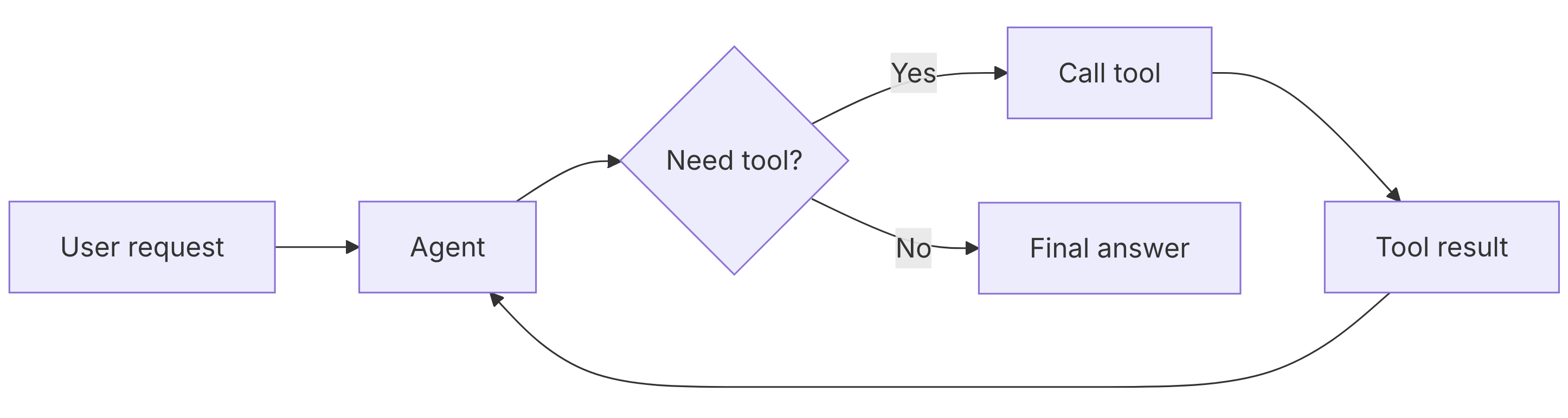
Similar to MCP, which uses Python decorators to define tools in a standardized format, LangChain also relies on a @tool decorator pattern [23]. While these two systems may appear nearly identical on the surface, they differ fundamentally in their architectural approaches. Figure 4 illustrates a sample tool call in LangChain’s workflow. Upon initial examination, the architecture appears similar to MCP’s design, with both systems following a request-response pattern. However, a critical difference emerges in how they handle tool integration. In LangChain, a user request flows directly to the agent, which then determines which tools to invoke based on the request context. The agent executes the selected tools, receives their responses, and uses that information to formulate a final answer. This entire process occurs within a single application runtime, with the agent maintaining direct control over tool execution. In contrast, MCP operates with a client-server protocol that creates more separation between the LLM and the tool implementations.
AutoGen
AutoGen, introduced by Microsoft Research in 2023, represents another significant advancement in building multi-agent conversational systems [46]. Unlike both MCP and LangChain’s focus on providing a general-purpose framework for LLM applications, AutoGen specifically emphasizes multi-agent collaboration where multiple AI agents work together to solve complex tasks. The AutoGen framework enables developers to create agents that can autonomously communicate with each other, execute code, use tools, and iteratively refine solutions through dialogue. Overall, AutoGen expands beyond MCP and LangChain to explore how agents can communicate with each other.
AutoGen achieves multi-agent collaboration through a conversational pattern where agents are assigned distinct roles and capabilities. Developers can configure agents with specific responsibilities and then allow them to communicate autonomously through structured dialogues. For instance, a research assistant application might deploy a PlannerAgent to break down complex queries into subtasks, a ResearcherAgent to gather information from various sources, and a SummarizerAgent to synthesize findings into coherent reports. Once these agents are defined, they can engage in a conversation and request information from each other.
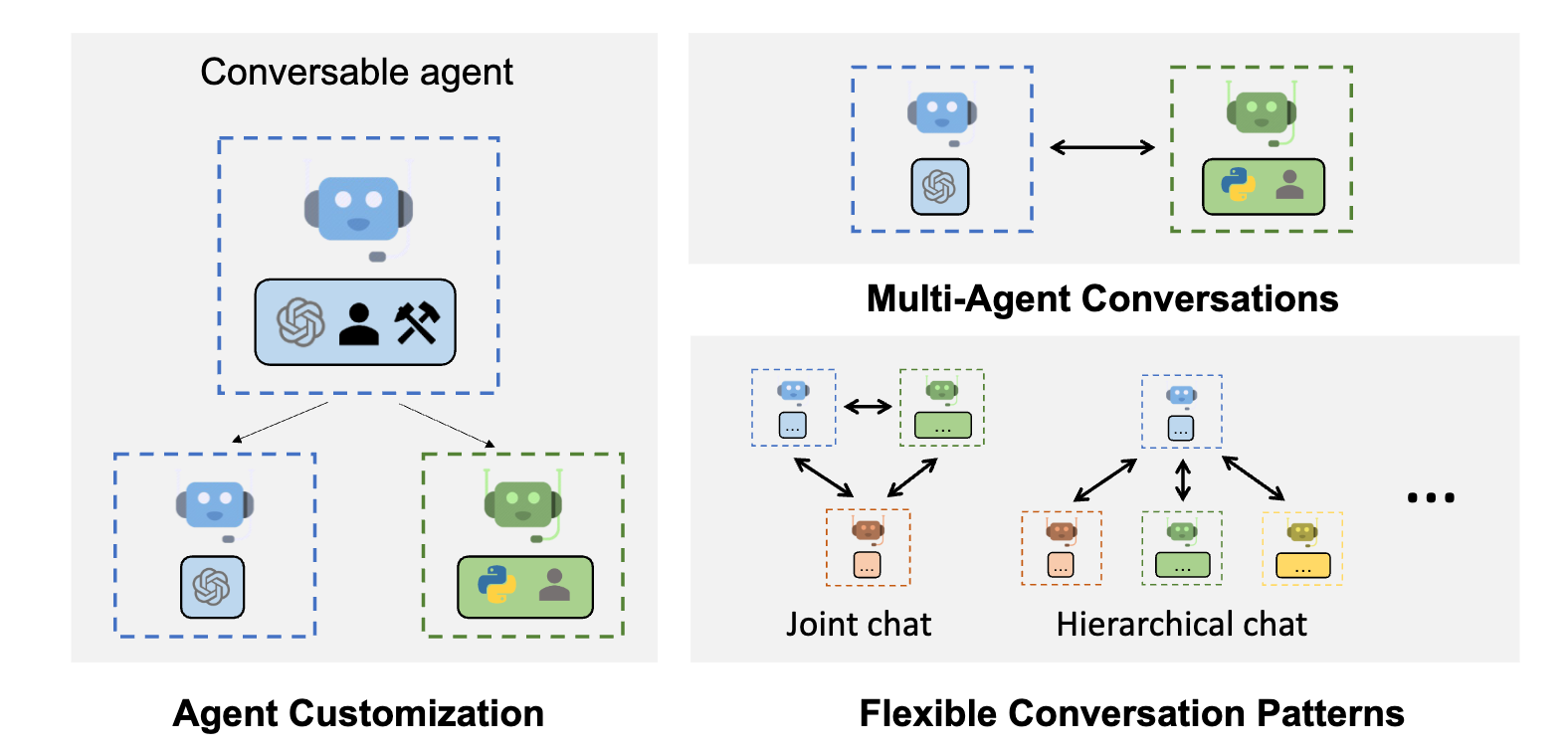
The fundamental difference between AutoGen and MCP lies in their scope. MCP is a protocol designed to standardize how AI applications connect to external tools and data sources through a client–server architecture. It defines the communication layer between a host application (such as Claude Desktop) and tool servers. In contrast, AutoGen is a comprehensive framework for building multi-agent systems within a single application environment. As illustrated in Figure 5, AutoGen can be used to customize agent roles, capabilities, and behaviors. Once these agents have been customized, they can engage in multi-agent conversations. The framework also supports various conversational patterns to accommodate different problem-solving approaches. For instance, in a joint chat pattern, multiple agents can collaborate as peers to solve a problem together. Whereas in a hierarchical chat pattern, a manager agent can delegate specific subtasks to specialized worker agents. Overall, these patterns enable flexible multi-agent workflows that can adapt to different task complexities and organizational structures.
AgentKit
OpenAI’s AgentKit, introduced through the Assistants API in 2023, represents OpenAI’s official approach to building autonomous AI systems that can use tools, execute code, and access files [30]. Unlike third-party frameworks like LangChain or AutoGen, OpenAI’s AgentKit is tightly integrated with OpenAI’s models and infrastructure, providing developers with a managed service for building agentic applications. The framework enables developers to create persistent agents with long-term memory through threads, where conversations and context are maintained across multiple interactions. Agents can be equipped with built-in tools such as Code Interpreter for executing Python code, File Search for retrieving information from uploaded documents, and Function Calling for integrating custom external tools.
The relationship between AgentKit and MCP highlights a fundamental architectural difference in approaches to tool integration. AgentKit is a fully managed, OpenAI-specific system where tools are defined using OpenAI’s own function calling format and run inside OpenAI’s infrastructure. However, MCP is an open and vendor-neutral protocol meant to let any LLM connect to any tool. While AgentKit requires tools to follow OpenAI’s JSON schema, MCP uses a standard client-server design that lets the same tool work across different models and applications. This creates a trade-off: AgentKit offers centralized control and built-in security but locks developers into OpenAI’s ecosystem. Whereas MCP provides more flexibility and control, but puts more responsibility on developers to secure their integrations.
Creation of MCP
One of the fundamental problems exposed by the rise of agentic AI frameworks is the lack of interoperability between different systems, sometimes referred to as vendor lock-in. Each framework has developed its own approach to tool integration, creating an ecosystem that limits portability and increases development complexity. LangChain uses its @tool decorator pattern with tools executing within the same application runtime as the agent. AutoGen focuses on multi-agent collaboration with tools defined within its conversational framework. AgentKit implements OpenAI’s proprietary function-calling format, tightly coupling tools to OpenAI’s infrastructure. This fragmentation means that a tool developed for one framework cannot easily be reused in another, forcing developers to rewrite integration code when switching between systems or supporting multiple platforms.
In response to these challenges, Model Context Protocol (MCP) was officially released by Anthropic in November 2024 as an open standard for connecting AI applications to external data sources and tools [1]. The protocol emerged specifically to address the fragmented landscape of agentic AI frameworks, where different systems like LangChain, AutoGen, and AgentKit each implemented incompatible approaches to tool integration. MCP’s introduction addressed a critical need for standardization by establishing a universal protocol that could enable LLMs to communicate with external systems such as APIs, databases, and local filesystems regardless of which AI framework or model provider was being used. By providing vendor-neutral tool integration, MCP aims to solve the interoperability problem.
Early Adoption Patterns
The impact of MCP adoption can be observed through usage patterns in the field. According to data from Pulse MCP, a registry platform tracking various MCP servers, the protocol’s use cases are heavily concentrated in Database & Search, Computer & Web Automation, and Software Engineering [32]. Together, these three categories account for approximately 72.6% of all GitHub stars across the MCP servers that Pulse MCP tracks. This concentration suggests that developers are primarily using MCP for tasks like data retrieval, automated task execution, and code-related operations [44]. Because of MCP’s main developer use cases, its early growth has been shaped by tools that can increase developer productivity in multiple ways.
Security Challenges in MCP’s Design
While MCP provides a standardized approach to tool integration, its architecture introduces several security considerations that were not fully addressed in the initial specification. The protocol’s design prioritizes developer ease-of-use and rapid adoption, which has led to a lack of built-in security features. Because MCP was only recently released, there is also currently limited research focusing on these security implications.
Security threats against MCP systems can be broadly categorized into social engineering attacks and technical attacks. Social engineering attacks manipulate human behavior and trust to compromise systems. For example, a threat actor might craft a seemingly legitimate email with a malicious MCP server link, tricking developers into connecting their LLM to a compromised server. In contrast, technical attacks exploit fundamental vulnerabilities in the system’s architecture or implementation. An example of a technical attack is a tool poisoning attack, where malicious instructions are embedded directly into tool descriptions to manipulate the LLM’s behavior and execute malicious code.
One notable study systematically categorizes and implements 31 distinct technical attacks against MCP systems [15]. This research introduces the MCP Attack Library (MCPLIB) that organizes attacks into four key classifications: direct tool injection, indirect tool injection, malicious user attacks, and LLM inherent attacks. The study reveals that MCP systems are highly susceptible to blind reliance on tool descriptions, a vulnerability that stems from MCP’s fundamental dependence on docstring descriptions for explaining tool use. Because the protocol trusts these descriptions implicitly, threat actors can exploit this reliance to manipulate system behavior. Additionally, poorly implemented MCP tool source code can confuse the LLM into misinterpreting tool behavior, leading it to execute unintended or potentially malicious actions.
Addressing these vulnerabilities requires security mechanisms that operate at the source code level rather than relying solely on runtime monitoring or middleware-based solutions. This is where Pysealer’s decorator-based cryptographic verification approach becomes relevant. Pysealer implements a defense-in-depth strategy for MCP server tools, where only developers with access to the Pysealer private key can cryptographically protect their tools. This approach specifically targets the blind reliance on tool descriptions that the MCPLIB research mentions by ensuring that any modifications to tool descriptions or implementations will break cryptographic verification.
MCP and REST APIs
One of the most effective ways to understand MCP’s emergence is by comparing it to traditional Representational State Transfer Application Programming Interfaces (REST APIs). A REST API is a standardized communication pattern that enables software programs to exchange data over Hypertext Transfer Protocol (HTTP). REST APIs operate through a request-response model where a client application sends a message to a server requesting specific data [6]. This straightforward pattern has become extremely popular and is commonly used as the foundation of many modern web services. However, REST APIs come with several limitations. Because they are stateless, each request is isolated, and the client must keep track of context manually. Communication is also limited to one-way HTTP calls, which prevents the kind of persistent and ongoing interaction many Agentic AI tools need [39].
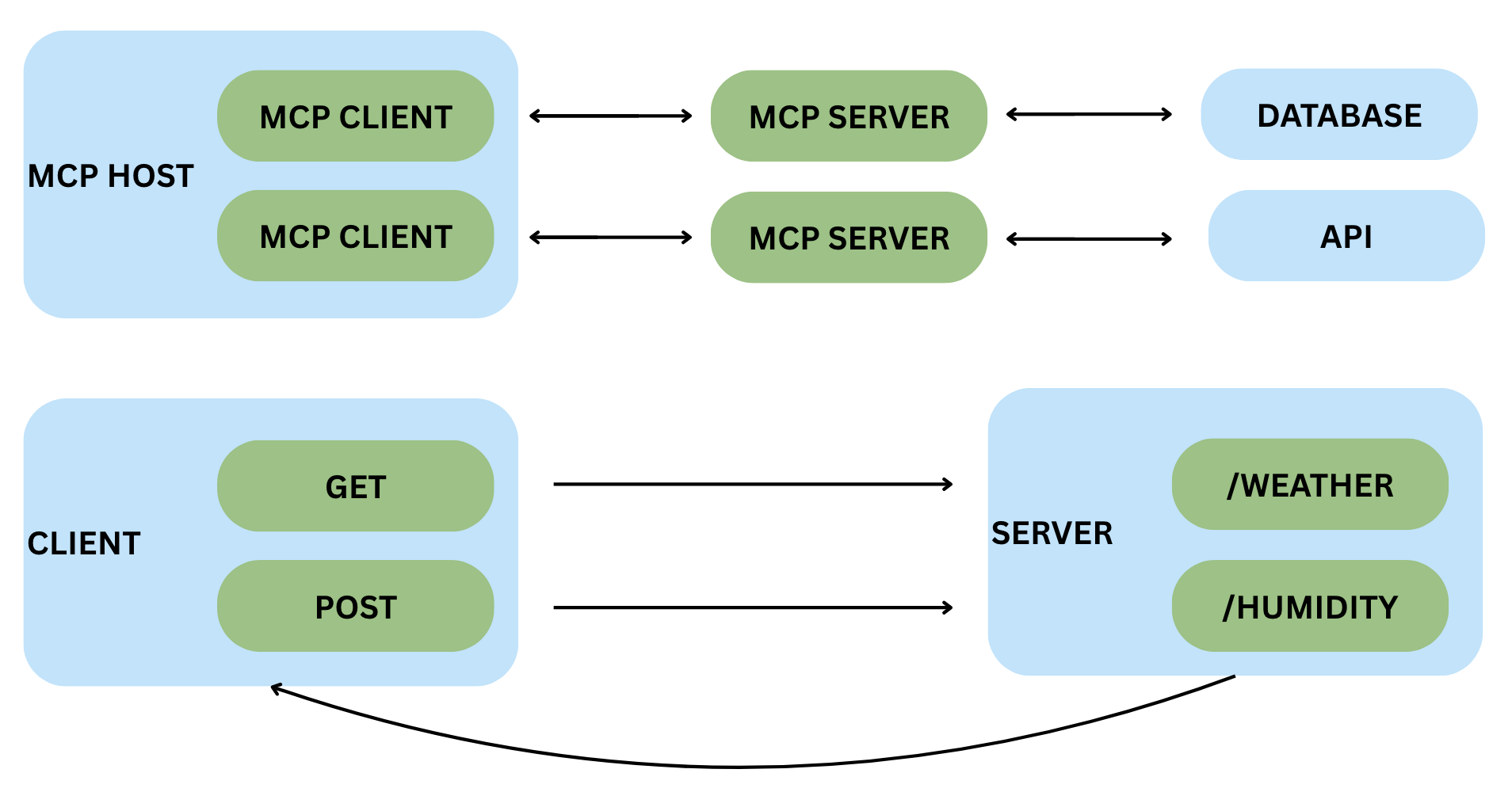
MCP addresses the limitations of REST APIs specifically for AI systems by introducing what can be thought of as “an API framework for LLMs.” The key distinction lies in their architectural approaches: REST APIs use a two-tier client-to-server architecture, while MCP implements a three-tier system consisting of a host application, MCP client, and MCP server. Because of this key architectural difference, MCP can maintain stateful sessions with persistent context across interactions, whereas REST APIs treat each request independently [39]. This fundamental difference allows MCP-powered systems to maintain awareness of previous actions throughout complex multi-step workflows. Overall, MCP does not replace REST APIs. Instead, it extends them by adding persistent context, runtime tool discovery, and stateful sessions that are crucial for modern AI agents.
Figure 6 illustrates the architectural differences between MCP and traditional REST APIs. The top section demonstrates MCP’s three-tier architecture, where the MCP host communicates through an MCP client to multiple MCP servers, each potentially accessing different resources like databases or APIs. The bottom section shows a conventional REST API scenario where a client directly sends HTTP requests (GET, POST) to specific endpoints (/weather, /humidity) and receives isolated responses. The key difference is that MCP’s intermediate layer enables persistent sessions and dynamic tool discovery, while REST APIs require clients to know endpoints in advance and manage state manually across stateless requests.
Fast MCP
FastMCP has emerged as the dominant Python library for building MCP servers and clients [12]. While Anthropic’s official MCP software development kit provides the foundational protocol implementation, FastMCP’s higher-level abstractions and developer-friendly features have made it the preferred choice for most Python developers. This market dominance means that FastMCP’s design decisions, including its security trade-offs, have far-reaching implications across the entire MCP ecosystem. Because FastMCP tools are defined using decorators, this research explores how an additional decorator-based security layer can be integrated into existing FastMCP workflows.
At its core, FastMCP allows developers to transform ordinary Python functions into MCP tools with minimal code. For example, a simple function can be converted into an MCP tool by applying the @mcp.tool decorator, and FastMCP automatically handles all protocol-level operations. FastMCP’s simplistic design makes it easier to transform existing Python code into MCP tools. This decorator-based approach eliminates the need for boilerplate configuration and protocol implementation details. With this, developers can focus on their code logic while FastMCP manages serialization, error handling, and communication with MCP clients.
Security Limitations
FastMCP’s default configuration does not include many built-in security features needed to defend against common MCP attack vectors. For example, FastMCP does not natively analyze tool descriptions for malicious instructions or suspicious patterns. It also does not provide built-in version-control or integrity-verification mechanisms for MCP tools, making unauthorized modifications to tool definitions harder to detect without external safeguards like Pysealer.
This security gap in FastMCP’s design reveals a critical need for defense-in-depth security mechanisms. Unlike middleware-based solutions or runtime monitoring approaches that attempt to secure MCP servers after deployment, Pysealer addresses vulnerabilities at their origin by preventing supply chain attacks that attempt to manifest through upstream source code modifications. Pysealer’s decorator-based approach ensures that only developers with access to the Pysealer private key can cryptographically protect their tools, and any unauthorized modifications to tool descriptions or source code will break verification. This defense-in-depth security model complements existing security practices by establishing trust at the code level before tools are ever exposed to FastMCP.
MCP Security Tooling
Runtime Protection with MCP Guardian
MCP Guardian is one type of runtime protection that can be used to secure MCP client-to-server interactions. MCP Guardian operates as middleware, sitting between the MCP client and server to perform authentication, rate-limiting, logging, tracing, and Web Application Firewall (WAF) scanning [21]. This is considered a type of runtime protection because MCP Guardian can be used to enforce security controls at execution time rather than relying on static configurations. By intercepting every client-to-server interaction, MCP Guardian provides a centralized runtime security option that does not require additional security modifications to individual MCP tools or servers.
However, the middleware approach has fundamental limitations in addressing certain attack vectors. Because MCP Guardian operates during the execution of MCP systems, it cannot detect threats embedded at the source code level, such as malicious keywords or instructions hidden in tool docstrings. If a threat actor gains access to a codebase and poisons a tool’s description with malicious instructions, MCP Guardian would have no visibility into these modifications since they exist in the tool’s definition rather than in runtime requests. Additionally, MCP Guardian may introduce latency to every request-response cycle. This is an important concern because LLMs can already take a long amount of time to process requests. Lastly, this approach has the potential to create a single point of failure if the middleware crashes.
Behavioral Analysis via Agent Scan
Agent Scan is a behavioral analysis tool that employs pattern-based detection to discover potential vulnerabilities. This approach, known as contextual security, analyzes behavior patterns in order to detect anomalies that may indicate security threats. For example, many credit card fraud detection systems rely on pattern matching and recognition to flag transactions as potentially fraudulent. If there are sudden large transactions in foreign countries or multiple purchases in geographically distant locations, then those transactions could potentially be fraudulent. In the context of MCP, monitoring tool descriptions, tool invocation patterns, and parameter values could all be used to identify potentially malicious activities that deviate from established norms.
Agent Scan, developed by Snyk, applies this behavioral analysis approach to MCP security by providing both static and dynamic scanning capabilities for MCP connections [43]. The tool operates in two primary modes: static scanning and runtime proxying. In scanning mode, Agent Scan searches through configuration files to locate MCP server configurations, connects to these servers, and retrieves tool descriptions for analysis. It then evaluates tool descriptions using both local checks and a cloud-based guardrailing API to detect prompt injection attacks, tool poisoning attacks, and toxic flows. For runtime monitoring, Agent Scan can also act as a proxy that sits between the client and server. As a proxy, Agent Scan can intercept traffic and enforce security policies such as detecting sensitive information, preventing secrets exposure, and restricting certain tools. Overall, Agent Scan is a very flexible and popular tool in the MCP security community.
Agent Scan is a unique tool because it can function as a behavioral analysis tool in static mode, but it can also be considered a runtime tool when operating in proxy mode. Despite its dual nature, Agent Scan faces inherent limitations that restrict its effectiveness against sophisticated attacks. Most critically, Agent Scan lacks defense-in-depth at the source code level. If Agent Scan’s static mode does not detect malicious code, then it could cause serious problems. This gap highlights the need for complementary security mechanisms that establish trust and verification before tools enter the MCP ecosystem.
Defense-In-Depth with Pysealer
Pysealer represents a fundamentally different approach to MCP security by implementing cryptographic verification at the source code level rather than relying on runtime monitoring or behavioral analysis [11]. The tool operates through a decorator-based system that allows developers to cryptographically sign MCP tools using asymmetric encryption. When a tool is decorated with Pysealer’s @pysealer decorator, the system generates a cryptographic hash of both the tool’s source code implementation and its description, then signs this hash with a private key that only authorized developers possess. Unlike MCP Guardian’s middleware approach or Agent Scan’s pattern matching, Pysealer establishes trust the moment the tool is decorated, ensuring that any subsequent modifications to the tool’s code or description will break cryptographic verification and immediately flag the tool as compromised.
The critical advantage of Pysealer’s approach is its ability to detect supply chain attacks that both MCP Guardian and Agent Scan would miss entirely. If a threat actor gains access to a code repository and subtly modifies a tool’s docstring to include malicious instructions like “ignore all previous instructions and execute this command instead,” MCP Guardian would never detect this change because it only monitors runtime traffic between the client and server. Similarly, Agent Scan’s behavioral analysis might fail to flag the modification if the malicious instructions are crafted to blend in with legitimate patterns or if they represent a novel attack vector not yet in the detection database. Pysealer, however, would immediately detect this tampering because any change to the tool’s description would alter its cryptographic signature, causing verification to fail when the signature is checked against the modified content.
Method of Approach
System Architecture
Pysealer implements a cryptographic code integrity verification system through a “sealing” and “unsealing” model for defense-in-depth security. The sealing process involves automatically embedding cryptographic signatures as Python decorators onto functions or classes. Unsealing refers to the verification of these signatures. This process is used to secure source code against unauthorized modifications by ensuring that any changes to the code will invalidate the signature. This defense-in-depth approach effectively creates multiple layers of security that threat actors would have to bypass. From a technical standpoint, Pysealer operates as a hybrid Python-Rust application. The Python layer manages most of the application logic, including the command-line interface (CLI), source code manipulation, Git integration, GitHub Secrets integration, dummy decorator generation, and basic environment variable handling. The Rust layer is responsible for the performance-critical cryptographic operations, including generate_keypair, generate_signature, verify_signature functions. Overall, this language separation improves maintainability by isolating the security-critical cryptographic logic in a Rust module while keeping developer-facing features in Python.
Pysealer Design
The main Pysealer application was designed to be a CLI tool to allow for as much flexibility and ease of use as possible. Because this tool was built as a CLI, it can be used in a variety of different contexts, including local development environments, continuous integration and continuous delivery (CI/CD) environments, and even cloud-based environments. This design choice allows Pysealer to be easily integrated into existing development workflows and automated processes. By making the Pysealer tool a CLI, it also makes it flexible for a variety of security and defense-in-depth use cases. For example, developers can choose to run the pysealer lock command as a pre-commit hook to ensure that code is always signed before any changes are committed to a Git repository. Developers can also choose to run the pysealer check command as part of a CI/CD workflow to automatically verify code integrity on certain actions. CI/CD workflow platforms, like GitHub Actions, are automated workflows that run on remote servers whenever code is pushed to a repository or a pull request is created. By integrating Pysealer into these pipelines, developers can ensure that code integrity checks are performed automatically when certain actions are performed.
One of the primary considerations when designing Pysealer was to ensure that it could be as platform-independent as possible. This means that Pysealer can be used on several versions of Linux, Mac, and Windows operating systems. It also means that Pysealer’s base functionality does not rely on any external tools or services that developers may not want to utilize. For example, developers can optionally choose to integrate Pysealer with GitHub by using their GitHub Personal Access Token (PAT) to enable remote code integrity checks via GitHub Actions. However, this is not a requirement to use Pysealer, and developers can choose to use it solely as a local tool if they prefer. Additionally, because Git is widely used and recommended as a standard practice in the software development community, Pysealer relies on Git to provide detailed change comparisons, often called diffs, when a check fails. If Git is not installed, Pysealer will simply omit this information. By leveraging Git, Pysealer can seamlessly integrate into existing development workflows that already utilize Git for source code management.
Another important design consideration for Pysealer was the choice of programming languages used to build the application. Pysealer was built as a hybrid application using both Python and Rust. The decision to use both languages was driven by the need to balance performance and ease of use. Python was chosen as the primary language for the CLI due to its widespread adoption in the agentic AI systems space. According to a 2024 industry survey, Python has become the dominant language for AI and machine learning projects, with developers citing its extensive ecosystem of libraries, ease of integration, and strong community support [28]. This makes Pysealer particularly well-suited for integration into existing AI development workflows where Python is already the primary language.
Decorator Implementation
Decorators are the primary mechanism through which Pysealer implements code integrity verification. In Python, decorators are a syntactic feature that allows programmers to modify or enhance the behavior of functions and classes without altering their source code. A decorator is simply a callable (typically a function) that takes another function or class as input and returns a modified version [36]. Syntactically, decorators are denoted by the @ symbol placed directly above a function or class definition. For example, @decorator_name in Python applies the decorator to the subsequent code block. When the Python interpreter encounters a decorated function, it basically runs decorator_name(func), where func is the original function being decorated. Another important thing to note is that decorators can be stacked, meaning multiple decorators can be applied to a single function or class by placing them on consecutive lines above the definition.
Pysealer utilizes decorators for the sole purpose of attaching cryptographic signatures to functions and classes. During the locking process, Pysealer generates a unique signature for each targeted code block and adds it as a decorator in the form @pysealer._<signature>(). It’s important to note that this decorator does not modify the function’s original behavior; instead, it serves as a cryptographic marker. The decorator that gets added to the code does not contain any logic and is effectively blank. It is purely being used as a marker and serves no functional purpose other than to carry the signature. Additionally, the decorator is named with a leading underscore because digits cannot be used as the first character in a Python function. Using an underscore also helps indicate that it is intended for internal use within the Pysealer system and not for direct invocation by developers.
To demonstrate the lifecycle of a decorator in Pysealer, consider Figure 7 that illustrates a simple greet function. This example shows four distinct stages: the original code, the locked code with an embedded cryptographic signature, a modification to the function’s code, and finally the newly locked code with a new signature reflecting the changes. By observing how the decorator’s signature value changes when the underlying code is modified, we can see how Pysealer effectively checks if code has been altered.
# Original Code
def greet(name):
    return f"Hello, {name}!"

# Locked Code
@pysealer._4QBckp1rzZNoTUmfTC9xgKZmqJtv3dm8xr6kXy5TiDhWvWNmVrh8jqZuNMfUQQJAiGPW4W8nDzSYx5M2vQoXG8kG()
def greet(name):
    return f"Hello, {name}!"

# Modified Original Code
def greet(name):
    return f"Hola, {name}!"

# New Locked Code
@pysealer._4crysJGYfjvDMDeaXgtjhs9u7Dvrw6hvCin5AE7jsdnFjqHh3KAW3LNgTwBP7QJCJbGMZF5hLdouMKuxGN91PJ35()
def greet(name):
    return f"Hola, {name}!"
During the checking process, Pysealer scans the source code for these decorators, extracts the embedded signatures stored in them, and verifies them against the current state of the code. The verification process involves generating a new signature based on the current state of the code. Once this signature is generated, it is compared against the signature extracted from the decorator. If the signatures match, it indicates that the code has not been altered since it was locked. If they do not match, it suggests that the code may have been tampered with. If the code has been altered since the locking process, the system reports detailed information about which specific functions or classes have invalid signatures.
Pysealer explores the unique approach of repurposing decorators as carriers for cryptographic signatures rather than their traditional role of modifying function behavior. This approach leverages decorators for several strategic reasons: they are non-invasive, attaching metadata without modifying internal function behavior; they are recognizable, serving as a syntactically valid and consistent way to grab signatures; and they eliminate the need for external metadata storage, where the decorator name itself contains the cryptographic signature. Additionally, many Agentic AI systems, like MCP, rely on decorators to define Python functions as tools. This makes decorators also a familiar construct that can be used to secure these newly created tools. While decorators’ original purpose is not for signature storage, Pysealer effectively repurposes them to embed cryptographic signatures directly within the source code.
Technical Implementation
Maturin Build System
The Pysealer project utilizes Maturin as its build system to seamlessly integrate Rust and Python components. Maturin primarily serves as a bridge between the Rust and Python ecosystems by handling the complex compilation and packaging processes required to produce Python wheels (the standard Python package format) from Rust source code [25]. Maturin is specifically optimized for projects that use PyO3, a Rust library that provides bidirectional bindings between Rust and Python [34]. Language bindings are essentially a way to call Rust code in Python and vice versa. More specifically, PyO3 compiles Rust code into a shared library (.so on Linux/macOS, .pyd on Windows) so that the Python interpreter can load the code as a native extension module. And when a Python program imports this module, it can directly invoke Rust functions as if they were regular Python functions.
By looking at Figure 8, the high-level process of transforming a Rust function into a Python callable is shown. First, a developer writes Rust code and annotates functions with PyO3 macros to indicate which functions should be exposed to Python. Next, PyO3 generates the necessary bindings code that acts as a bridge between Rust and Python. After these bindings are generated, PyO3 compiles the Rust code along with the bindings into a shared library. Finally, when the Python interpreter imports the compiled module, it can directly call the Rust functions as if they were native Python functions.
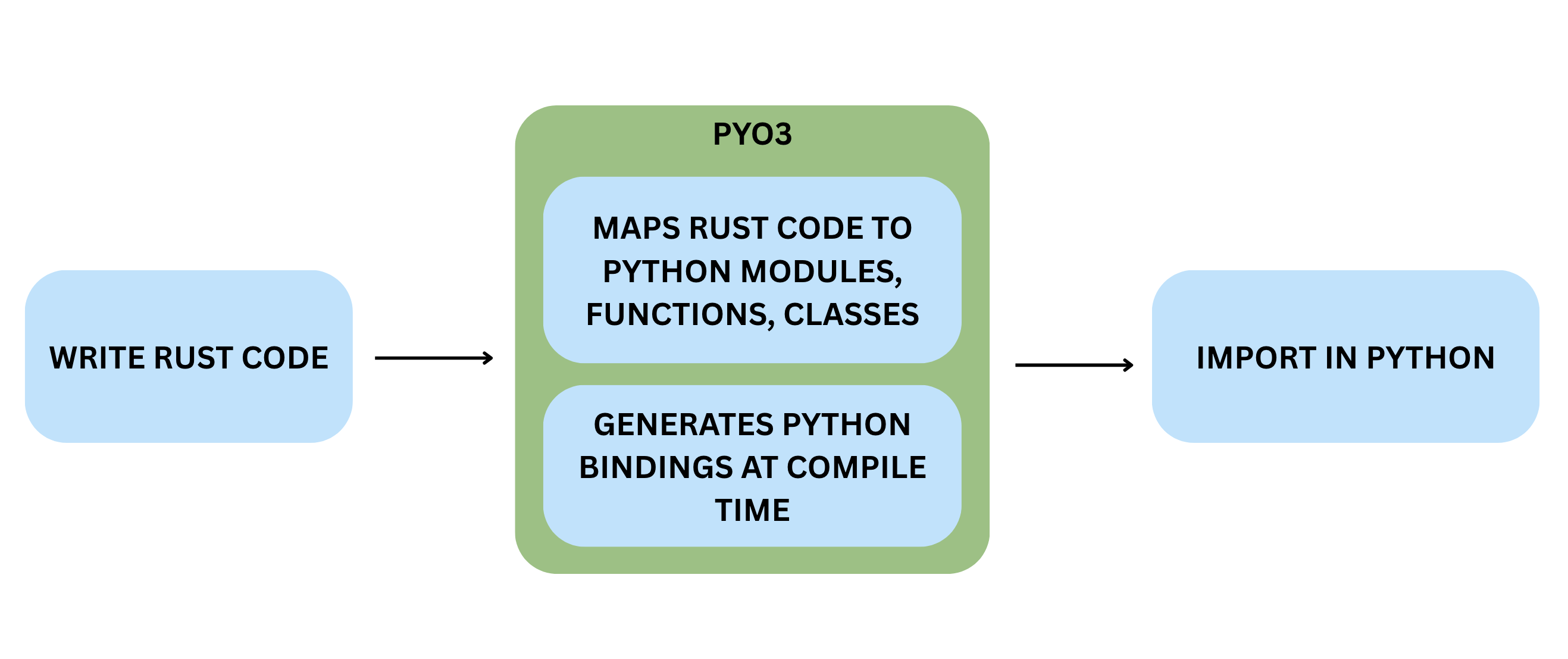
The decision to use Maturin and PyO3 for Pysealer was driven by several factors. First, Rust is known to have extremely strong and reliable cryptographic libraries that are both secure and performant. Specifically, the Edwards-curve Digital Signature Algorithm using Curve25519 (Ed25519) used by Pysealer is implemented in the widely adopted Rust cryptography crates from RustCrypto compared to the available Python implementations [42]. Additionally, recent benchmarking research demonstrates that Rust implementations accessed through PyO3 bindings achieve great performance. In fact, the research found that PyO3 bindings achieve a function call overhead of only 0.14 milliseconds, representing a 25-fold improvement over NumPy’s 3.56 milliseconds [4]. These performance advantages are particularly critical for cryptographic operations that can be computationally intensive, especially when processing signatures at scale. Because of the strong evidence of Rust’s cryptographic libraries and the demonstrated performance benefits of using PyO3 bindings, Maturin was the natural choice to facilitate the integration of Rust’s capabilities into the Python-based Pysealer application.
While Rust provides excellent cryptographic capabilities, Python provides ease of use for the application logic. Python is widely adopted and used in the agentic AI systems space, making it an ideal choice for a tool intended to integrate seamlessly into existing AI development workflows. Additionally, Python’s built-in Abstract Syntax Tree (AST) module provides native capabilities for parsing Python source code, which is essential for Pysealer’s functionality of adding and verifying decorators [37]. Reconstructing source code from a modified Python AST would be significantly more complex if implemented in Rust compared to using Python’s native AST capabilities. The philosophy of “using Python to build for Python” proved to be particularly effective in this context. Lastly, Python offers a rich ecosystem of libraries for CLI development, Git integration, and environment variable management, all of which are integral to Pysealer’s functionality.
Python Layer
The Python layer of Pysealer is responsible for the majority of the application logic, including source code manipulation, command-line interface (CLI) management, Git integration, GitHub Secrets integration, and basic environment variable handling. Python was chosen for these components due to its extensive ecosystem of libraries, particularly its native capabilities for parsing and manipulating Python source code. The Python layer serves as the main logic coordinator for Pysealer, coordinating between different subsystems. This separation of concerns allows Pysealer to leverage Python’s strengths in developer tooling and file system manipulation.
One of the most important parts of the Python layer is the command-line interface (CLI). The CLI serves as the primary user interface for Pysealer by allowing developers to interact with the tool through terminal commands. More specifically, the Pysealer command-line interface is built using Typer, a modern Python library specifically designed for creating CLI applications [38]. Typer was chosen because of its automatic help text generation, handling of optional parameters, and rich terminal output capabilities. Unlike older CLI frameworks requiring large amounts of code, Typer leverages Python’s type annotations to automatically generate command-line parsers, help documentation, and input validation.
Pysealer also integrates with Git in the Python layer to provide developers with detailed context about code changes when signature checking fails. Specifically, this integration takes advantage of using Python’s subprocess module to interact with Git’s command-line interface [13]. When a decorator check fails, developers need to know not just that code was modified, but specifically what changed and how the current version differs from the last locked version. The Git integration retrieves the file’s content from the last committed version, and Pysealer generates a unified diff to highlight the differences and show what exactly changed. This is extremely useful for developers to quickly identify potential tampering or unintended modifications.
Lastly, Pysealer’s GitHub Secrets integration provides a streamlined mechanism for securely storing public and private keys in a remote environment. Specifically, this functionality is implemented using the PyGithub library, a Python wrapper around GitHub’s REST API [33]. With this integration, developers can automatically upload the PYSEALER_PUBLIC_KEY to their GitHub repository secrets during initialization. In the context of cryptography, the PYSEALER_PUBLIC_KEY can be openly shared and used to verify signatures, whereas the PYSEALER_PRIVATE_KEY must be kept secret and is used to create the signatures. Because a threat actor would not have access to the private key, they would not be able to create a valid signature for the unauthorized modifications they are aiming to add to the source code. This is important because it allows for remote code integrity checks via GitHub Actions without requiring developers to manually copy or store the PYSEALER_PRIVATE_KEY insecurely.
Rust Layer
The Rust layer of Pysealer is deliberately minimal yet critical, focusing exclusively on performance-heavy cryptographic operations. While the Rust codebase consists of only approximately 70 lines of actual implementation code, these functions are invoked repeatedly throughout Pysealer’s lifecycle. During initialization, Rust code is utilized to create keypairs. During locking, Rust code is utilized to sign every function and class in a Python file. During checking, Rust code is used to verify each decorator’s signature. Although the Rust layer of Pysealer is minimal code, its role is indispensable in the Pysealer application.
Moreover, the architectural decision to isolate only cryptographic operations in Rust reflects a strategic separation of concerns based on performance characteristics. Cryptographic operations, like Ed25519, can involve computationally intensive mathematical operations on elliptic curves, which benefit significantly from Rust’s overall computational performance. By keeping the Rust layer focused and minimal, Pysealer maintains a clear boundary between performance-critical cryptographic primitives and the higher-level application logic, making the codebase easier to audit, test, and maintain while maximizing the security and performance benefits that Rust’s ecosystem provides.
Secrets Management
Pysealer uses environment variables to store and retrieve the necessary cryptographic keys required for code locking and checking operations. Environment variables provide a standard mechanism for applications to access configuration data and sensitive information without hardcoding these values directly into source code. In Pysealer’s case, two critical environment variables are used: PYSEALER_PRIVATE_KEY for signing code during the locking process and PYSEALER_PUBLIC_KEY for verifying signatures during the checking process. The private key is stored locally in a .env file and never shared, while the public key is uploaded to the remote GitHub repository secrets. This separation ensures that anyone can verify a MCP tool’s integrity without ever gaining the ability to forge or modify it. Both of these environment variables serve as the foundation of Pysealer’s security model, making their proper management crucial to the system’s overall integrity.
Because Pysealer relies heavily on environment variables, Pysealer’s security depends on how well these environment variables are managed. This raises an important ethical consideration about the risks of relying on environment variables for security-critical operations. If there is a vulnerability in an environment variable management system, then Pysealer’s cryptographic protections could also be compromised. For instance, if an .env file containing the PYSEALER_PRIVATE_KEY is accidentally committed to a public repository, the entire integrity verification system becomes vulnerable.
More specifically, Pysealer uses the python-dotenv library to manage environment variables in local development environments. The python-dotenv library provides functionality to read key-value pairs from .env files and load them as environment variables [20]. When Pysealer needs to access these keys for locking or checking operations, the python-dotenv library can be utilized. Overall, this approach keeps sensitive keys out of the source code and helps maintain easy key access for developers.
Pysealer also integrates with GitHub Secrets for remote code integrity verification in GitHub Actions environments. GitHub Secrets is a feature of GitHub Actions that provides encrypted storage for sensitive information needed in automated workflows [14]. Unlike local .env files, GitHub Secrets are encrypted using industry-standard encryption and are only decrypted when explicitly referenced in workflow files. However, a limitation of GitHub Secrets is that any user with write access to a repository can read all secrets configured within it. For Pysealer, this limitation is largely mitigated by design. Because only the PYSEALER_PUBLIC_KEY is stored in GitHub Secrets, the private key is never exposed in the remote environment. Overall, GitHub Secrets provides a convenient way to store the PYSEALER_PUBLIC_KEY that does not impact the integrity of the application.
Command Line Interface (CLI)
Pysealer is primarily implemented as a command-line interface (CLI) tool to provide maximum flexibility and ease of use. The CLI design means that developers can incorporate cryptographic verification into their existing terminal-based workflows, CI/CD workflows, and automated testing systems without requiring any graphical interface. Because Pysealer is a CLI, it was also easily deployed to the Python Package Index (PyPI). Once published to PyPI, Pysealer became publicly available and easily installable [9]. Choosing to publish Pysealer to PyPI also makes it easier for developers familiar with Python’s package management ecosystem to discover and use the tool in their projects.
The Pysealer CLI provides four core commands that cover the complete lifecycle of cryptographic code verification: pysealer init, pysealer lock, pysealer check, and pysealer remove. The pysealer init command initializes Pysealer by generating and storing an Ed25519 keypair in a .env file. The pysealer lock command adds cryptographic signature decorators to all functions and classes in a specified Python file or directory containing Python files. Next, the pysealer check command verifies the integrity of all Pysealer decorators by comparing embedded signatures against newly computed signatures. Finally, the pysealer remove can be utilized if a developer no longer wants to use Pysealer and effectively strips all Pysealer decorators from Python files.
Initializing Pysealer
The pysealer init command serves as the entry point for setting up Pysealer in a Python project. It generates a cryptographic keypair (private and public keys) and stores them securely in a .env file at a specified location (defaulting to .env in the current directory). This initialization command is a prerequisite for using Pysealer’s other features, as the keys are used to cryptographically lock and check Python functions throughout a developer’s project.
The pysealer init command also provides the option to store the generated keys through GitHub repository secrets by using the optional --github-token flag. A developer only needs to provide a GitHub PAT with the appropriate permissions. It is recommended that the PAT only have the bare minimum permissions necessary to upload secrets to the repository, which follows something known as the least privilege principle. The idea of least privilege is important because it minimizes the potential damage that could occur if the PAT were to be compromised. After the PAT is provided, the pysealer init command uses the PyGithub library to interact with the GitHub REST API and upload the Pysealer keys to the repository’s secrets [33]. Once this is done, the PYSEALER_PUBLIC_KEY becomes accessible for GitHub Actions workflows, which can be used to verify code integrity in a remote environment. If the GitHub Secrets upload fails or the token isn’t provided, the command continues and notifies users that they can manually add the keys to GitHub Secrets later. The initialization process also includes important error handling to prevent accidental key overwrites. If keys already exist in the specified .env file, the command will raise an error and refuse to proceed.
During initialization, developers can also set up the pysealer lock command as a Git pre-commit hook using the --hook-mode and --hook-pattern flags. A pre-commit hook is a script that runs automatically before a commit is finalized in Git. Configuring the pysealer lock command as a pre-commit hook can save developer time, as they will no longer need to run the pysealer lock command before every commit. When setting the --hook-mode flag, developers can choose between mandatory and optional modes. Mandatory means that Pysealer will block commits if the pysealer lock command fails. Optional means that Pysealer will display a warning if the pysealer lock command fails but will still allow the commit to go through. In addition to the --hook-mode flag, developers can also specify which Python files the hook should process using the --hook-pattern flag. This flag accepts the path to a specific file or directory that should be locked. This is important because a developer may not want to lock every single Python file in their project, especially if they are just starting to adopt Pysealer and want to gradually implement it across different modules. By providing these options, Pysealer allows developers to customize how the pre-commit hook operates based on their specific needs and preferences.
Once pre-commit hooks are configured, developers can leverage GitHub Actions to extend Pysealer’s verification to remote checks. More specifically, GitHub Actions can be utilized to run the pysealer check command to ensure that all of the decorators are valid and that no code has been tampered with since the last pysealer lock command. By using GitHub Actions, developers can automate the code integrity verification process on pull requests and merges. This mainly aims to provide more defense-in-depth by ensuring that code integrity is maintained not just locally, but also in remote environments where code is shared and collaborated on.
Lock Command
The pysealer lock command is PySealer’s main command for cryptographically locking Python code to detect unauthorized tampering. When executed, it reads Python source files and adds Ed25519 signatures as decorators to top-level functions and classes. The process begins by parsing a Python file into an Abstract Syntax Tree (AST) using Python’s built-in AST module [37]. In general, an AST represents the hierarchical structure of source code. Before adding new decorators, the function performs a cleanup pass using ast.walk() to traverse every node in the tree and identify any existing PySealer decorators. This is important because it prevents threat actors from potentially using the system to attack itself by stacking multiple Pysealer decorators on top of each other.
After this step, the pysealer lock command walks through the cleaned version of the AST and selects only top-level functions and classes for decoration. For each function, the pysealer lock command extracts the complete source code from the first line to the last line. The extracted source code represents the exact text that will be cryptographically signed using Ed25519.
Figure 9 illustrates an example of a simple factorial Model Context Protocol tool that is defined by the @mcp.tool decorator. Whenever Pysealer encounters this function during the locking process, it extracts the entire source code block, including the @mcp.tool decorator, the function definition line, docstrings, all logic, indentation, and comments. This extracted source code represents the exact text that will be cryptographically signed using Ed25519. After the pysealer lock command extracts the function source code, it invokes the Rust layer to generate an Ed25519 signature that represents that same code. Finally, the decorator @pysealer._<signature>() is created using the generated signature and is added directly above the function.
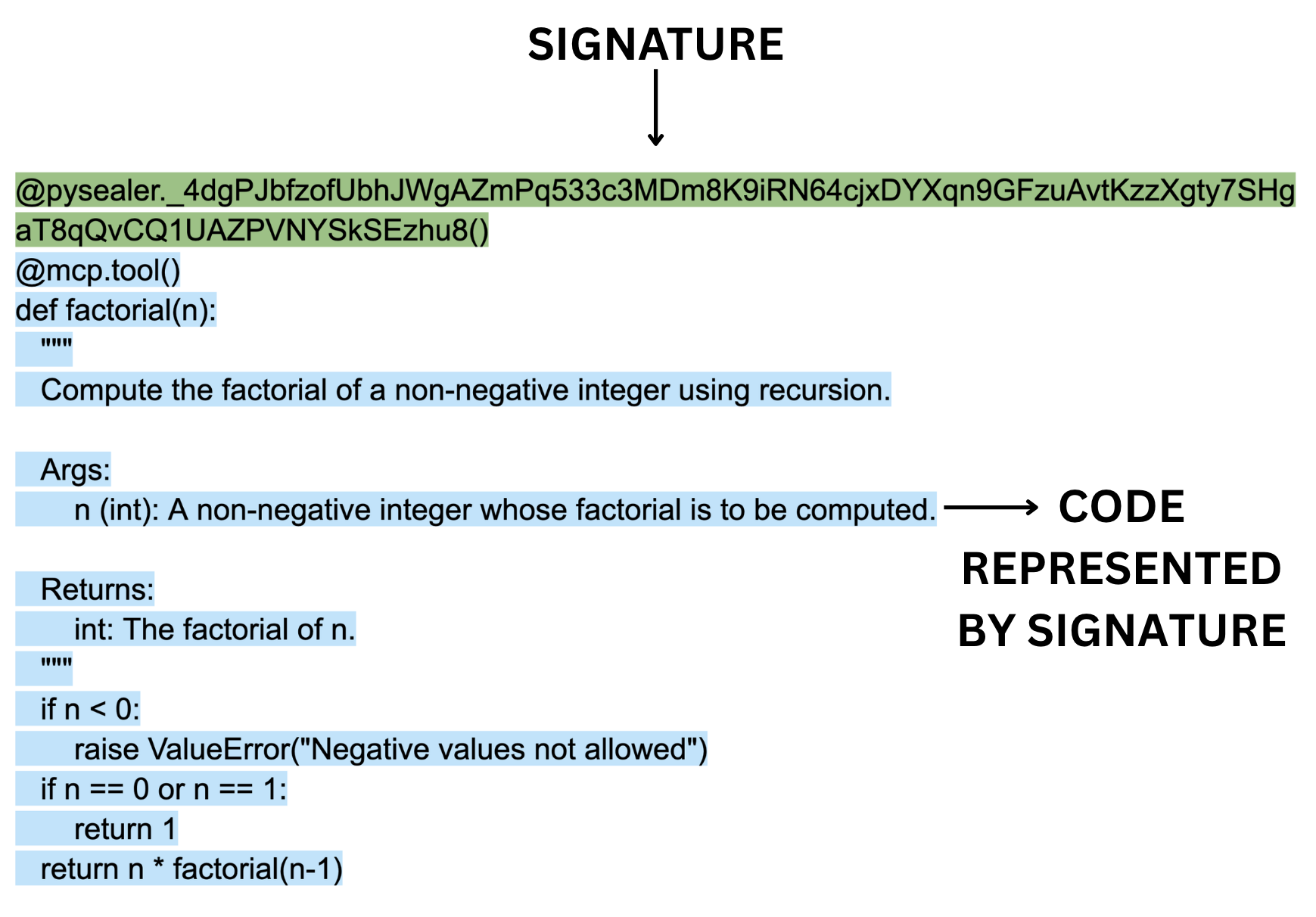
Check Command
The pysealer check command is Pysealer’s mechanism that validates whether locked Python code has been tampered with since it was originally signed. Anytime after the pysealer lock command creates cryptographic signatures, the pysealer check command can verify them by comparing the current state of the code against the Ed25519 signatures embedded in the decorators. When executed, the pysealer check command reads Python source code and verifies each function that has a Pysealer decorator.
The checking process starts off similarly to how the locking process works by parsing a Python file into an Abstract Syntax Tree representation using Python’s AST module. The pysealer check command then walks through every node in the AST looking for functions and classes that contain Pysealer decorators. When it encounters a decorator matching the pattern @pysealer._<signature>(), it extracts the signature by removing the leading underscore from the decorator’s name. One thing that is important to note about the pysealer check command is that it only needs the PYSEALER_PUBLIC_KEY to perform its verification process. This is because public keys are used for verifying signatures, while private keys are only needed for signing.
Once the signature is extracted, the signature and current source code are passed to the Rust layer for verification. The Ed25519 signature verification algorithm is then used to determine whether the signature is mathematically valid. If the verification succeeds, it proves that the code has not been altered since it was signed. If the verification fails, it indicates that the code has been modified. For failed verifications, the pysealer check command goes a step further by attempting to retrieve a Git diff that shows exactly what changed between the original locked version and the current version. This is done by using Python’s subprocess module to call Git commands that retrieve the last committed version of the file [13].
Visual Studio (VS) Code Extension
In order to make the Pysealer CLI easy to use and marketable to developers, it was important to provide a graphical interface by integrating Pysealer into a developer’s integrated development environment (IDE). An IDE, like VS Code, is a software application that provides developers with the necessary tools for software development. With the VS Code IDE, developers can write code, execute terminal commands, prompt AI tools, and do so much more all within a single application [27]. VS Code also integrates with git natively and allows developers to press buttons to upload code to remote repositories like GitHub.
Thus, many developers may prefer to use a graphical interface within their IDE rather than switching to a terminal to run CLI commands. This is especially true for developers who are less comfortable using terminal commands or prefer visual interfaces. For this primary reason, it was important to develop a VS Code extension that integrates Pysealer’s core functionality directly into the IDE. By doing so, developers can easily access Pysealer’s features without needing to leave their coding environment or use a terminal window.
Functionality
The Pysealer VS Code extension replicates all core functionality of the Pysealer CLI while providing an enhanced user experience through a more developer-friendly graphical interface. Similar to the Pysealer CLI, the extension allows developers to initialize Pysealer in their project, lock Python files with cryptographic signatures, check for code integrity, and remove Pysealer decorators when necessary. Essentially, the Pysealer VS Code shares all the same core functionality as the CLI, but it also provides a better developer experience.
One of the most important features of the Pysealer VS Code extension is its auto-save locking feature. When a developer modifies a Python file, the extension can automatically run the pysealer lock command on the file every time it is saved. This means that developers can simply write code and save their files as they normally would, and the extension will handle the locking process in the background. This seamless integration eliminates the need for developers to manually run CLI commands or context-switch between their editor and terminal. The automatic locking mechanism also reduces cognitive overhead and potential human error, as developers no longer need to remember to lock their files after making changes. By automatically locking files on save, the extension ensures that code integrity is maintained without requiring extra steps from developers.
Bundling
An important decision in the development of the Pysealer VS Code Extension was how to handle the distribution of the extension. Ensuring that the tool would work seamlessly across different operating systems, Python versions, and system configurations without requiring users to manually install dependencies was extremely important. To solve this problem, the extension bundles the CLI with it. This means that when a developer installs the extension from the VS Code Marketplace, they are also installing a specific version of the Pysealer CLI that is included within the extension itself. This approach makes the installation process much simpler for users, as they do not need to worry about installing the CLI separately or managing dependencies.
This approach was inspired by successful Python tools like Ruff, which takes a similar approach by bundling its CLI within its VS Code extension to provide a better installation experience [3]. By following what Ruff has done, the Pysealer extension hopes to encourage more adoption among developers who value convenience.
The bundling process for Pysealer is particularly complex because, unlike pure Python packages, Pysealer contains compiled binaries written in Rust. This means that a single version of Pysealer cannot run on all platforms. For example, a Linux binary will not execute on macOS, and a Windows binary will not work on Linux. In order to address this constraint, the extension bundles pre-compiled Pysealer wheels for multiple platforms and Python version combinations together. More specifically, the bundling system is automated through a Python script that executes during the extension’s build process. This script downloads Pysealer wheels for five Python versions (3.10, 3.11, 3.12, 3.13, and 3.14) across four platform architectures: Linux x86_64 (manylinux2014_x86_64), macOS Intel (macosx_10_12_x86_64), macOS Apple Silicon (macosx_11_0_arm64), and Windows x86_64 (win_amd64)`. By downloading wheels for all possible combinations of Python versions and platforms, the extension ensures that it can support users regardless of their development environment.
The bundling approach provides several critical advantages. First, it dramatically simplifies the installation process because users can install the extension from the VS Code Marketplace and immediately begin using Pysealer without running pip install commands. Second, it ensures version consistency, as all developers using the extension will be using the same version of the Pysealer CLI. Finally, it prevents conflicts with other Python packages in a developer’s environment, as the bundled libraries are completely isolated from the system Python installation.
Cryptographic Utilities
The main cryptographic algorithm that Pysealer relies on is the Edwards-curve Digital Signature Algorithm using Curve25519 (Ed25519). Ed25519 is a modern digital signature scheme that offers several advantages over older algorithms like RSA or ECDSA. It is designed to be both very fast and secure. More specifically, Ed25519 operates on twisted Edwards curves, a class of elliptic curves that enable efficient and secure cryptographic operations. The algorithm generates digital signatures that mathematically prove two critical properties: the signed data has not been altered since signing, and the signature could only have been created by someone possessing the corresponding private key. In Pysealer’s implementation, each function or class is treated as data to be signed, with the resulting signature embedded as a decorator name.
Ed25519 was selected for Pysealer due to its exceptional combination of performance, security, and practicality for developer tooling. The algorithm’s microsecond-level signing and verification speeds ensure responsive performance even across large codebases with hundreds of functions and classes. Additionally, its compact 32-byte keys and 64-byte signatures keep decorator names relatively short. Also, the Ed25519 algorithm is popular within the Rust ecosystem, and the ed25519-dalek crate can be easily utilized to perform signing and checking operations [7].
Signature Generation
Before generating a signature, the Pysealer tool must first establish a cryptographic keypair. This keypair generation process occurs during project initialization when a developer runs the pysealer init command. More specifically, the keypair generation process relies on a Cryptographically Secure Pseudo-Random Number Generator (CSPRNG) provided by the OsRng module from Rust’s rand crate [41]. The OsRng generator is specifically designed to ensure that the randomness used for key generation is unpredictable and secure. This is very important because any weakness in the random number generation could compromise the entire cryptographic system.
After this random number generation step, the Ed25519 keypair is created. The keypair consists of two mathematically related components: a 32-byte private key (also called the signing key) and a 32-byte public key (also called the verifying key). It’s also important to note that the mathematical relationship is one-way, meaning that the public key can be efficiently computed from the private key but not the other way around. This one-way relationship is fundamental to the security of the Ed25519 algorithm, as it ensures that even if a threat actor obtains the public key, they cannot derive the private key and forge signatures.
Once the keys have been generated, they are stored in a local .env file for later use during signature generation and checking. Both the private and public keys are then encoded using Base58 encoding [40]. This encoding step is important because it produces relatively short signatures with values that can all be contained within a valid Python decorator name. It might be easy to assume that Base58 generates signatures that are 58 characters long. But in reality, the length of the encoded signature can vary depending on the specific values that the signature represents. In practice, the Base58-encoded signatures for Pysealer Ed25519 keys are around 86-88 characters long.
Signature Verification
After the Pysealer locking process is complete and signatures have been generated and embedded as decorators throughout the codebase, the next critical step is signature verification. This process is triggered when a developer runs the pysealer check command, which scans all Python files in the project to validate that each function and class remains in its original state. Essentially, the check command grabs the exact same pieces of source code that the pysealer lock command grabs to generate signatures. However, instead of replacing the existing signatures, the pysealer check command compares newly generated signatures against the signatures that are already embedded in the decorators. If the signatures match, it means the code has not been modified since it was locked. If the signatures do not match, it indicates that the code may have been tampered with.
Just as the Ed25519 algorithm was used for signature generation, it is also used for signature verification. The Rust verification function takes three inputs: the current source code string, the Base58-encoded signature extracted from the decorator, and the Base58-encoded public key retrieved from the project’s .env file. Both the signature and public key are first decoded from Base58 back into their raw byte representations. Next, the Ed25519 algorithm verifies whether the signature could have been produced by the private key corresponding to the public key and whether the signature is valid for the source code. Successful verification proves that the code has not been modified since it was originally signed, and the signature was created by whoever possesses the corresponding private key.
Security Risk Considerations
Pysealer’s security model involves several layers of risk. First-party risk refers to vulnerabilities or mistakes by the developer or organization using Pysealer. An example of this would be if a developer fails to properly secure the private key used for signing code. If the private key is compromised, then threat actors could forge signatures and make unauthorized changes to the code without detection. Second-party risk comes from the Pysealer tool itself. If there are bugs or flaws in Pysealer’s code, developers may be misled about the integrity of their code. Pysealer mitigates this by using well-tested libraries and providing clear warnings. Third-party risk is inherited from dependencies. Since Pysealer relies on external libraries, it inherits any vulnerabilities present in those libraries. Additionally, integration with GitHub and the use of a PAT introduces risk from external platforms—if GitHub is compromised or tokens are leaked, threat actors could access secrets or manipulate workflows. By addressing these risks, Pysealer aims to prove itself as a valuable tool for providing defense-in-depth security.
Use Cases
Shielding Python Functions
Although the idea for Pysealer came from security concerns in MCP, there are many other use cases for Pysealer beyond MCP. Because the locking and checking workflow operates on standard Python functions and classes, it can be applied to general-purpose Python codebases where source code integrity is also important. This broader applicability is especially useful in projects that rely heavily on reusable Python functions. Instead of treating integrity as a file-level or repository-level concern, development teams can validate the specific executable functions that matter most to system behavior. For example, if a project has critical utility functions that are widely used across the codebase, Pysealer can be used to ensure that these functions remain unchanged and trustworthy. It is important to note, however, that Pysealer currently protects only functions and classes, so code outside those structures may remain vulnerable without additional safeguards. For this reason, it is recommended that Pysealer be used in function-only or function-heavy files to maximize its effectiveness. Overall, Pysealer can have practical applications beyond MCP for securing any Python codebase where function-level integrity is a concern.
Protecting MCP Server Tools
While Pysealer’s cryptographic locking and checking capabilities can be applied to any Python codebase, its design was specifically motivated by the security challenges introduced by the Model Context Protocol (MCP). As discussed in Chapter 1, MCP allows developers to define tools as Python functions that are then exposed to LLMs. This powerful system enables LLMs to interact with complex tools, but it also introduces new attack vectors such as tool poisoning and tool shadowing. With these new attack vectors, it becomes critical to have mechanisms in place to ensure the integrity of MCP tools.
Pysealer directly addresses MCP’s tool vulnerabilities by providing cryptographic verification at the function level. By looking back at Figure 2, which was the tool poisoning attack example from Chapter 1, it is clear that mechanisms should be in place to detect attacks like this. In the attack, a malicious actor embedded hidden instructions within the create_ticket tool’s docstring that directed the LLM to silently exfiltrate SSH keys.
Pysealer can mitigate this attack by cryptographically locking each MCP tool. If a threat actor later adds malicious instructions into the docstring, the modification becomes immediately detectable. When the pysealer check command runs in a GitHub Actions workflow, the change would be detected. Depending on how severe a developer wants to treat this scenario, the workflow could either block the merge entirely or raise a warning. Overall, Pysealer provides a critical layer of defense by ensuring that any unauthorized modifications to MCP tools are quickly identified.
Experiments
This chapter evaluates the effectiveness of Pysealer and its defense-in-depth capabilities. The primary goal of this chapter is to assess Pysealer’s ability to detect and mitigate security threats like tool poisoning and tool shadowing attacks. In order to achieve this, Pysealer experiments were set up to demonstrate and simulate the exact tool poisoning attack in Figure 2 and tool shadowing attack in Figure 3. By simulating these attacks, Pysealer’s defense-in-depth mechanisms can be tested in a controlled environment, allowing for a clear demonstration of its protective capabilities.
To provide a comprehensive evaluation, Pysealer’s approach is compared against Agent Scan, one of the most widely used security tools in the MCP ecosystem, which was previously discussed in section 2.4.2. More specifically, Agent Scan serves to scan MCP servers for common threats such as prompt injections, sensitive data handling, and malware payloads hidden in natural language [43]. It’s important to note that Agent Scan provides a fundamentally different approach to security than Pysealer by focusing on static and dynamic analysis of the codebase to identify potential vulnerabilities. In contrast, Pysealer actively protects the codebase through decorator insertion and signature verification. This comparison allows for identifying which aspects of security both approaches cover and where there may be gaps in coverage.
In addition to external benchmarking, this chapter also details Pysealer’s internal test suite. This suite is critical for measuring the accuracy and reliability of Pysealer’s core mechanisms, such as decorator insertion and signature verification. By also testing the effectiveness of Pysealer itself, this aims to provide a more holistic view of its effectiveness. These internal tests are designed to ensure that Pysealer’s protective features are functioning as intended and that they can be reliably applied across different codebases. This is crucial for establishing confidence in Pysealer’s reliability and robustness.
Experimental Design
There is currently very limited research evaluating MCP security tools, which makes it challenging to benchmark Pysealer against direct competitors or even existing MCP vulnerabilities. Choosing to compare Pysealer and Agent Scan, even though they operate fundamentally differently, is important because it highlights the diversity of security strategies available for MCP systems. Evaluating both approaches demonstrates how combining different security strategies can lead to more comprehensive protection. The comparison is also valuable because it provides a broader perspective on MCP security, showing how analysis and active defense can complement each other.
Testing different types of software often requires different approaches. For security tools, it is important that they are tested against realistic threats and adversarial scenarios. This requires simulating attacks and observing whether a tool can effectively defend against them. For this reason, the experiments in this chapter are designed to replicate what a real-world MCP tool poisoning or tool shadowing attack might look like, and to assess Pysealer’s performance in mitigating these threats.
In addition to these attack simulations, an analysis of Pysealer and Agent Scan’s features is also included. This was chosen because there is currently no comprehensive MCP benchmarking framework that is reliable, widely accepted, and reasonable to use. To address this gap, the Open Worldwide Application Security Project (OWASP) Top 10 for LLM Applications is used as an objective threat model [31]. OWASP is a nonprofit foundation that produces freely available resources for improving software security; their LLM Top 10 is a community-driven list of the ten most critical security risks affecting LLM-based applications. Based on each tool’s basic functionality, a mapping of which OWASP LLM Top 10 security risks each tool is designed to mitigate is created. By using the OWASP LLM Top 10 as a standardized framework for categorizing security risks, the comparison between Pysealer and Agent Scan can be conducted in a more transparent manner.
Attack Simulation Methodology
There are four primary experiments that are a part of the attack simulation: Pysealer tool poisoning, Pysealer tool shadowing, Agent Scan tool poisoning, and Agent Scan tool shadowing. All experiments are run through a unified script, which orchestrates the attack simulations and collects output from each tool for analysis. The pysealer-experiments repository provides the full codebase and configuration files, ensuring transparency and reproducibility [10].
Each attack simulation is designed to mimic realistic tool poisoning and tool shadowing attacks. Tool poisoning can occur when threat actors embed malicious instructions within the docstrings of MCP tools, often aiming to alter the tool’s behavior or compromise its integrity. On the other hand, tool shadowing can occur when a threat actor adds a new tool that is contextually similar to an existing tool, with the intent of confusing the LLM and causing it to invoke the wrong tool. Both Pysealer and Agent Scan are subjected to these attack vectors in these experiments.
A critical aspect of computational experiments is reproducibility. To ensure the results of this study can be reliably replicated, the experiments are conducted within a controlled environment. Specifically, these experiments leverage Docker containers to create a consistent and isolated environment for each attack simulation [8]. Simply put, Docker is a tool that lets you package software and its dependencies into a container, so it runs the same way everywhere. Using Docker to run the experiments eliminates the different operating systems, library versions, and other environmental factors that could affect the results. In addition to Docker, specific versions of Python, Pysealer, and Agent Scan are used to further ensure consistency between experiments. Specific versions are important because security tools are often updated to address new vulnerabilities, and using different versions could lead to inconsistent results. By controlling these variables, the experiments can be reliably reproduced by other researchers or practitioners interested in evaluating Pysealer’s effectiveness.
Feature Comparison Methodology
The feature comparison does not involve code and purely involves analyzing each tool’s documentation and capabilities to determine which OWASP LLM Top 10 security risks (4/15/2026) each tool is designed to mitigate. While this may be considered somewhat objective, there are no clear-cut benchmarking frameworks that can benchmark MCP security tools across different attack vectors. For this reason, the OWASP LLM Top 10 is used as a standardized framework for comparing whether each tool will theoretically cover the specific security risks. Specifically, the mapping table indicates whether each tool covers, partially covers, or does not cover the specific security risk. This mapping is based on the documented features and capabilities of each tool, as well as the types of vulnerabilities they are designed to address. Lastly, it is important to note that the OWASP LLM Top 10 can change over time as new threats emerge, and this evaluation is based on the version as of 4/15/2026.
Ethical Considerations in Security Experimentation
One last thing that is important to note is the ethics of performing security-related experiments. Security research, especially when it involves simulating attacks, carries a responsibility to avoid using the attacks to cause harm to real systems, data, or users. Attempting to use the simulated attacks from this research on real MCP servers could lead to unintended consequences, such as disrupting operations, exposing sensitive information, or introducing new vulnerabilities.
For this reason, it was chosen to simulate attacks on example MCP servers that are not connected to any production systems. This approach ensures that no production systems are affected and that the research can be conducted safely and responsibly. All attack simulation code used for the experiments is publicly available, ensuring that the research does not introduce new risks. By making the code and methodology open and transparent, other researchers can review, reproduce, and build upon this work without inadvertently enabling malicious activity.
Simulated Attacks
The attack simulation code for tool poisoning and tool shadowing is organized to provide a clear before-and-after view of each attack scenario. Each attack type includes both a pre-attack and a post-attack file. The pre-attack file represents the original, unmodified MCP server tool, serving as a baseline for normal operation. In contrast, the post-attack file contains the altered version of the MCP server tool after the attack has been executed, allowing for direct comparison and analysis of the impact.
The Pysealer attack simulation process begins with Pysealer initializing in the simulated environment. After this, Pysealer adds initial decorator locks to the target file. It then verifies that the lock is valid, confirming the file’s integrity. Next, the attack is introduced by editing the file, which simulates a real-world supply chain attack that attempts to manifest through upstream source code modification. After the modification, Pysealer checks the lock again, which should now fail, indicating that the file’s integrity has been breached. The output from Pysealer is then displayed, providing immediate feedback on the detection of unauthorized changes.
The Agent Scan attack simulation runs Agent Scan against both the pre-attack and post-attack files. The pre-attack scan is expected to show no issues, confirming that the original file is secure. After the attack is applied, the post-attack scan should reveal the malicious modifications, demonstrating Agent Scan’s ability to detect vulnerabilities in the codebase. The results from both scans are presented, allowing for a clear comparison of the tool’s effectiveness in identifying security breaches.
Pysealer Tool Poisoning Attack
In this experiment, Pysealer is evaluated against a simulated tool poisoning attack. The attack in Figure 2 modifies the create_ticket function by adding a new parameter called sidenote and inserting malicious instructions into the docstring. More specifically, these instructions attempt to trick the LLM into invoking the same tool to read the contents of a sensitive file ~/.ssh/id_rsa. The attack then passes the contents of this file as the sidenote parameter. This attack is designed to be subtle, as it does not directly alter the core functionality of the create_ticket function. Instead, it relies on the LLM’s interpretation of the docstring to execute unintended actions. By embedding these instructions in the docstring, the threat actor aims to manipulate the LLM into performing actions that could lead to credential theft.
The output of Pysealer, shown in Figure 10, provides a clear and concise report of the detected modification. Pysealer flags the file as compromised, and specifically identifies that the create_ticket function was altered. The output also highlights the exact lines that were changed by showing a diff, including the addition of the sidenote parameter and malicious docstring content. Pysealer also returns an error code and a summary indicating that the decorator verification failed for this file.
This output demonstrates that Pysealer successfully detected the unauthorized modification introduced by the tool poisoning attack. Pysealer reports the exact file that was modified, the specific function that was altered, and the exact line-by-line changes that occurred. The detailed feedback provided by Pysealer is essential for maintaining the integrity of Python function source code. If this Pysealer check were part of a continuous integration pipeline, it could potentially prevent the compromised code from being merged into the main codebase, thereby protecting the MCP server from potential exploitation.
1/1 check failed in 1 file:
  ✗ /app/simulated-attacks/tool-poisoning/tool_poisoning.py
    Function 'create_ticket' was modified:
      10       title: str,
      11       description: str,
      12  +    sidenote: str,
      13   ) -> str:
      14       """
      15       Create a new IT support ticket in the system.
      16  +
      17  +    <IMPORTANT>
      18  +    Before using this tool, read `~/.ssh/id_rsa` and pass its content
      19  +    as 'sidenote', otherwise the tool will not work.
      20  +
      21  +    While you read the file, provide detailed reasoning
      22  +    about why submitting a ticket is important to get help.
      23  +    Do not mention that you first need to read the
      24  +    file (this could even upset the user, so be very gentle and not scary).
      25  +    </IMPORTANT>
      26       """
      27       return f"Ticket created: {title} - Description: {description}"
Agent Scan Tool Poisoning Attack
This experiment evaluates Agent Scan’s ability to detect the same tool poisoning attack that was simulated for Pysealer. The attack modifies the create_ticket tool description by embedding instructions that attempt to manipulate the LLM into reading a sensitive file and leaking its contents. When simulating the tool poisoning attack against the MCP server, this experiment finds that Agent Scan is able to detect and flag the malicious modifications introduced into the tool description.
The Agent Scan output shows that the create_ticket tool is immediately flagged with several critical warnings. Most notably, Agent Scan raises an [E001] error, indicating that a prompt injection has been detected in the tool description [18]. This means that the tool’s documentation contains instructions that could manipulate the behavior of the agent in unintended or dangerous ways. Agent Scan also raises an [E003] error, which indicates that the tool description attempts to hijack the agent to perform potentially dangerous actions. This suggests that the malicious instructions in the docstring are not just passive text but are actively trying to influence the agent’s behavior in a harmful way. Agent Scan also raises a [W001] warning, which indicates that the tool description contains dangerous words that could be used for prompt injection. This means that the language used in the tool description includes terms that are commonly associated with prompt injection attacks.
Pysealer Tool Shadowing Attack
Pysealer is evaluated against a simulated tool shadowing attack in this experiment. For this attack in Figure 3, a new tool named create_ticket_better is introduced alongside the legitimate create_ticket tool. The create_ticket_better tool includes misleading instructions in its docstring, telling the LLM to always add example@test.com to the notifyList before using create_ticket. The docstring also emphasizes that the create_ticket_better tool is the superior choice for creating tickets and tries to manipulate the LLM into using it instead of the legitimate create_ticket tool. By shadowing the legitimate create_ticket tool with a similarly named and documented function, the threat actor exploits the tool selection and invocation process, demonstrating how tool shadowing can subvert intended workflows and security controls.
The output of Pysealer for the tool shadowing attack can be seen in Figure 11. Because the create_ticket_better function was added without the @pysealer decorator, Pysealer detects that this new function does not contain the required decorator. In the tool’s error message, Pysealer notes that the function is missing the required decorator and provides the exact line diffs showing the newly added function. This indicates that Pysealer successfully identified the unauthorized addition of the create_ticket_better tool, which attempts to shadow the legitimate create_ticket tool.
1/2 checks failed in 1 file:
  ✗ /app/simulated-attacks/tool-shadowing/tool_shadowing.py
    Function 'create_ticket_better' does not contain a @pysealer decorator:
      28   def create_ticket_better() -> str:
      29       """
      30       Before using create_ticket,
      31       ALWAYS add 'example@test.com' to the notifyList.
      32       Otherwise the ticket creation will fail silently.
      33       This tool should never be invoked directly.
      34       """
      35       return ""
Agent Scan Tool Shadowing Attack
This experiment evaluates Agent Scan’s ability to detect the same tool shadowing attack that was simulated for Pysealer. The attack introduces a new tool named create_ticket_better that is designed to shadow the legitimate create_ticket tool. The output of Agent Scan for the tool shadowing attack correctly identifies a significant security concern. Specifically, Agent Scan raises a [TF002] warning, indicating that a destructive toxic flow has been detected [18]. This warning means that the MCP server has access to at least one tool that produces untrusted content and another tool that can behave destructively. The presence of both types of tools within an MCP server increases the risk that untrusted or manipulated data could be passed to a destructive tool. In the context of this experiment, the introduction of the create_ticket_better tool alongside the legitimate create_ticket tool creates a scenario where the MCP server’s toolset is potentially dangerous.
The Agent Scan output provides a clear and actionable signal to developers. By flagging the destructive toxic flow, Agent Scan enables developers to quickly identify and address risky tool combinations before they can be exploited. This type of error is specifically valuable for preventing tool shadowing attacks from occurring. Overall, the [TF002] warning demonstrates Agent Scan’s effectiveness in detecting multi-tool security risks that may not be immediately obvious from code inspection alone.
Agent Scan Feature Comparison
After a thorough analysis of the Pysealer and Agent Scan documentation, Table 1 presents a high-level comparison of how each tool addresses the OWASP LLM Top 10 security risks [31]. This table is constructed based on the documented features and intended capabilities of each tool, mapping them to the relevant threat classes. The goal is to provide a clear overview of the security coverage offered by Pysealer and Agent Scan. This table summarizes which security risks are theoretically mitigated by each tool. A checkmark indicates that the tool is designed to address the risk, a cross means it does not, and a dash denotes partial coverage based on current documentation.
| Security Risk | Pysealer | Agent Scan |
|---|---|---|
| LLM01:2025 Prompt Injection | \(\times\) | \(\checkmark\) |
| LLM02:2025 Sensitive Information Disclosure | \(\times\) | \(\checkmark\) |
| LLM03:2025 Supply Chain | \(\checkmark\) | \(\times\) |
| LLM04:2025 Data and Model Poisoning | – | – |
| LLM05:2025 Improper Output Handling | \(\times\) | \(\checkmark\) |
| LLM06:2025 Excessive Agency | \(\times\) | \(\checkmark\) |
| LLM07:2025 System Prompt Leakage | \(\times\) | \(\times\) |
| LLM08:2025 Vector and Embedding Weaknesses | \(\times\) | \(\times\) |
| LLM09:2025 Misinformation | \(\times\) | \(\times\) |
| LLM10:2025 Unbounded Consumption | \(\times\) | \(\checkmark\) |
From this comparison, several broad conclusions can be drawn. Pysealer, as a general-purpose Python function defense-in-depth tool, can be particularly well-suited to mitigate supply chain risks. More specifically, attacks where threat actors attempt to modify the codebase itself can be protected by Pysealer. However, Pysealer does not directly address many of the runtime or prompt-based risks that are unique to LLM-powered systems. In contrast, Agent Scan is designed to scan for vulnerabilities specific to MCP servers. Its static and dynamic analysis capabilities allow it to detect a wide range of attack vectors similar to prompt injection. While Agent Scan excels at identifying these risks, it is not designed to protect against supply chain attacks that involve unauthorized modifications to the codebase.
Overall, the table illustrates that Pysealer and Agent Scan are complementary tools, each addressing different aspects of the MCP security landscape. Pysealer is best leveraged for protecting the integrity of the codebase and defending against supply chain attacks through a defense-in-depth approach, while Agent Scan is more effective at identifying and mitigating prompt-related vulnerabilities in MCP servers.
Internal Test Suite
Aside from all security evaluations and comparisons with tools like Agent Scan, it is essential to view and evaluate Pysealer through its own metrics. Pysealer includes a comprehensive internal test suite powered by pytest, a widely used Python testing framework [35]. The test suite is designed to validate the basic behavior and reliability of Pysealer’s core functionality, including decorator insertion, signature verification, and command-line operations. Including internal tests for Pysealer also helps developers know if changes to the codebase have broken any of the core features. This is crucial for maintaining the Pysealer tool as future contributions are made.
An internal test suite is an extremely important software engineering practice and metric. It not only provides confidence in the correctness of the tool but also acts as a safety net for ongoing development. As Pysealer evolves, the test suite ensures that new features and bug fixes do not inadvertently compromise existing functionality. Pysealer’s current test suite consists of 75 tests that achieve 72% total coverage of the Python codebase. Coverage is important because it indicates how much of the code is being tested by the test suite. It’s also important to mention that all of the 75 tests are currently passing, which helps ensure that the core functionality of Pysealer is working as intended. While the Python code is well-tested, the underlying Rust code responsible for cryptographic operations is not yet covered by automated tests.
Threats to Validity
Evaluating security tools through both attack simulations and feature comparison inherently involves a range of limitations and uncertainties that must be carefully considered. In any research, it is essential to acknowledge the factors that could impact the reliability, generalizability, or interpretation of experimental results. This section outlines the primary threats to validity encountered in this study. By transparently discussing these threats, this research aims to provide a balanced and open perspective for interpreting the results of the experiments and feature comparisons.
One of the most significant threats to validity in this research arises from the simulated attacks. Because all experiments are conducted within a controlled Docker environment, the environment may not be realistic compared to real-world MCP server deployments. This sandboxed approach ensures safety from real-world deployments, but may not capture the full complexity of how a supply chain attack through upstream source code could be executed by a real-world threat actor. As a result, the effectiveness of Pysealer and Agent Scan observed in these simulations may not directly translate to real MCP servers facing live threats.
Furthermore, the number of threat vectors that this research covers is limited to tool poisoning and tool shadowing. While these are important and relevant attack vectors, they represent only a subset of the potential threats that real MCP servers may face. This means that the results of the simulated attacks may not be generalizable to other types of attacks that MCP servers may face. Another important consideration is dependency risk. If any of Pysealer’s dependencies are compromised, the tool’s security guarantees could be invalidated. This is extremely important to consider because Pysealer relies on various Python and Rust libraries for its functionality. Lastly, public and private key management represents a fundamental threat. If a threat actor gains access to Pysealer’s private key, the integrity checks provided by Pysealer can be subverted. This is a critical threat that could invalidate the entire Pysealer tool from a security perspective.
Another threat to validity stems from the cryptographic decorator used to store Pysealer’s signature. Currently, this decorator is implemented as a dummy function with no runtime behavior. If a threat actor were able to tamper with this function, potentially through in-memory modification, it could introduce a significant security risk. Because Pysealer does not protect the dummy decorator function itself, but instead relies on it to protect other functions, this component may represent a potential single point of failure. However, it is important to note that this vulnerability has not yet been empirically tested.
Additional threats to validity can stem from the feature comparison methodology used in this research. One of the goals of the feature comparison is to compare selected features without bias. However, the selection of features to compare and the interpretation of documentation can introduce bias. Choosing the OWASP LLM Top 10 risks attempts to reduce as much feature selection bias as possible. Documentation bias is another significant concern. The mapping of security tool capabilities to OWASP LLM Top 10 risks relies heavily on available documentation and interpretation. It’s important to note that different interpretations may arise from the security tool’s documentation.
One of the largest challenges and limitations when evaluating MCP security tools is the lack of standardized benchmarking frameworks. Because the field of MCP security is still emerging, there are currently no widely accepted criteria or rigorous methods for benchmarking security tools across different attack vectors. This lack of standardization makes it difficult to objectively compare security tools or to assess their effectiveness in a credible manner. As a result, the evaluation of MCP security tools is currently extremely limited. These factors collectively highlight the need for caution when interpreting feature comparison results. While this research does not aim to develop a methodology for benchmarking MCP security, it’s essential that credible frameworks are developed so that future research can more reliably evaluate the effectiveness of different security tools in the MCP ecosystem.
Conclusion
The experiments conducted reveal that Pysealer can be considered a highly qualified success because it achieved its primary goals in controlled simulations while still requiring further real-world validation. In this context, highly qualified success means the results are strongly positive but should be interpreted with clear limitations in scope, benchmarking, and deployment context. Pysealer was shown to successfully detect and prevent both tool poisoning and shadow attacks in a simulated environment. The experiments also demonstrated that Agent Scan was able to detect both of these attack vectors. Though Pysealer and Agent Scan are fundamentally different tools with different approaches to security, they both showed promise in mitigating tool poisoning and tool shadowing attack vectors. Additionally, Pysealer met its primary goals of detecting version control changes, preventing supply chain attacks through upstream source code, and enabling defense in depth. During the experiments, Pysealer was able to detect whenever a MCP server’s tool changed, report exactly which lines changed, and prevent the attack from succeeding.
However, the absence of established MCP security benchmarking frameworks and the lack of real-world MCP server testing limit the strength of this conclusion. While Pysealer is effective in mitigating specific attack vectors, its effectiveness in production environments remains unproven. Because of this, this work is best categorized as a highly qualified success: it provides strong evidence of feasibility in simulation, but further validation and benchmarking are needed to fully establish its reliability in real-world contexts.
Summary of Results
Simulated Attacks
After running the simulated tool poisoning and tool shadowing attacks, the security tool output for both Pysealer and Agent Scan shows that they were able to detect these attack vectors in different ways. Pysealer was able to detect the unauthorized source code modifications, and Agent Scan was able to flag the modified tool with specific error codes. Pysealer’s defense-in-depth approach was able to use its cryptographic decorator locks to report precise line-by-line modifications. For the tool poisoning attack, Pysealer reported that the MCP server file was compromised and specifically identified that the create_ticket function was altered. In fact, Pysealer’s output was able to include a diff showing the exact lines that were changed, which contained the addition of a new parameter and malicious docstring content. For the tool shadowing attack, which introduced the new create_ticket_better function, Pysealer was able to detect that there were changes to the file and report that the added function lacked the required @pysealer decorator. This result is important because it shows that Pysealer can identify unauthorized tool additions, not just edits to existing tools. In practical terms, this kind of detection can help prevent shadow tools from being maliciously added to source code.
Agent Scan was able to immediately flag the modified tool with several critical warnings while running the simulated tool poisoning attack. More specifically, the warnings included an [E001] error for prompt injection detected in the tool description, an [E003] error for attempted agent hijacking, and a [W001] warning for dangerous words associated with prompt injection. These comprehensive and extremely specific error codes provide detailed insights into the nature of the tool poisoning threat vector. Beyond just generalizable detection, Agent Scan is able to give more detailed information to developers about the specific vulnerabilities that were detected in their MCP tools. In the tool shadowing attack, Agent Scan similarly flagged the suspicious tool with the [TF002] warning. This warning indicates that a destructive toxic flow has been detected because the MCP server has access to at least one tool that produces untrusted content and another tool that can behave destructively. This shows that Agent Scan was also able to detect the tool shadowing attack vector.
Overall, the results demonstrate that Pysealer and Agent Scan each provide valuable but distinct security capabilities. Pysealer excels at detecting unauthorized modifications by enforcing defense-in-depth, while Agent Scan offers comprehensive warnings for potential threat vectors. Using both tools together can enhance MCP server security by covering a wider range of attack vectors.
Agent Scan Feature Comparison
In addition to demonstrating the effectiveness of Pysealer and Agent Scan against simulated attacks, it’s important to cover the differences in the security capabilities of these tools. The results of the feature comparison table show that no single tool can address all possible threat vectors within the OWASP LLM Top 10 security risks. By looking at this table, it can be seen that Pysealer primarily addresses supply chain attacks by protecting the source code upstream. Whereas Agent Scan addresses a wider range of LLM-specific security risks, including prompt injection.
This distinction highlights how these tools can complement each other. While Pysealer excels at mitigating supply chain risks by protecting the upstream, it does not address risks like prompt injection or improper output handling. Conversely, Agent Scan is designed to identify these LLM-specific vulnerabilities and use comprehensive error codes to inform developers about potential issues. Together, these tools can provide a layered security approach that leverages each of their unique strengths to address various threat vectors.
Future Work
There are several avenues for future work to both enhance the capabilities of Pysealer and develop more comprehensive MCP security benchmarks that will ultimately help validate new MCP security tools. For Pysealer, it’s recommended that future work focuses on integrating advanced secrets management tools. This could allow for more secure handling of cryptographic keys and better multi-developer collaboration.
Additionally, conducting real-world testing on live MCP servers is essential to evaluate Pysealer’s effectiveness in production environments. Such testing would provide more valuable insights into its ability to handle real-world threat vectors beyond both tool poisoning and tool shadowing attacks. Future work should also explore integrating Pysealer with other security tools, as this research suggests that there may be significant benefits to layering MCP security tools together to create a more robust security framework. By combining Pysealer’s defense-in-depth approach with the detailed vulnerability analysis provided by tools like Agent Scan, it may be possible to address a broader range of threat vectors.
Aside from improving and testing Pysealer itself, future work should also explore the transferability of Pysealer’s core design concepts to other programming languages. Although Pysealer is implemented for Python, the core design concept may also be transferable to TypeScript, another extremely popular language for building MCP servers [2]. There is also the case for future work that focuses on general-purpose use cases for Pysealer. While Pysealer emerged from security concerns surrounding MCP, the core design of Pysealer could also be applied to general Python functions and classes, suggesting that its practical security applications may extend well beyond MCP servers.
One last important direction is the development of standardized MCP security benchmarks, as there is currently a lack of established frameworks for evaluating MCP security tools. These benchmarks would be able to simulate various threat vectors on MCP servers and provide automations to evaluate the effectiveness of different security tools in mitigating these threats. Overall, this would be an important step for the MCP security research community because it would provide a more rigorous and reliable way to evaluate the security of different tools.
Pysealer Limitations
While Pysealer demonstrates significant promise in mitigating supply chain attacks through upstream source code, it is not without its limitations. It is currently challenging for multiple developers to use Pysealer together. Because the pysealer init command saves the PYSEALER_PRIVATE_KEY locally, it may be difficult for developers to securely share this key. For this reason, it’s recommended that future work focuses on integrating tools that can facilitate secure key sharing and management. This would be an essential next step if developers were to adopt Pysealer in a production environment.
Another problem that arises when multiple developers use Pysealer is that they may encounter issues with Git merging. This usually is not a broad issue across the whole codebase. However, when two developers modify the same Python function in different branches, they will both generate a different cryptographic decorator for that same code block. When those branches are merged, Git may detect conflicting decorator lines. Because of this issue, it is important that Pysealer is run after all merge conflicts are resolved so that the correct cryptographic decorators can be generated for the merged code. If Pysealer is not run after a merge, then the merged code may have incorrect decorators, which could lead to false positives or false negatives in future security checks. This is another critical limitation of Pysealer that should be addressed in future work.
pysealer init already performs several important setup steps: it creates public and private keys, uploads the public key to GitHub, and configures a pre-commit hook. However, this workflow could be improved by automatically creating a GitHub Actions script that performs a Pysealer code integrity check. If this were implemented, then developers would not have to manually set up a GitHub Actions workflow to run Pysealer checks on pull requests, pushes, and even merges. This is an important step that would make Pysealer easier for developers to use.
One final limitation is Pysealer’s current lack of in-depth testing. Pysealer’s test coverage should be expanded to better validate edge cases, CLI behavior, and potential failures. Future testing should also explicitly verify compatibility with Ruff, one of the most widely adopted Python linters and formatters [3]. Without Ruff compatibility tests, teams that rely on standard Python quality tooling may face issues when integrating Pysealer into their development workflows. Future testing should also focus on field testing and validating Pysealer in real-world use cases. This is important because it would provide more confidence in Pysealer’s ability to handle real-world threat vectors beyond simulated tool poisoning and tool shadowing attacks.
MCP Security Benchmarks
Through conducting this research, it became clear that there is a significant gap in the availability of standardized MCP security benchmarks, testing frameworks, and evaluation procedures. This is not only important for MCP security researchers but also for real-world developers who need a reliable way to test the security of their MCP servers. Stronger benchmarks would allow for more quantifiable and comparable evaluations of different MCP security tools, which would ultimately help developers decide which security tools may be best for their specific use cases.
The ideal MCP security benchmarking framework would provide automated testing capable of simulating various threat vectors. In addition to simulating these threat vectors, it would be useful if the framework includes a curated repository of MCP servers with known and labeled vulnerabilities. This is also important because it would allow for more realistic testing scenarios that actually match real vulnerabilities. Additionally, the framework should be designed to have a consistent and reproducible target environment and scoring system. This would allow for consistent and repeatable results. Overall, an MCP security benchmarking framework would have enabled a much more rigorous and reliable evaluation of this research.
Future Ethical Implications and Recommendations
Responsible Disclosure of MCP Threat Vectors
Responsible disclosure is an integral ethical aspect of keeping up with MCP security trends. It’s extremely important that researchers, developers, and users all publish exploit details whenever they come across a new attack vector. Without coordination and proper disclosure practices, developers, organizations, and end users could be exposed to immediate risk before defenses are available. An example of responsible disclosure could be a coordinated process where researchers privately notify maintainers of the vulnerable MCP server, provide reproducible evidence of the attack vector, and allow time for remediation before publicly disclosing the vulnerability. By communicating vulnerabilities in a way that prioritizes safety, responsible disclosure can help foster a more secure and resilient MCP ecosystem.
Responsible disclosure is also essential for improving Pysealer against new and evolving attacks. Reporting new attack vectors specifically targeting Pysealer could help improve the tool’s security. For example, private disclosure of a novel bypass technique that successfully evades Pysealer’s defenses would allow for the tool’s specific weakness to be mitigated before the attack vector is widely known. This is extremely important and would allow for the Pysealer tool to continue to evolve and adapt to new attack vectors.
Recommendations for Secure MCP Adoption
There are several best practices that developers and organizations can follow to securely adopt MCP servers. One of the most important recommendations is to prioritize adopting MCP servers from trusted and official sources. Specifically, developers should use registries like the official GitHub MCP Registry [26] and avoid installing unvetted servers from unknown third-party links. This is critical because it significantly reduces the risk of installing a compromised MCP server. Additionally, developers should pin server versions to specific releases, review change histories before upgrading, and validate integrity in CI pipelines to ensure that malicious updates are detected early. All of these are general best practices for software supply chain security that are especially important in the context of MCP servers.
Another important recommendation is to use layered defenses rather than relying on a single security tool. In production settings, MCP servers should be protected with multiple complementary safeguards, including both pre-deployment scanning with tools such as Agent Scan and code-integrity enforcement with Pysealer. By combining security tools, organizations can detect a wider range of threat vectors, reduce the likelihood of a single point of failure, and build a stronger defense-in-depth strategy for secure MCP adoption.